Compare commits
1 Commits
main
...
feature/gp
| Author | SHA1 | Date |
|---|---|---|
 Henry
Henry
|
b97816b561 |
|
|
@ -5,6 +5,3 @@ build
|
|||
**/node_modules
|
||||
**/build
|
||||
**/dist
|
||||
|
||||
packages/server/.env
|
||||
packages/ui/.env
|
||||
|
|
|
|||
|
|
@ -1,13 +0,0 @@
|
|||
# These are supported funding model platforms
|
||||
|
||||
github: [FlowiseAI] # Replace with up to 4 GitHub Sponsors-enabled usernames e.g., [user1, user2]
|
||||
patreon: # Replace with a single Patreon username
|
||||
open_collective: # Replace with a single Open Collective username
|
||||
ko_fi: # Replace with a single Ko-fi username
|
||||
tidelift: # Replace with a single Tidelift platform-name/package-name e.g., npm/babel
|
||||
community_bridge: # Replace with a single Community Bridge project-name e.g., cloud-foundry
|
||||
liberapay: # Replace with a single Liberapay username
|
||||
issuehunt: # Replace with a single IssueHunt username
|
||||
otechie: # Replace with a single Otechie username
|
||||
lfx_crowdfunding: # Replace with a single LFX Crowdfunding project-name e.g., cloud-foundry
|
||||
custom: # Replace with up to 4 custom sponsorship URLs e.g., ['link1', 'link2']
|
||||
|
|
@ -0,0 +1,32 @@
|
|||
---
|
||||
name: Bug report
|
||||
about: Create a report to help us improve
|
||||
title: '[BUG]'
|
||||
labels: ''
|
||||
assignees: ''
|
||||
---
|
||||
|
||||
**Describe the bug**
|
||||
A clear and concise description of what the bug is.
|
||||
|
||||
**To Reproduce**
|
||||
Steps to reproduce the behavior:
|
||||
|
||||
1. Go to '...'
|
||||
2. Click on '....'
|
||||
3. Scroll down to '....'
|
||||
4. See error
|
||||
|
||||
**Expected behavior**
|
||||
A clear and concise description of what you expected to happen.
|
||||
|
||||
**Screenshots**
|
||||
If applicable, add screenshots to help explain your problem.
|
||||
|
||||
**Setup**
|
||||
|
||||
- OS: [e.g. iOS, Windows, Linux]
|
||||
- Browser [e.g. chrome, safari]
|
||||
|
||||
**Additional context**
|
||||
Add any other context about the problem here.
|
||||
|
|
@ -1,101 +0,0 @@
|
|||
name: Bug Report
|
||||
description: File a bug report to help us improve
|
||||
labels: ['bug']
|
||||
assignees: []
|
||||
body:
|
||||
- type: markdown
|
||||
attributes:
|
||||
value: |
|
||||
Make sure to have a proper title and description.
|
||||
|
||||
- type: textarea
|
||||
id: bug-description
|
||||
attributes:
|
||||
label: Describe the bug
|
||||
description: A clear and concise description of what the bug is.
|
||||
placeholder: Tell us what you see!
|
||||
validations:
|
||||
required: true
|
||||
|
||||
- type: textarea
|
||||
id: reproduce
|
||||
attributes:
|
||||
label: To Reproduce
|
||||
description: Steps to reproduce the behavior
|
||||
placeholder: |
|
||||
1. Go to '...'
|
||||
2. Click on '....'
|
||||
3. Scroll down to '....'
|
||||
4. See error
|
||||
validations:
|
||||
required: true
|
||||
|
||||
- type: textarea
|
||||
id: expected
|
||||
attributes:
|
||||
label: Expected behavior
|
||||
description: A clear and concise description of what you expected to happen.
|
||||
validations:
|
||||
required: true
|
||||
|
||||
- type: textarea
|
||||
id: screenshots
|
||||
attributes:
|
||||
label: Screenshots
|
||||
description: If applicable, add screenshots to help explain your problem.
|
||||
placeholder: Drag and drop or paste screenshots here
|
||||
|
||||
- type: textarea
|
||||
id: flow
|
||||
attributes:
|
||||
label: Flow
|
||||
description: If applicable, add exported flow in order to help replicating the problem.
|
||||
placeholder: Paste your exported flow here
|
||||
|
||||
- type: dropdown
|
||||
id: method
|
||||
attributes:
|
||||
label: Use Method
|
||||
description: How did you use Flowise?
|
||||
options:
|
||||
- Flowise Cloud
|
||||
- Docker
|
||||
- npx flowise start
|
||||
- pnpm start
|
||||
|
||||
- type: input
|
||||
id: version
|
||||
attributes:
|
||||
label: Flowise Version
|
||||
description: What version of Flowise are you running?
|
||||
placeholder: e.g., 1.2.11
|
||||
|
||||
- type: dropdown
|
||||
id: os
|
||||
attributes:
|
||||
label: Operating System
|
||||
description: What operating system are you using?
|
||||
options:
|
||||
- Windows
|
||||
- macOS
|
||||
- Linux
|
||||
- Other
|
||||
|
||||
- type: dropdown
|
||||
id: browser
|
||||
attributes:
|
||||
label: Browser
|
||||
description: What browser are you using?
|
||||
options:
|
||||
- Chrome
|
||||
- Firefox
|
||||
- Safari
|
||||
- Edge
|
||||
- Other
|
||||
|
||||
- type: textarea
|
||||
id: context
|
||||
attributes:
|
||||
label: Additional context
|
||||
description: Add any other context about the problem here.
|
||||
placeholder: Any additional information that might be helpful
|
||||
|
|
@ -0,0 +1,13 @@
|
|||
---
|
||||
name: Feature request
|
||||
about: Suggest an idea for this project
|
||||
title: '[FEATURE]'
|
||||
labels: ''
|
||||
assignees: ''
|
||||
---
|
||||
|
||||
**Describe the feature you'd like**
|
||||
A clear and concise description of what you would like Flowise to have.
|
||||
|
||||
**Additional context**
|
||||
Add any other context or screenshots about the feature request here.
|
||||
|
|
@ -1,67 +0,0 @@
|
|||
name: Feature Request
|
||||
description: Suggest a new feature or enhancement for Flowise
|
||||
labels: ['enhancement']
|
||||
assignees: []
|
||||
body:
|
||||
- type: markdown
|
||||
attributes:
|
||||
value: |
|
||||
Thanks for suggesting a new feature! Please provide as much detail as possible to help us understand your request.
|
||||
|
||||
- type: textarea
|
||||
id: feature-description
|
||||
attributes:
|
||||
label: Feature Description
|
||||
description: A clear and concise description of the feature you'd like to see in Flowise.
|
||||
placeholder: Describe what you want to be added or improved...
|
||||
validations:
|
||||
required: true
|
||||
|
||||
- type: dropdown
|
||||
id: feature-category
|
||||
attributes:
|
||||
label: Feature Category
|
||||
description: What category does this feature belong to?
|
||||
options:
|
||||
- UI/UX Improvement
|
||||
- New Node/Component
|
||||
- Integration
|
||||
- Performance
|
||||
- Security
|
||||
- Documentation
|
||||
- API Enhancement
|
||||
- Workflow/Flow Management
|
||||
- Authentication/Authorization
|
||||
- Database/Storage
|
||||
- Deployment/DevOps
|
||||
- Other
|
||||
validations:
|
||||
required: true
|
||||
|
||||
- type: textarea
|
||||
id: problem-statement
|
||||
attributes:
|
||||
label: Problem Statement
|
||||
description: What problem does this feature solve? What's the current pain point?
|
||||
placeholder: Describe the problem or limitation you're facing...
|
||||
|
||||
- type: textarea
|
||||
id: proposed-solution
|
||||
attributes:
|
||||
label: Proposed Solution
|
||||
description: How would you like this feature to work? Be as specific as possible.
|
||||
placeholder: Describe your ideal solution in detail...
|
||||
|
||||
- type: textarea
|
||||
id: mockups-references
|
||||
attributes:
|
||||
label: Mockups or References
|
||||
description: Any mockups, screenshots, or references to similar features in other tools?
|
||||
placeholder: Upload images or provide links to examples...
|
||||
|
||||
- type: textarea
|
||||
id: additional-context
|
||||
attributes:
|
||||
label: Additional Context
|
||||
description: Any other information, context, or examples that would help us understand this request.
|
||||
placeholder: Add any other relevant information...
|
||||
|
|
@ -1,72 +0,0 @@
|
|||
name: Docker Image CI - Docker Hub
|
||||
|
||||
on:
|
||||
workflow_dispatch:
|
||||
inputs:
|
||||
node_version:
|
||||
description: 'Node.js version to build this image with.'
|
||||
type: choice
|
||||
required: true
|
||||
default: '20'
|
||||
options:
|
||||
- '20'
|
||||
tag_version:
|
||||
description: 'Tag version of the image to be pushed.'
|
||||
type: string
|
||||
required: true
|
||||
default: 'latest'
|
||||
|
||||
jobs:
|
||||
docker:
|
||||
runs-on: ubuntu-latest
|
||||
steps:
|
||||
- name: Set default values
|
||||
id: defaults
|
||||
run: |
|
||||
echo "node_version=${{ github.event.inputs.node_version || '20' }}" >> $GITHUB_OUTPUT
|
||||
echo "tag_version=${{ github.event.inputs.tag_version || 'latest' }}" >> $GITHUB_OUTPUT
|
||||
|
||||
- name: Checkout
|
||||
uses: actions/checkout@v4.1.1
|
||||
|
||||
- name: Set up QEMU
|
||||
uses: docker/setup-qemu-action@v3.0.0
|
||||
|
||||
- name: Set up Docker Buildx
|
||||
uses: docker/setup-buildx-action@v3.0.0
|
||||
|
||||
- name: Login to Docker Hub
|
||||
uses: docker/login-action@v3
|
||||
with:
|
||||
username: ${{ secrets.DOCKERHUB_USERNAME }}
|
||||
password: ${{ secrets.DOCKERHUB_TOKEN }}
|
||||
|
||||
# -------------------------
|
||||
# Build and push main image
|
||||
# -------------------------
|
||||
- name: Build and push main image
|
||||
uses: docker/build-push-action@v5.3.0
|
||||
with:
|
||||
context: .
|
||||
file: ./docker/Dockerfile
|
||||
build-args: |
|
||||
NODE_VERSION=${{ steps.defaults.outputs.node_version }}
|
||||
platforms: linux/amd64,linux/arm64
|
||||
push: true
|
||||
tags: |
|
||||
flowiseai/flowise:${{ steps.defaults.outputs.tag_version }}
|
||||
|
||||
# -------------------------
|
||||
# Build and push worker image
|
||||
# -------------------------
|
||||
- name: Build and push worker image
|
||||
uses: docker/build-push-action@v5.3.0
|
||||
with:
|
||||
context: .
|
||||
file: docker/worker/Dockerfile
|
||||
build-args: |
|
||||
NODE_VERSION=${{ steps.defaults.outputs.node_version }}
|
||||
platforms: linux/amd64,linux/arm64
|
||||
push: true
|
||||
tags: |
|
||||
flowiseai/flowise-worker:${{ steps.defaults.outputs.tag_version }}
|
||||
|
|
@ -1,73 +0,0 @@
|
|||
name: Docker Image CI - AWS ECR
|
||||
|
||||
on:
|
||||
workflow_dispatch:
|
||||
inputs:
|
||||
environment:
|
||||
description: 'Environment to push the image to.'
|
||||
required: true
|
||||
default: 'dev'
|
||||
type: choice
|
||||
options:
|
||||
- dev
|
||||
- prod
|
||||
node_version:
|
||||
description: 'Node.js version to build this image with.'
|
||||
type: choice
|
||||
required: true
|
||||
default: '20'
|
||||
options:
|
||||
- '20'
|
||||
tag_version:
|
||||
description: 'Tag version of the image to be pushed.'
|
||||
type: string
|
||||
required: true
|
||||
default: 'latest'
|
||||
|
||||
jobs:
|
||||
docker:
|
||||
runs-on: ubuntu-latest
|
||||
environment: ${{ github.event.inputs.environment }}
|
||||
steps:
|
||||
- name: Set default values
|
||||
id: defaults
|
||||
run: |
|
||||
echo "node_version=${{ github.event.inputs.node_version || '20' }}" >> $GITHUB_OUTPUT
|
||||
echo "tag_version=${{ github.event.inputs.tag_version || 'latest' }}" >> $GITHUB_OUTPUT
|
||||
|
||||
- name: Checkout
|
||||
uses: actions/checkout@v4.1.1
|
||||
|
||||
- name: Set up QEMU
|
||||
uses: docker/setup-qemu-action@v3.0.0
|
||||
|
||||
- name: Set up Docker Buildx
|
||||
uses: docker/setup-buildx-action@v3.0.0
|
||||
|
||||
- name: Configure AWS Credentials
|
||||
uses: aws-actions/configure-aws-credentials@v3
|
||||
with:
|
||||
aws-access-key-id: ${{ secrets.AWS_ACCESS_KEY_ID }}
|
||||
aws-secret-access-key: ${{ secrets.AWS_SECRET_ACCESS_KEY }}
|
||||
aws-region: ${{ secrets.AWS_REGION }}
|
||||
|
||||
- name: Login to Amazon ECR
|
||||
uses: aws-actions/amazon-ecr-login@v1
|
||||
|
||||
# -------------------------
|
||||
# Build and push main image
|
||||
# -------------------------
|
||||
- name: Build and push main image
|
||||
uses: docker/build-push-action@v5.3.0
|
||||
with:
|
||||
context: .
|
||||
file: Dockerfile
|
||||
build-args: |
|
||||
NODE_VERSION=${{ steps.defaults.outputs.node_version }}
|
||||
platforms: linux/amd64,linux/arm64
|
||||
push: true
|
||||
tags: |
|
||||
${{ format('{0}.dkr.ecr.{1}.amazonaws.com/flowise:{2}',
|
||||
secrets.AWS_ACCOUNT_ID,
|
||||
secrets.AWS_REGION,
|
||||
steps.defaults.outputs.tag_version) }}
|
||||
|
|
@ -1,14 +1,17 @@
|
|||
name: Node CI
|
||||
|
||||
on:
|
||||
push:
|
||||
branches:
|
||||
- main
|
||||
- master
|
||||
|
||||
pull_request:
|
||||
branches:
|
||||
- '*'
|
||||
workflow_dispatch:
|
||||
|
||||
permissions:
|
||||
contents: read
|
||||
|
||||
jobs:
|
||||
build:
|
||||
strategy:
|
||||
|
|
@ -16,37 +19,18 @@ jobs:
|
|||
platform: [ubuntu-latest]
|
||||
node-version: [18.15.0]
|
||||
runs-on: ${{ matrix.platform }}
|
||||
env:
|
||||
PUPPETEER_SKIP_DOWNLOAD: true
|
||||
|
||||
steps:
|
||||
- uses: actions/checkout@v4
|
||||
- uses: pnpm/action-setup@v3
|
||||
with:
|
||||
version: 9.0.4
|
||||
- uses: actions/checkout@v3
|
||||
- name: Use Node.js ${{ matrix.node-version }}
|
||||
uses: actions/setup-node@v4
|
||||
uses: actions/setup-node@v3
|
||||
with:
|
||||
node-version: ${{ matrix.node-version }}
|
||||
cache: 'pnpm'
|
||||
cache-dependency-path: 'pnpm-lock.yaml'
|
||||
- run: pnpm install
|
||||
- run: pnpm lint
|
||||
- run: pnpm build
|
||||
env:
|
||||
NODE_OPTIONS: '--max_old_space_size=4096'
|
||||
- name: Cypress install
|
||||
run: pnpm cypress install
|
||||
- name: Install dependencies (Cypress Action)
|
||||
uses: cypress-io/github-action@v6
|
||||
with:
|
||||
working-directory: ./
|
||||
runTests: false
|
||||
- name: Cypress test
|
||||
uses: cypress-io/github-action@v6
|
||||
with:
|
||||
install: false
|
||||
working-directory: packages/server
|
||||
start: pnpm start
|
||||
wait-on: 'http://localhost:3000'
|
||||
wait-on-timeout: 120
|
||||
browser: chrome
|
||||
|
||||
- run: npm i -g yarn
|
||||
|
||||
- run: yarn install --ignore-engines
|
||||
|
||||
- run: yarn lint
|
||||
|
||||
- run: yarn build
|
||||
|
|
|
|||
|
|
@ -1,19 +0,0 @@
|
|||
name: Test Docker Build
|
||||
|
||||
on:
|
||||
push:
|
||||
branches:
|
||||
- main
|
||||
|
||||
pull_request:
|
||||
branches:
|
||||
- '*'
|
||||
workflow_dispatch:
|
||||
jobs:
|
||||
build:
|
||||
runs-on: ubuntu-latest
|
||||
env:
|
||||
PUPPETEER_SKIP_DOWNLOAD: true
|
||||
steps:
|
||||
- uses: actions/checkout@v4
|
||||
- run: docker build --no-cache -t flowise .
|
||||
|
|
@ -8,12 +8,8 @@
|
|||
**/yarn.lock
|
||||
|
||||
## logs
|
||||
**/logs
|
||||
**/*.log
|
||||
|
||||
## pnpm
|
||||
.pnpm-store/
|
||||
|
||||
## build
|
||||
**/dist
|
||||
**/build
|
||||
|
|
@ -42,65 +38,5 @@
|
|||
**/*.key
|
||||
**/api.json
|
||||
|
||||
## uploads
|
||||
**/uploads
|
||||
|
||||
## compressed
|
||||
**/*.tgz
|
||||
|
||||
## vscode
|
||||
.vscode/*
|
||||
!.vscode/settings.json
|
||||
!.vscode/tasks.json
|
||||
!.vscode/launch.json
|
||||
!.vscode/extensions.json
|
||||
!.vscode/*.code-snippets
|
||||
|
||||
# Local History for Visual Studio Code
|
||||
.history/
|
||||
|
||||
## other keys
|
||||
*.key
|
||||
*.keys
|
||||
*.priv
|
||||
*.rsa
|
||||
*.key.json
|
||||
|
||||
## ssh keys
|
||||
*.ssh
|
||||
*.ssh-key
|
||||
.key-mrc
|
||||
|
||||
## Certificate Authority
|
||||
*.ca
|
||||
|
||||
## Certificate
|
||||
*.crt
|
||||
|
||||
## Certificate Sign Request
|
||||
*.csr
|
||||
|
||||
## Certificate
|
||||
*.der
|
||||
|
||||
## Key database file
|
||||
*.kdb
|
||||
|
||||
## OSCP request data
|
||||
*.org
|
||||
|
||||
## PKCS #12
|
||||
*.p12
|
||||
|
||||
## PEM-encoded certificate data
|
||||
*.pem
|
||||
|
||||
## Random number seed
|
||||
*.rnd
|
||||
|
||||
## SSLeay data
|
||||
*.ssleay
|
||||
|
||||
## S/MIME message
|
||||
*.smime
|
||||
*.vsix
|
||||
**/*.tgz
|
||||
|
|
@ -1,5 +1,5 @@
|
|||
#!/bin/sh
|
||||
. "$(dirname "$0")/_/husky.sh"
|
||||
|
||||
pnpm quick # prettify
|
||||
pnpm lint-staged # eslint lint(also include prettify but prettify support more file extensions than eslint, so run prettify first)
|
||||
yarn quick # prettify
|
||||
yarn lint-staged # eslint lint(also include prettify but prettify support more file extensions than eslint, so run prettify first)
|
||||
6
.npmrc
6
.npmrc
|
|
@ -1,6 +0,0 @@
|
|||
auto-install-peers = true
|
||||
strict-peer-dependencies = false
|
||||
prefer-workspace-packages = true
|
||||
link-workspace-packages = deep
|
||||
hoist = true
|
||||
shamefully-hoist = true
|
||||
|
|
@ -0,0 +1,3 @@
|
|||
**/node_modules
|
||||
**/dist
|
||||
**/build
|
||||
|
|
@ -0,0 +1,9 @@
|
|||
module.exports = {
|
||||
printWidth: 140,
|
||||
singleQuote: true,
|
||||
jsxSingleQuote: true,
|
||||
trailingComma: 'none',
|
||||
tabWidth: 4,
|
||||
semi: false,
|
||||
endOfLine: 'auto'
|
||||
}
|
||||
|
|
@ -1,7 +1,5 @@
|
|||
# Contributor Covenant Code of Conduct
|
||||
|
||||
English | [中文](./i18n/CODE_OF_CONDUCT-ZH.md)
|
||||
|
||||
## Our Pledge
|
||||
|
||||
In the interest of fostering an open and welcoming environment, we as
|
||||
|
|
|
|||
|
|
@ -2,8 +2,6 @@
|
|||
|
||||
# Contributing to Flowise
|
||||
|
||||
English | [中文](./i18n/CONTRIBUTING-ZH.md)
|
||||
|
||||
We appreciate any form of contributions.
|
||||
|
||||
## ⭐ Star
|
||||
|
|
@ -30,7 +28,7 @@ Found an issue? [Report it](https://github.com/FlowiseAI/Flowise/issues/new/choo
|
|||
|
||||
Not sure what to contribute? Some ideas:
|
||||
|
||||
- Create new components from `packages/components`
|
||||
- Create new components from Langchain
|
||||
- Update existing components such as extending functionality, fixing bugs
|
||||
- Add new chatflow ideas
|
||||
|
||||
|
|
@ -40,13 +38,13 @@ Flowise has 3 different modules in a single mono repository.
|
|||
|
||||
- `server`: Node backend to serve API logics
|
||||
- `ui`: React frontend
|
||||
- `components`: Third-party nodes integrations
|
||||
- `components`: Langchain components
|
||||
|
||||
#### Prerequisite
|
||||
|
||||
- Install [PNPM](https://pnpm.io/installation). The project is configured to use pnpm v9.
|
||||
- Install Yarn
|
||||
```bash
|
||||
npm i -g pnpm
|
||||
npm i -g yarn
|
||||
```
|
||||
|
||||
#### Step by step
|
||||
|
|
@ -71,110 +69,59 @@ Flowise has 3 different modules in a single mono repository.
|
|||
6. Install all dependencies of all modules:
|
||||
|
||||
```bash
|
||||
pnpm install
|
||||
yarn install
|
||||
```
|
||||
|
||||
7. Build all the code:
|
||||
|
||||
```bash
|
||||
pnpm build
|
||||
yarn build
|
||||
```
|
||||
|
||||
8. Start the app on [http://localhost:3000](http://localhost:3000)
|
||||
|
||||
```bash
|
||||
pnpm start
|
||||
yarn start
|
||||
```
|
||||
|
||||
9. For development:
|
||||
|
||||
- Create `.env` file and specify the `VITE_PORT` (refer to `.env.example`) in `packages/ui`
|
||||
- Create `.env` file and specify the `PORT` (refer to `.env.example`) in `packages/server`
|
||||
- Run
|
||||
9. For development, run
|
||||
|
||||
```bash
|
||||
pnpm dev
|
||||
yarn dev
|
||||
```
|
||||
|
||||
Any changes made in `packages/ui` or `packages/server` will be reflected on [http://localhost:8080](http://localhost:8080)
|
||||
|
||||
For changes made in `packages/components`, run `pnpm build` again to pickup the changes.
|
||||
For changes made in `packages/components`, run `yarn build` again to pickup the changes.
|
||||
|
||||
10. After making all the changes, run
|
||||
|
||||
```bash
|
||||
pnpm build
|
||||
yarn build
|
||||
```
|
||||
|
||||
and
|
||||
|
||||
```bash
|
||||
pnpm start
|
||||
yarn start
|
||||
```
|
||||
|
||||
to make sure everything works fine in production.
|
||||
|
||||
11. Commit code and submit Pull Request from forked branch pointing to [Flowise main](https://github.com/FlowiseAI/Flowise/tree/main).
|
||||
|
||||
## 🌱 Env Variables
|
||||
|
||||
Flowise support different environment variables to configure your instance. You can specify the following variables in the `.env` file inside `packages/server` folder. Read [more](https://docs.flowiseai.com/environment-variables)
|
||||
|
||||
| Variable | Description | Type | Default |
|
||||
| ---------------------------------- | --------------------------------------------------------------------------------------------------------------------------------------------------------------------------------------------------------------------------------------------------------------------------------- | ------------------------------------------------ | ----------------------------------- |
|
||||
| PORT | The HTTP port Flowise runs on | Number | 3000 |
|
||||
| CORS_ORIGINS | The allowed origins for all cross-origin HTTP calls | String | |
|
||||
| IFRAME_ORIGINS | The allowed origins for iframe src embedding | String | |
|
||||
| FLOWISE_FILE_SIZE_LIMIT | Upload File Size Limit | String | 50mb |
|
||||
| DEBUG | Print logs from components | Boolean | |
|
||||
| LOG_PATH | Location where log files are stored | String | `your-path/Flowise/logs` |
|
||||
| LOG_LEVEL | Different levels of logs | Enum String: `error`, `info`, `verbose`, `debug` | `info` |
|
||||
| LOG_JSON_SPACES | Spaces to beautify JSON logs | | 2 |
|
||||
| TOOL_FUNCTION_BUILTIN_DEP | NodeJS built-in modules to be used for Custom Tool or Function | String | |
|
||||
| TOOL_FUNCTION_EXTERNAL_DEP | External modules to be used for Custom Tool or Function | String | |
|
||||
| ALLOW_BUILTIN_DEP | Allow project dependencies to be used for Custom Tool or Function | Boolean | false |
|
||||
| DATABASE_TYPE | Type of database to store the flowise data | Enum String: `sqlite`, `mysql`, `postgres` | `sqlite` |
|
||||
| DATABASE_PATH | Location where database is saved (When DATABASE_TYPE is sqlite) | String | `your-home-dir/.flowise` |
|
||||
| DATABASE_HOST | Host URL or IP address (When DATABASE_TYPE is not sqlite) | String | |
|
||||
| DATABASE_PORT | Database port (When DATABASE_TYPE is not sqlite) | String | |
|
||||
| DATABASE_USER | Database username (When DATABASE_TYPE is not sqlite) | String | |
|
||||
| DATABASE_PASSWORD | Database password (When DATABASE_TYPE is not sqlite) | String | |
|
||||
| DATABASE_NAME | Database name (When DATABASE_TYPE is not sqlite) | String | |
|
||||
| DATABASE_SSL_KEY_BASE64 | Database SSL client cert in base64 (takes priority over DATABASE_SSL) | Boolean | false |
|
||||
| DATABASE_SSL | Database connection overssl (When DATABASE_TYPE is postgre) | Boolean | false |
|
||||
| SECRETKEY_PATH | Location where encryption key (used to encrypt/decrypt credentials) is saved | String | `your-path/Flowise/packages/server` |
|
||||
| FLOWISE_SECRETKEY_OVERWRITE | Encryption key to be used instead of the key stored in SECRETKEY_PATH | String | |
|
||||
| MODEL_LIST_CONFIG_JSON | File path to load list of models from your local config file | String | `/your_model_list_config_file_path` |
|
||||
| STORAGE_TYPE | Type of storage for uploaded files. default is `local` | Enum String: `s3`, `local`, `gcs` | `local` |
|
||||
| BLOB_STORAGE_PATH | Local folder path where uploaded files are stored when `STORAGE_TYPE` is `local` | String | `your-home-dir/.flowise/storage` |
|
||||
| S3_STORAGE_BUCKET_NAME | Bucket name to hold the uploaded files when `STORAGE_TYPE` is `s3` | String | |
|
||||
| S3_STORAGE_ACCESS_KEY_ID | AWS Access Key | String | |
|
||||
| S3_STORAGE_SECRET_ACCESS_KEY | AWS Secret Key | String | |
|
||||
| S3_STORAGE_REGION | Region for S3 bucket | String | |
|
||||
| S3_ENDPOINT_URL | Custom Endpoint for S3 | String | |
|
||||
| S3_FORCE_PATH_STYLE | Set this to true to force the request to use path-style addressing | Boolean | false |
|
||||
| GOOGLE_CLOUD_STORAGE_PROJ_ID | The GCP project id for cloud storage & logging when `STORAGE_TYPE` is `gcs` | String | |
|
||||
| GOOGLE_CLOUD_STORAGE_CREDENTIAL | The credential key file path when `STORAGE_TYPE` is `gcs` | String | |
|
||||
| GOOGLE_CLOUD_STORAGE_BUCKET_NAME | Bucket name to hold the uploaded files when `STORAGE_TYPE` is `gcs` | String | |
|
||||
| GOOGLE_CLOUD_UNIFORM_BUCKET_ACCESS | Enable uniform bucket level access when `STORAGE_TYPE` is `gcs` | Boolean | true |
|
||||
| SHOW_COMMUNITY_NODES | Show nodes created by community | Boolean | |
|
||||
| DISABLED_NODES | Hide nodes from UI (comma separated list of node names) | String | |
|
||||
| TRUST_PROXY | Configure proxy trust settings for proper IP detection. Values: 'true' (trust all), 'false' (disable), number (hop count), or Express proxy values (e.g., 'loopback', 'linklocal', 'uniquelocal', IP addresses). [Learn More](https://expressjs.com/en/guide/behind-proxies.html) | Boolean/String/Number | true |
|
||||
|
||||
You can also specify the env variables when using `npx`. For example:
|
||||
|
||||
```
|
||||
npx flowise start --PORT=3000 --DEBUG=true
|
||||
```
|
||||
11. Commit code and submit Pull Request from forked branch pointing to [Flowise master](https://github.com/FlowiseAI/Flowise/tree/master).
|
||||
|
||||
## 📖 Contribute to Docs
|
||||
|
||||
[Flowise Docs](https://github.com/FlowiseAI/FlowiseDocs)
|
||||
In-Progress
|
||||
|
||||
## 🏷️ Pull Request process
|
||||
|
||||
A member of the FlowiseAI team will automatically be notified/assigned when you open a pull request. You can also reach out to us on [Discord](https://discord.gg/jbaHfsRVBW).
|
||||
|
||||
## 📃 Contributor License Agreement
|
||||
|
||||
Before we can merge your contribution you have to sign our [Contributor License Agreement (CLA)](https://cla-assistant.io/FlowiseAI/Flowise). The CLA contains the terms and conditions under which the contribution is submitted. You need to do this only once for your first pull request. Keep in mind that without a signed CLA we cannot merge your contribution.
|
||||
|
||||
## 📜 Code of Conduct
|
||||
|
||||
This project and everyone participating in it are governed by the Code of Conduct which can be found in the [file](CODE_OF_CONDUCT.md). By participating, you are expected to uphold this code. Please report unacceptable behavior to hello@flowiseai.com.
|
||||
|
|
|
|||
44
Dockerfile
44
Dockerfile
|
|
@ -1,45 +1,31 @@
|
|||
# Build local monorepo image
|
||||
# docker build --no-cache -t flowise .
|
||||
|
||||
# Run image
|
||||
# docker run -d -p 3000:3000 flowise
|
||||
FROM node:18-alpine
|
||||
|
||||
FROM node:20-alpine
|
||||
WORKDIR /usr/src/packages
|
||||
|
||||
# Install system dependencies and build tools
|
||||
RUN apk update && \
|
||||
apk add --no-cache \
|
||||
libc6-compat \
|
||||
python3 \
|
||||
make \
|
||||
g++ \
|
||||
build-base \
|
||||
cairo-dev \
|
||||
pango-dev \
|
||||
chromium \
|
||||
curl && \
|
||||
npm install -g pnpm
|
||||
# Copy root package.json and lockfile
|
||||
COPY package.json ./
|
||||
COPY yarn.lock ./
|
||||
|
||||
ENV PUPPETEER_SKIP_DOWNLOAD=true
|
||||
ENV PUPPETEER_EXECUTABLE_PATH=/usr/bin/chromium-browser
|
||||
# Copy components package.json
|
||||
COPY packages/components/package.json ./packages/components/package.json
|
||||
|
||||
ENV NODE_OPTIONS=--max-old-space-size=8192
|
||||
# Copy ui package.json
|
||||
COPY packages/ui/package.json ./packages/ui/package.json
|
||||
|
||||
WORKDIR /usr/src/flowise
|
||||
# Copy server package.json
|
||||
COPY packages/server/package.json ./packages/server/package.json
|
||||
|
||||
RUN yarn install
|
||||
|
||||
# Copy app source
|
||||
COPY . .
|
||||
|
||||
# Install dependencies and build
|
||||
RUN pnpm install && \
|
||||
pnpm build
|
||||
|
||||
# Give the node user ownership of the application files
|
||||
RUN chown -R node:node .
|
||||
|
||||
# Switch to non-root user (node user already exists in node:20-alpine)
|
||||
USER node
|
||||
RUN yarn build
|
||||
|
||||
EXPOSE 3000
|
||||
|
||||
CMD [ "pnpm", "start" ]
|
||||
CMD [ "yarn", "start" ]
|
||||
|
|
|
|||
197
LICENSE.md
197
LICENSE.md
|
|
@ -1,184 +1,21 @@
|
|||
Copyright (c) 2023-present FlowiseAI, Inc.
|
||||
The MIT License
|
||||
|
||||
Portions of this software are licensed as follows:
|
||||
Copyright (c) 2023 FlowiseAI
|
||||
|
||||
- All content that resides under https://github.com/FlowiseAI/Flowise/tree/main/packages/server/src/enterprise directory and files with explicit copyright notice such as [IdentityManager.ts](https://github.com/FlowiseAI/Flowise/tree/main/packages/server/src/IdentityManager.ts) are licensed under [Commercial License](https://github.com/FlowiseAI/Flowise/tree/main/packages/server/src/enterprise/LICENSE.md).
|
||||
- All third party components incorporated into the FlowiseAI Software are licensed under the original license provided by the owner of the applicable component.
|
||||
- Content outside of the above mentioned directories or restrictions above is available under the "Apache 2.0" license as defined below.
|
||||
Permission is hereby granted, free of charge, to any person obtaining a copy
|
||||
of this software and associated documentation files (the "Software"), to deal
|
||||
in the Software without restriction, including without limitation the rights
|
||||
to use, copy, modify, merge, publish, distribute, sublicense, and/or sell
|
||||
copies of the Software, and to permit persons to whom the Software is
|
||||
furnished to do so, subject to the following conditions:
|
||||
|
||||
Apache License
|
||||
Version 2.0, January 2004
|
||||
http://www.apache.org/licenses/
|
||||
The above copyright notice and this permission notice shall be included in
|
||||
all copies or substantial portions of the Software.
|
||||
|
||||
TERMS AND CONDITIONS FOR USE, REPRODUCTION, AND DISTRIBUTION
|
||||
|
||||
1. Definitions.
|
||||
|
||||
"License" shall mean the terms and conditions for use, reproduction,
|
||||
and distribution as defined by Sections 1 through 9 of this document.
|
||||
|
||||
"Licensor" shall mean the copyright owner or entity authorized by
|
||||
the copyright owner that is granting the License.
|
||||
|
||||
"Legal Entity" shall mean the union of the acting entity and all
|
||||
other entities that control, are controlled by, or are under common
|
||||
control with that entity. For the purposes of this definition,
|
||||
"control" means (i) the power, direct or indirect, to cause the
|
||||
direction or management of such entity, whether by contract or
|
||||
otherwise, or (ii) ownership of fifty percent (50%) or more of the
|
||||
outstanding shares, or (iii) beneficial ownership of such entity.
|
||||
|
||||
"You" (or "Your") shall mean an individual or Legal Entity
|
||||
exercising permissions granted by this License.
|
||||
|
||||
"Source" form shall mean the preferred form for making modifications,
|
||||
including but not limited to software source code, documentation
|
||||
source, and configuration files.
|
||||
|
||||
"Object" form shall mean any form resulting from mechanical
|
||||
transformation or translation of a Source form, including but
|
||||
not limited to compiled object code, generated documentation,
|
||||
and conversions to other media types.
|
||||
|
||||
"Work" shall mean the work of authorship, whether in Source or
|
||||
Object form, made available under the License, as indicated by a
|
||||
copyright notice that is included in or attached to the work
|
||||
(an example is provided in the Appendix below).
|
||||
|
||||
"Derivative Works" shall mean any work, whether in Source or Object
|
||||
form, that is based on (or derived from) the Work and for which the
|
||||
editorial revisions, annotations, elaborations, or other modifications
|
||||
represent, as a whole, an original work of authorship. For the purposes
|
||||
of this License, Derivative Works shall not include works that remain
|
||||
separable from, or merely link (or bind by name) to the interfaces of,
|
||||
the Work and Derivative Works thereof.
|
||||
|
||||
"Contribution" shall mean any work of authorship, including
|
||||
the original version of the Work and any modifications or additions
|
||||
to that Work or Derivative Works thereof, that is intentionally
|
||||
submitted to Licensor for inclusion in the Work by the copyright owner
|
||||
or by an individual or Legal Entity authorized to submit on behalf of
|
||||
the copyright owner. For the purposes of this definition, "submitted"
|
||||
means any form of electronic, verbal, or written communication sent
|
||||
to the Licensor or its representatives, including but not limited to
|
||||
communication on electronic mailing lists, source code control systems,
|
||||
and issue tracking systems that are managed by, or on behalf of, the
|
||||
Licensor for the purpose of discussing and improving the Work, but
|
||||
excluding communication that is conspicuously marked or otherwise
|
||||
designated in writing by the copyright owner as "Not a Contribution."
|
||||
|
||||
"Contributor" shall mean Licensor and any individual or Legal Entity
|
||||
on behalf of whom a Contribution has been received by Licensor and
|
||||
subsequently incorporated within the Work.
|
||||
|
||||
2. Grant of Copyright License. Subject to the terms and conditions of
|
||||
this License, each Contributor hereby grants to You a perpetual,
|
||||
worldwide, non-exclusive, no-charge, royalty-free, irrevocable
|
||||
copyright license to reproduce, prepare Derivative Works of,
|
||||
publicly display, publicly perform, sublicense, and distribute the
|
||||
Work and such Derivative Works in Source or Object form.
|
||||
|
||||
3. Grant of Patent License. Subject to the terms and conditions of
|
||||
this License, each Contributor hereby grants to You a perpetual,
|
||||
worldwide, non-exclusive, no-charge, royalty-free, irrevocable
|
||||
(except as stated in this section) patent license to make, have made,
|
||||
use, offer to sell, sell, import, and otherwise transfer the Work,
|
||||
where such license applies only to those patent claims licensable
|
||||
by such Contributor that are necessarily infringed by their
|
||||
Contribution(s) alone or by combination of their Contribution(s)
|
||||
with the Work to which such Contribution(s) was submitted. If You
|
||||
institute patent litigation against any entity (including a
|
||||
cross-claim or counterclaim in a lawsuit) alleging that the Work
|
||||
or a Contribution incorporated within the Work constitutes direct
|
||||
or contributory patent infringement, then any patent licenses
|
||||
granted to You under this License for that Work shall terminate
|
||||
as of the date such litigation is filed.
|
||||
|
||||
4. Redistribution. You may reproduce and distribute copies of the
|
||||
Work or Derivative Works thereof in any medium, with or without
|
||||
modifications, and in Source or Object form, provided that You
|
||||
meet the following conditions:
|
||||
|
||||
(a) You must give any other recipients of the Work or
|
||||
Derivative Works a copy of this License; and
|
||||
|
||||
(b) You must cause any modified files to carry prominent notices
|
||||
stating that You changed the files; and
|
||||
|
||||
(c) You must retain, in the Source form of any Derivative Works
|
||||
that You distribute, all copyright, patent, trademark, and
|
||||
attribution notices from the Source form of the Work,
|
||||
excluding those notices that do not pertain to any part of
|
||||
the Derivative Works; and
|
||||
|
||||
(d) If the Work includes a "NOTICE" text file as part of its
|
||||
distribution, then any Derivative Works that You distribute must
|
||||
include a readable copy of the attribution notices contained
|
||||
within such NOTICE file, excluding those notices that do not
|
||||
pertain to any part of the Derivative Works, in at least one
|
||||
of the following places: within a NOTICE text file distributed
|
||||
as part of the Derivative Works; within the Source form or
|
||||
documentation, if provided along with the Derivative Works; or,
|
||||
within a display generated by the Derivative Works, if and
|
||||
wherever such third-party notices normally appear. The contents
|
||||
of the NOTICE file are for informational purposes only and
|
||||
do not modify the License. You may add Your own attribution
|
||||
notices within Derivative Works that You distribute, alongside
|
||||
or as an addendum to the NOTICE text from the Work, provided
|
||||
that such additional attribution notices cannot be construed
|
||||
as modifying the License.
|
||||
|
||||
You may add Your own copyright statement to Your modifications and
|
||||
may provide additional or different license terms and conditions
|
||||
for use, reproduction, or distribution of Your modifications, or
|
||||
for any such Derivative Works as a whole, provided Your use,
|
||||
reproduction, and distribution of the Work otherwise complies with
|
||||
the conditions stated in this License.
|
||||
|
||||
5. Submission of Contributions. Unless You explicitly state otherwise,
|
||||
any Contribution intentionally submitted for inclusion in the Work
|
||||
by You to the Licensor shall be under the terms and conditions of
|
||||
this License, without any additional terms or conditions.
|
||||
Notwithstanding the above, nothing herein shall supersede or modify
|
||||
the terms of any separate license agreement you may have executed
|
||||
with Licensor regarding such Contributions.
|
||||
|
||||
6. Trademarks. This License does not grant permission to use the trade
|
||||
names, trademarks, service marks, or product names of the Licensor,
|
||||
except as required for reasonable and customary use in describing the
|
||||
origin of the Work and reproducing the content of the NOTICE file.
|
||||
|
||||
7. Disclaimer of Warranty. Unless required by applicable law or
|
||||
agreed to in writing, Licensor provides the Work (and each
|
||||
Contributor provides its Contributions) on an "AS IS" BASIS,
|
||||
WITHOUT WARRANTIES OR CONDITIONS OF ANY KIND, either express or
|
||||
implied, including, without limitation, any warranties or conditions
|
||||
of TITLE, NON-INFRINGEMENT, MERCHANTABILITY, or FITNESS FOR A
|
||||
PARTICULAR PURPOSE. You are solely responsible for determining the
|
||||
appropriateness of using or redistributing the Work and assume any
|
||||
risks associated with Your exercise of permissions under this License.
|
||||
|
||||
8. Limitation of Liability. In no event and under no legal theory,
|
||||
whether in tort (including negligence), contract, or otherwise,
|
||||
unless required by applicable law (such as deliberate and grossly
|
||||
negligent acts) or agreed to in writing, shall any Contributor be
|
||||
liable to You for damages, including any direct, indirect, special,
|
||||
incidental, or consequential damages of any character arising as a
|
||||
result of this License or out of the use or inability to use the
|
||||
Work (including but not limited to damages for loss of goodwill,
|
||||
work stoppage, computer failure or malfunction, or any and all
|
||||
other commercial damages or losses), even if such Contributor
|
||||
has been advised of the possibility of such damages.
|
||||
|
||||
9. Accepting Warranty or Additional Liability. While redistributing
|
||||
the Work or Derivative Works thereof, You may choose to offer,
|
||||
and charge a fee for, acceptance of support, warranty, indemnity,
|
||||
or other liability obligations and/or rights consistent with this
|
||||
License. However, in accepting such obligations, You may act only
|
||||
on Your own behalf and on Your sole responsibility, not on behalf
|
||||
of any other Contributor, and only if You agree to indemnify,
|
||||
defend, and hold each Contributor harmless for any liability
|
||||
incurred by, or claims asserted against, such Contributor by reason
|
||||
of your accepting any such warranty or additional liability.
|
||||
|
||||
END OF TERMS AND CONDITIONS
|
||||
THE SOFTWARE IS PROVIDED "AS IS", WITHOUT WARRANTY OF ANY KIND, EXPRESS OR
|
||||
IMPLIED, INCLUDING BUT NOT LIMITED TO THE WARRANTIES OF MERCHANTABILITY,
|
||||
FITNESS FOR A PARTICULAR PURPOSE AND NONINFRINGEMENT. IN NO EVENT SHALL THE
|
||||
AUTHORS OR COPYRIGHT HOLDERS BE LIABLE FOR ANY CLAIM, DAMAGES OR OTHER
|
||||
LIABILITY, WHETHER IN AN ACTION OF CONTRACT, TORT OR OTHERWISE, ARISING FROM,
|
||||
OUT OF OR IN CONNECTION WITH THE SOFTWARE OR THE USE OR OTHER DEALINGS IN
|
||||
THE SOFTWARE.
|
||||
|
|
|
|||
194
README.md
194
README.md
|
|
@ -1,43 +1,14 @@
|
|||
<!-- markdownlint-disable MD030 -->
|
||||
|
||||
<p align="center">
|
||||
<img src="https://github.com/FlowiseAI/Flowise/blob/main/images/flowise_white.svg#gh-light-mode-only">
|
||||
<img src="https://github.com/FlowiseAI/Flowise/blob/main/images/flowise_dark.svg#gh-dark-mode-only">
|
||||
</p>
|
||||
# Flowise - LangchainJS UI
|
||||
|
||||
<div align="center">
|
||||
|
||||
[](https://github.com/FlowiseAI/Flowise/releases)
|
||||
[](https://discord.gg/jbaHfsRVBW)
|
||||
[](https://twitter.com/FlowiseAI)
|
||||
[](https://star-history.com/#FlowiseAI/Flowise)
|
||||
[](https://github.com/FlowiseAI/Flowise/fork)
|
||||
|
||||
English | [繁體中文](./i18n/README-TW.md) | [简体中文](./i18n/README-ZH.md) | [日本語](./i18n/README-JA.md) | [한국어](./i18n/README-KR.md)
|
||||
|
||||
</div>
|
||||
|
||||
<h3>Build AI Agents, Visually</h3>
|
||||
<a href="https://github.com/FlowiseAI/Flowise">
|
||||
<img width="100%" src="https://github.com/FlowiseAI/Flowise/blob/main/images/flowise_agentflow.gif?raw=true"></a>
|
||||
<img width="100%" src="https://github.com/FlowiseAI/Flowise/blob/main/images/flowise.gif?raw=true"></a>
|
||||
|
||||
## 📚 Table of Contents
|
||||
|
||||
- [⚡ Quick Start](#-quick-start)
|
||||
- [🐳 Docker](#-docker)
|
||||
- [👨💻 Developers](#-developers)
|
||||
- [🌱 Env Variables](#-env-variables)
|
||||
- [📖 Documentation](#-documentation)
|
||||
- [🌐 Self Host](#-self-host)
|
||||
- [☁️ Flowise Cloud](#️-flowise-cloud)
|
||||
- [🙋 Support](#-support)
|
||||
- [🙌 Contributing](#-contributing)
|
||||
- [📄 License](#-license)
|
||||
Drag & drop UI to build your customized LLM flow using [LangchainJS](https://github.com/hwchase17/langchainjs)
|
||||
|
||||
## ⚡Quick Start
|
||||
|
||||
Download and Install [NodeJS](https://nodejs.org/en/download) >= 18.15.0
|
||||
|
||||
1. Install Flowise
|
||||
```bash
|
||||
npm install -g flowise
|
||||
|
|
@ -52,34 +23,11 @@ Download and Install [NodeJS](https://nodejs.org/en/download) >= 18.15.0
|
|||
|
||||
## 🐳 Docker
|
||||
|
||||
### Docker Compose
|
||||
|
||||
1. Clone the Flowise project
|
||||
2. Go to `docker` folder at the root of the project
|
||||
3. Copy `.env.example` file, paste it into the same location, and rename to `.env` file
|
||||
4. `docker compose up -d`
|
||||
5. Open [http://localhost:3000](http://localhost:3000)
|
||||
6. You can bring the containers down by `docker compose stop`
|
||||
|
||||
### Docker Image
|
||||
|
||||
1. Build the image locally:
|
||||
|
||||
```bash
|
||||
docker build --no-cache -t flowise .
|
||||
```
|
||||
|
||||
2. Run image:
|
||||
|
||||
```bash
|
||||
docker run -d --name flowise -p 3000:3000 flowise
|
||||
```
|
||||
|
||||
3. Stop image:
|
||||
|
||||
```bash
|
||||
docker stop flowise
|
||||
```
|
||||
1. Go to `docker` folder at the root of the project
|
||||
2. Create `.env` file and specify the `PORT` (refer to `.env.example`)
|
||||
3. `docker-compose up -d`
|
||||
4. Open [http://localhost:3000](http://localhost:3000)
|
||||
5. You can bring the containers down by `docker-compose stop`
|
||||
|
||||
## 👨💻 Developers
|
||||
|
||||
|
|
@ -87,155 +35,77 @@ Flowise has 3 different modules in a single mono repository.
|
|||
|
||||
- `server`: Node backend to serve API logics
|
||||
- `ui`: React frontend
|
||||
- `components`: Third-party nodes integrations
|
||||
- `api-documentation`: Auto-generated swagger-ui API docs from express
|
||||
- `components`: Langchain components
|
||||
|
||||
### Prerequisite
|
||||
|
||||
- Install [PNPM](https://pnpm.io/installation)
|
||||
- Install Yarn
|
||||
```bash
|
||||
npm i -g pnpm
|
||||
npm i -g yarn
|
||||
```
|
||||
|
||||
### Setup
|
||||
|
||||
1. Clone the repository:
|
||||
1. Clone the repository
|
||||
|
||||
```bash
|
||||
git clone https://github.com/FlowiseAI/Flowise.git
|
||||
```
|
||||
|
||||
2. Go into repository folder:
|
||||
2. Go into repository folder
|
||||
|
||||
```bash
|
||||
cd Flowise
|
||||
```
|
||||
|
||||
3. Install all dependencies of all modules:
|
||||
3. Install all dependencies of all modules:
|
||||
|
||||
```bash
|
||||
pnpm install
|
||||
yarn install
|
||||
```
|
||||
|
||||
4. Build all the code:
|
||||
4. Build all the code:
|
||||
|
||||
```bash
|
||||
pnpm build
|
||||
yarn build
|
||||
```
|
||||
|
||||
<details>
|
||||
<summary>Exit code 134 (JavaScript heap out of memory)</summary>
|
||||
If you get this error when running the above `build` script, try increasing the Node.js heap size and run the script again:
|
||||
5. Start the app:
|
||||
|
||||
```bash
|
||||
# macOS / Linux / Git Bash
|
||||
export NODE_OPTIONS="--max-old-space-size=4096"
|
||||
|
||||
# Windows PowerShell
|
||||
$env:NODE_OPTIONS="--max-old-space-size=4096"
|
||||
|
||||
# Windows CMD
|
||||
set NODE_OPTIONS=--max-old-space-size=4096
|
||||
```
|
||||
|
||||
Then run:
|
||||
|
||||
```bash
|
||||
pnpm build
|
||||
```
|
||||
|
||||
</details>
|
||||
|
||||
5. Start the app:
|
||||
|
||||
```bash
|
||||
pnpm start
|
||||
yarn start
|
||||
```
|
||||
|
||||
You can now access the app on [http://localhost:3000](http://localhost:3000)
|
||||
|
||||
6. For development build:
|
||||
6. For development build:
|
||||
|
||||
- Create `.env` file and specify the `VITE_PORT` (refer to `.env.example`) in `packages/ui`
|
||||
- Create `.env` file and specify the `PORT` (refer to `.env.example`) in `packages/server`
|
||||
- Run:
|
||||
|
||||
```bash
|
||||
pnpm dev
|
||||
```
|
||||
```bash
|
||||
yarn dev
|
||||
```
|
||||
|
||||
Any code changes will reload the app automatically on [http://localhost:8080](http://localhost:8080)
|
||||
|
||||
## 🌱 Env Variables
|
||||
|
||||
Flowise supports different environment variables to configure your instance. You can specify the following variables in the `.env` file inside `packages/server` folder. Read [more](https://github.com/FlowiseAI/Flowise/blob/main/CONTRIBUTING.md#-env-variables)
|
||||
|
||||
## 📖 Documentation
|
||||
|
||||
You can view the Flowise Docs [here](https://docs.flowiseai.com/)
|
||||
Coming soon
|
||||
|
||||
## 💻 Cloud Hosted
|
||||
|
||||
Coming soon
|
||||
|
||||
## 🌐 Self Host
|
||||
|
||||
Deploy Flowise self-hosted in your existing infrastructure, we support various [deployments](https://docs.flowiseai.com/configuration/deployment)
|
||||
|
||||
- [AWS](https://docs.flowiseai.com/configuration/deployment/aws)
|
||||
- [Azure](https://docs.flowiseai.com/configuration/deployment/azure)
|
||||
- [Digital Ocean](https://docs.flowiseai.com/configuration/deployment/digital-ocean)
|
||||
- [GCP](https://docs.flowiseai.com/configuration/deployment/gcp)
|
||||
- [Alibaba Cloud](https://computenest.console.aliyun.com/service/instance/create/default?type=user&ServiceName=Flowise社区版)
|
||||
- <details>
|
||||
<summary>Others</summary>
|
||||
|
||||
- [Railway](https://docs.flowiseai.com/configuration/deployment/railway)
|
||||
|
||||
[](https://railway.app/template/pn4G8S?referralCode=WVNPD9)
|
||||
|
||||
- [Northflank](https://northflank.com/stacks/deploy-flowiseai)
|
||||
|
||||
[](https://northflank.com/stacks/deploy-flowiseai)
|
||||
|
||||
- [Render](https://docs.flowiseai.com/configuration/deployment/render)
|
||||
|
||||
[](https://docs.flowiseai.com/configuration/deployment/render)
|
||||
|
||||
- [HuggingFace Spaces](https://docs.flowiseai.com/deployment/hugging-face)
|
||||
|
||||
<a href="https://huggingface.co/spaces/FlowiseAI/Flowise"><img src="https://huggingface.co/datasets/huggingface/badges/raw/main/open-in-hf-spaces-sm.svg" alt="HuggingFace Spaces"></a>
|
||||
|
||||
- [Elestio](https://elest.io/open-source/flowiseai)
|
||||
|
||||
[](https://elest.io/open-source/flowiseai)
|
||||
|
||||
- [Sealos](https://template.sealos.io/deploy?templateName=flowise)
|
||||
|
||||
[](https://template.sealos.io/deploy?templateName=flowise)
|
||||
|
||||
- [RepoCloud](https://repocloud.io/details/?app_id=29)
|
||||
|
||||
[](https://repocloud.io/details/?app_id=29)
|
||||
|
||||
</details>
|
||||
|
||||
## ☁️ Flowise Cloud
|
||||
|
||||
Get Started with [Flowise Cloud](https://flowiseai.com/).
|
||||
Coming soon
|
||||
|
||||
## 🙋 Support
|
||||
|
||||
Feel free to ask any questions, raise problems, and request new features in [Discussion](https://github.com/FlowiseAI/Flowise/discussions).
|
||||
Feel free to ask any questions, raise problems, and request new features in [discussion](https://github.com/FlowiseAI/Flowise/discussions)
|
||||
|
||||
## 🙌 Contributing
|
||||
|
||||
Thanks go to these awesome contributors
|
||||
|
||||
<a href="https://github.com/FlowiseAI/Flowise/graphs/contributors">
|
||||
<img src="https://contrib.rocks/image?repo=FlowiseAI/Flowise" />
|
||||
</a><br><br>
|
||||
|
||||
See [Contributing Guide](CONTRIBUTING.md). Reach out to us at [Discord](https://discord.gg/jbaHfsRVBW) if you have any questions or issues.
|
||||
|
||||
[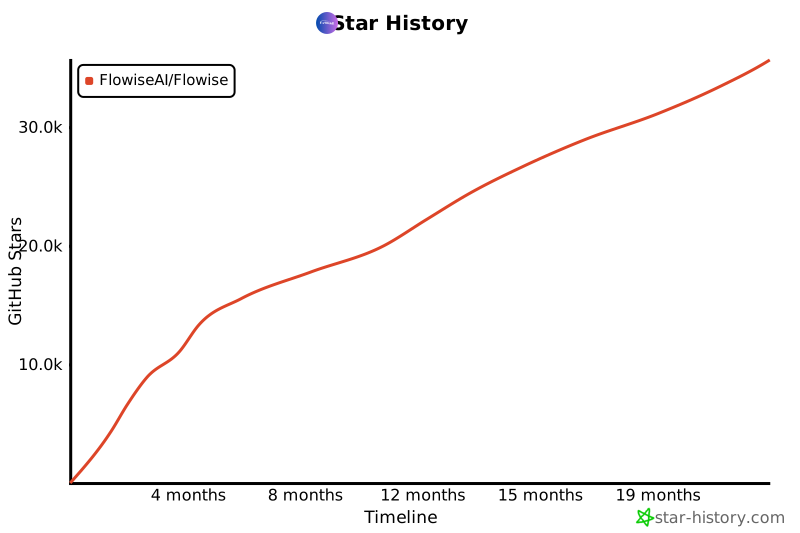](https://star-history.com/#FlowiseAI/Flowise&Date)
|
||||
See [contributing guide](CONTRIBUTING.md). Reach out to us at [Discord](https://discord.gg/jbaHfsRVBW) if you have any questions or issues.
|
||||
|
||||
## 📄 License
|
||||
|
||||
Source code in this repository is made available under the [Apache License Version 2.0](LICENSE.md).
|
||||
Source code in this repository is made available under the [MIT License](LICENSE.md).
|
||||
|
|
|
|||
38
SECURITY.md
38
SECURITY.md
|
|
@ -1,38 +0,0 @@
|
|||
### Responsible Disclosure Policy
|
||||
|
||||
At Flowise, we prioritize security and continuously work to safeguard our systems. However, vulnerabilities can still exist. If you identify a security issue, please report it to us so we can address it promptly. Your cooperation helps us better protect our platform and users.
|
||||
|
||||
### Out of scope vulnerabilities
|
||||
|
||||
- Clickjacking on pages without sensitive actions
|
||||
- CSRF on unauthenticated/logout/login pages
|
||||
- Attacks requiring MITM (Man-in-the-Middle) or physical device access
|
||||
- Social engineering attacks
|
||||
- Activities that cause service disruption (DoS)
|
||||
- Content spoofing and text injection without a valid attack vector
|
||||
- Email spoofing
|
||||
- Absence of DNSSEC, CAA, CSP headers
|
||||
- Missing Secure or HTTP-only flag on non-sensitive cookies
|
||||
- Deadlinks
|
||||
- User enumeration
|
||||
|
||||
### Reporting Guidelines
|
||||
|
||||
- Submit your findings to https://github.com/FlowiseAI/Flowise/security
|
||||
- Provide clear details to help us reproduce and fix the issue quickly.
|
||||
|
||||
### Disclosure Guidelines
|
||||
|
||||
- Do not publicly disclose vulnerabilities until we have assessed, resolved, and notified affected users.
|
||||
- If you plan to present your research (e.g., at a conference or in a blog), share a draft with us at least **30 days in advance** for review.
|
||||
- Avoid including:
|
||||
- Data from any Flowise customer projects
|
||||
- Flowise user/customer information
|
||||
- Details about Flowise employees, contractors, or partners
|
||||
|
||||
### Response to Reports
|
||||
|
||||
- We will acknowledge your report within **5 business days** and provide an estimated resolution timeline.
|
||||
- Your report will be kept **confidential**, and your details will not be shared without your consent.
|
||||
|
||||
We appreciate your efforts in helping us maintain a secure platform and look forward to working together to resolve any issues responsibly.
|
||||
|
|
@ -1,36 +0,0 @@
|
|||
# npm install -g artillery@latest
|
||||
# artillery run artillery-load-test.yml
|
||||
# Refer https://www.artillery.io/docs
|
||||
|
||||
config:
|
||||
target: http://128.128.128.128:3000 # replace with your url
|
||||
phases:
|
||||
- duration: 1
|
||||
arrivalRate: 1
|
||||
rampTo: 2
|
||||
name: Warm up phase
|
||||
- duration: 1
|
||||
arrivalRate: 2
|
||||
rampTo: 3
|
||||
name: Ramp up load
|
||||
- duration: 1
|
||||
arrivalRate: 3
|
||||
name: Sustained peak load
|
||||
scenarios:
|
||||
- flow:
|
||||
- loop:
|
||||
- post:
|
||||
url: '/api/v1/prediction/chatflow-id' # replace with your chatflowid
|
||||
json:
|
||||
question: 'hello' # replace with your question
|
||||
count: 1 # how many request each user make
|
||||
|
||||
# User __
|
||||
# 3 /
|
||||
# 2 /
|
||||
# 1 _/
|
||||
# 1 2 3
|
||||
# Seconds
|
||||
# Total Users = 2 + 3 + 3 = 8
|
||||
# Each making 1 HTTP call
|
||||
# Over a durations of 3 seconds
|
||||
|
|
@ -0,0 +1,13 @@
|
|||
module.exports = {
|
||||
presets: [
|
||||
'@babel/preset-typescript',
|
||||
[
|
||||
'@babel/preset-env',
|
||||
{
|
||||
targets: {
|
||||
node: 'current'
|
||||
}
|
||||
}
|
||||
]
|
||||
]
|
||||
}
|
||||
|
|
@ -1,180 +1 @@
|
|||
PORT=3000
|
||||
|
||||
# APIKEY_PATH=/your_apikey_path/.flowise # (will be deprecated by end of 2025)
|
||||
|
||||
############################################################################################################
|
||||
############################################## DATABASE ####################################################
|
||||
############################################################################################################
|
||||
|
||||
DATABASE_PATH=/root/.flowise
|
||||
# DATABASE_TYPE=postgres
|
||||
# DATABASE_PORT=5432
|
||||
# DATABASE_HOST=""
|
||||
# DATABASE_NAME=flowise
|
||||
# DATABASE_USER=root
|
||||
# DATABASE_PASSWORD=mypassword
|
||||
# DATABASE_SSL=true
|
||||
# DATABASE_REJECT_UNAUTHORIZED=true
|
||||
# DATABASE_SSL_KEY_BASE64=<Self signed certificate in BASE64>
|
||||
|
||||
|
||||
############################################################################################################
|
||||
############################################## SECRET KEYS #################################################
|
||||
############################################################################################################
|
||||
|
||||
# SECRETKEY_STORAGE_TYPE=local #(local | aws)
|
||||
SECRETKEY_PATH=/root/.flowise
|
||||
# FLOWISE_SECRETKEY_OVERWRITE=myencryptionkey # (if you want to overwrite the secret key)
|
||||
# SECRETKEY_AWS_ACCESS_KEY=<your-access-key>
|
||||
# SECRETKEY_AWS_SECRET_KEY=<your-secret-key>
|
||||
# SECRETKEY_AWS_REGION=us-west-2
|
||||
# SECRETKEY_AWS_NAME=FlowiseEncryptionKey
|
||||
|
||||
|
||||
############################################################################################################
|
||||
############################################## LOGGING #####################################################
|
||||
############################################################################################################
|
||||
|
||||
# DEBUG=true
|
||||
LOG_PATH=/root/.flowise/logs
|
||||
# LOG_LEVEL=info #(error | warn | info | verbose | debug)
|
||||
# LOG_SANITIZE_BODY_FIELDS=password,pwd,pass,secret,token,apikey,api_key,accesstoken,access_token,refreshtoken,refresh_token,clientsecret,client_secret,privatekey,private_key,secretkey,secret_key,auth,authorization,credential,credentials
|
||||
# LOG_SANITIZE_HEADER_FIELDS=authorization,x-api-key,x-auth-token,cookie
|
||||
# TOOL_FUNCTION_BUILTIN_DEP=crypto,fs
|
||||
# TOOL_FUNCTION_EXTERNAL_DEP=moment,lodash
|
||||
# ALLOW_BUILTIN_DEP=false
|
||||
|
||||
|
||||
############################################################################################################
|
||||
############################################## STORAGE #####################################################
|
||||
############################################################################################################
|
||||
|
||||
# STORAGE_TYPE=local (local | s3 | gcs)
|
||||
BLOB_STORAGE_PATH=/root/.flowise/storage
|
||||
# S3_STORAGE_BUCKET_NAME=flowise
|
||||
# S3_STORAGE_ACCESS_KEY_ID=<your-access-key>
|
||||
# S3_STORAGE_SECRET_ACCESS_KEY=<your-secret-key>
|
||||
# S3_STORAGE_REGION=us-west-2
|
||||
# S3_ENDPOINT_URL=<custom-s3-endpoint-url>
|
||||
# S3_FORCE_PATH_STYLE=false
|
||||
# GOOGLE_CLOUD_STORAGE_CREDENTIAL=/the/keyfilename/path
|
||||
# GOOGLE_CLOUD_STORAGE_PROJ_ID=<your-gcp-project-id>
|
||||
# GOOGLE_CLOUD_STORAGE_BUCKET_NAME=<the-bucket-name>
|
||||
# GOOGLE_CLOUD_UNIFORM_BUCKET_ACCESS=true
|
||||
|
||||
|
||||
############################################################################################################
|
||||
############################################## SETTINGS ####################################################
|
||||
############################################################################################################
|
||||
|
||||
# NUMBER_OF_PROXIES= 1
|
||||
# CORS_ORIGINS=*
|
||||
# IFRAME_ORIGINS=*
|
||||
# FLOWISE_FILE_SIZE_LIMIT=50mb
|
||||
# SHOW_COMMUNITY_NODES=true
|
||||
# DISABLE_FLOWISE_TELEMETRY=true
|
||||
# DISABLED_NODES=bufferMemory,chatOpenAI (comma separated list of node names to disable)
|
||||
# Uncomment the following line to enable model list config, load the list of models from your local config file
|
||||
# see https://raw.githubusercontent.com/FlowiseAI/Flowise/main/packages/components/models.json for the format
|
||||
# MODEL_LIST_CONFIG_JSON=/your_model_list_config_file_path
|
||||
|
||||
|
||||
############################################################################################################
|
||||
############################################ AUTH PARAMETERS ###############################################
|
||||
############################################################################################################
|
||||
|
||||
# APP_URL=http://localhost:3000
|
||||
|
||||
# SMTP_HOST=smtp.host.com
|
||||
# SMTP_PORT=465
|
||||
# SMTP_USER=smtp_user
|
||||
# SMTP_PASSWORD=smtp_password
|
||||
# SMTP_SECURE=true
|
||||
# ALLOW_UNAUTHORIZED_CERTS=false
|
||||
# SENDER_EMAIL=team@example.com
|
||||
|
||||
JWT_AUTH_TOKEN_SECRET='AABBCCDDAABBCCDDAABBCCDDAABBCCDDAABBCCDD'
|
||||
JWT_REFRESH_TOKEN_SECRET='AABBCCDDAABBCCDDAABBCCDDAABBCCDDAABBCCDD'
|
||||
JWT_ISSUER='ISSUER'
|
||||
JWT_AUDIENCE='AUDIENCE'
|
||||
JWT_TOKEN_EXPIRY_IN_MINUTES=360
|
||||
JWT_REFRESH_TOKEN_EXPIRY_IN_MINUTES=43200
|
||||
# EXPIRE_AUTH_TOKENS_ON_RESTART=true # (if you need to expire all tokens on app restart)
|
||||
# EXPRESS_SESSION_SECRET=flowise
|
||||
# SECURE_COOKIES=
|
||||
|
||||
# INVITE_TOKEN_EXPIRY_IN_HOURS=24
|
||||
# PASSWORD_RESET_TOKEN_EXPIRY_IN_MINS=15
|
||||
# PASSWORD_SALT_HASH_ROUNDS=10
|
||||
# TOKEN_HASH_SECRET='popcorn'
|
||||
|
||||
# WORKSPACE_INVITE_TEMPLATE_PATH=/path/to/custom/workspace_invite.hbs
|
||||
|
||||
|
||||
############################################################################################################
|
||||
############################################# ENTERPRISE ###################################################
|
||||
############################################################################################################
|
||||
|
||||
# LICENSE_URL=
|
||||
# FLOWISE_EE_LICENSE_KEY=
|
||||
# OFFLINE=
|
||||
|
||||
|
||||
############################################################################################################
|
||||
########################################### METRICS COLLECTION #############################################
|
||||
############################################################################################################
|
||||
|
||||
# POSTHOG_PUBLIC_API_KEY=your_posthog_public_api_key
|
||||
|
||||
# ENABLE_METRICS=false
|
||||
# METRICS_PROVIDER=prometheus # prometheus | open_telemetry
|
||||
# METRICS_INCLUDE_NODE_METRICS=true # default is true
|
||||
# METRICS_SERVICE_NAME=FlowiseAI
|
||||
|
||||
# ONLY NEEDED if METRICS_PROVIDER=open_telemetry
|
||||
# METRICS_OPEN_TELEMETRY_METRIC_ENDPOINT=http://localhost:4318/v1/metrics
|
||||
# METRICS_OPEN_TELEMETRY_PROTOCOL=http # http | grpc | proto (default is http)
|
||||
# METRICS_OPEN_TELEMETRY_DEBUG=true # default is false
|
||||
|
||||
|
||||
############################################################################################################
|
||||
############################################### PROXY ######################################################
|
||||
############################################################################################################
|
||||
|
||||
# Uncomment the following lines to enable global agent proxy, see https://www.npmjs.com/package/global-agent for more details
|
||||
# GLOBAL_AGENT_HTTP_PROXY=CorporateHttpProxyUrl
|
||||
# GLOBAL_AGENT_HTTPS_PROXY=CorporateHttpsProxyUrl
|
||||
# GLOBAL_AGENT_NO_PROXY=ExceptionHostsToBypassProxyIfNeeded
|
||||
|
||||
|
||||
############################################################################################################
|
||||
########################################### QUEUE CONFIGURATION ############################################
|
||||
############################################################################################################
|
||||
|
||||
# MODE=queue #(queue | main)
|
||||
# QUEUE_NAME=flowise-queue
|
||||
# QUEUE_REDIS_EVENT_STREAM_MAX_LEN=100000
|
||||
# WORKER_CONCURRENCY=100000
|
||||
# REMOVE_ON_AGE=86400
|
||||
# REMOVE_ON_COUNT=10000
|
||||
# REDIS_URL=
|
||||
# REDIS_HOST=localhost
|
||||
# REDIS_PORT=6379
|
||||
# REDIS_USERNAME=
|
||||
# REDIS_PASSWORD=
|
||||
# REDIS_TLS=
|
||||
# REDIS_CERT=
|
||||
# REDIS_KEY=
|
||||
# REDIS_CA=
|
||||
# REDIS_KEEP_ALIVE=
|
||||
# ENABLE_BULLMQ_DASHBOARD=
|
||||
|
||||
|
||||
############################################################################################################
|
||||
############################################## SECURITY ####################################################
|
||||
############################################################################################################
|
||||
|
||||
# HTTP_DENY_LIST=
|
||||
# CUSTOM_MCP_SECURITY_CHECK=true
|
||||
# CUSTOM_MCP_PROTOCOL=sse #(stdio | sse)
|
||||
# TRUST_PROXY=true #(true | false | 1 | loopback| linklocal | uniquelocal | IP addresses | loopback, IP addresses)
|
||||
PORT=3000
|
||||
|
|
@ -1,25 +1,13 @@
|
|||
# Stage 1: Build stage
|
||||
FROM node:20-alpine AS build
|
||||
FROM node:18-alpine
|
||||
|
||||
USER root
|
||||
|
||||
# Skip downloading Chrome for Puppeteer (saves build time)
|
||||
ENV PUPPETEER_SKIP_DOWNLOAD=true
|
||||
RUN apk add --no-cache git
|
||||
RUN apk add --no-cache python3 py3-pip make g++
|
||||
|
||||
# Install latest Flowise globally (specific version can be set: flowise@1.0.0)
|
||||
# You can install a specific version like: flowise@1.0.0
|
||||
RUN npm install -g flowise
|
||||
|
||||
# Stage 2: Runtime stage
|
||||
FROM node:20-alpine
|
||||
WORKDIR /data
|
||||
|
||||
# Install runtime dependencies
|
||||
RUN apk add --no-cache chromium git python3 py3-pip make g++ build-base cairo-dev pango-dev curl
|
||||
|
||||
# Set the environment variable for Puppeteer to find Chromium
|
||||
ENV PUPPETEER_EXECUTABLE_PATH=/usr/bin/chromium-browser
|
||||
|
||||
# Copy Flowise from the build stage
|
||||
COPY --from=build /usr/local/lib/node_modules /usr/local/lib/node_modules
|
||||
COPY --from=build /usr/local/bin /usr/local/bin
|
||||
|
||||
ENTRYPOINT ["flowise", "start"]
|
||||
CMD "flowise"
|
||||
|
|
@ -1,51 +0,0 @@
|
|||
# Flowise Docker Hub Image
|
||||
|
||||
Starts Flowise from [DockerHub Image](https://hub.docker.com/r/flowiseai/flowise)
|
||||
|
||||
## Usage
|
||||
|
||||
1. Create `.env` file and specify the `PORT` (refer to `.env.example`)
|
||||
2. `docker compose up -d`
|
||||
3. Open [http://localhost:3000](http://localhost:3000)
|
||||
4. You can bring the containers down by `docker compose stop`
|
||||
|
||||
## 🌱 Env Variables
|
||||
|
||||
If you like to persist your data (flows, logs, credentials, storage), set these variables in the `.env` file inside `docker` folder:
|
||||
|
||||
- DATABASE_PATH=/root/.flowise
|
||||
- LOG_PATH=/root/.flowise/logs
|
||||
- SECRETKEY_PATH=/root/.flowise
|
||||
- BLOB_STORAGE_PATH=/root/.flowise/storage
|
||||
|
||||
Flowise also support different environment variables to configure your instance. Read [more](https://docs.flowiseai.com/configuration/environment-variables)
|
||||
|
||||
## Queue Mode:
|
||||
|
||||
### Building from source:
|
||||
|
||||
You can build the images for worker and main from scratch with:
|
||||
|
||||
```
|
||||
docker compose -f docker-compose-queue-source.yml up -d
|
||||
```
|
||||
|
||||
Monitor Health:
|
||||
|
||||
```
|
||||
docker compose -f docker-compose-queue-source.yml ps
|
||||
```
|
||||
|
||||
### From pre-built images:
|
||||
|
||||
You can also use the pre-built images:
|
||||
|
||||
```
|
||||
docker compose -f docker-compose-queue-prebuilt.yml up -d
|
||||
```
|
||||
|
||||
Monitor Health:
|
||||
|
||||
```
|
||||
docker compose -f docker-compose-queue-prebuilt.yml ps
|
||||
```
|
||||
|
|
@ -1,316 +0,0 @@
|
|||
version: '3.1'
|
||||
|
||||
services:
|
||||
redis:
|
||||
image: redis:alpine
|
||||
container_name: flowise-redis
|
||||
ports:
|
||||
- '6379:6379'
|
||||
volumes:
|
||||
- redis_data:/data
|
||||
networks:
|
||||
- flowise-net
|
||||
restart: always
|
||||
|
||||
flowise:
|
||||
image: flowiseai/flowise:latest
|
||||
container_name: flowise-main
|
||||
restart: always
|
||||
ports:
|
||||
- '${PORT:-3000}:${PORT:-3000}'
|
||||
volumes:
|
||||
- ~/.flowise:/root/.flowise
|
||||
environment:
|
||||
# --- Essential Flowise Vars ---
|
||||
- PORT=${PORT:-3000}
|
||||
- DATABASE_PATH=${DATABASE_PATH:-/root/.flowise}
|
||||
- DATABASE_TYPE=${DATABASE_TYPE}
|
||||
- DATABASE_PORT=${DATABASE_PORT}
|
||||
- DATABASE_HOST=${DATABASE_HOST}
|
||||
- DATABASE_NAME=${DATABASE_NAME}
|
||||
- DATABASE_USER=${DATABASE_USER}
|
||||
- DATABASE_PASSWORD=${DATABASE_PASSWORD}
|
||||
- DATABASE_SSL=${DATABASE_SSL}
|
||||
- DATABASE_SSL_KEY_BASE64=${DATABASE_SSL_KEY_BASE64}
|
||||
|
||||
# SECRET KEYS
|
||||
- SECRETKEY_STORAGE_TYPE=${SECRETKEY_STORAGE_TYPE}
|
||||
- SECRETKEY_PATH=${SECRETKEY_PATH}
|
||||
- FLOWISE_SECRETKEY_OVERWRITE=${FLOWISE_SECRETKEY_OVERWRITE}
|
||||
- SECRETKEY_AWS_ACCESS_KEY=${SECRETKEY_AWS_ACCESS_KEY}
|
||||
- SECRETKEY_AWS_SECRET_KEY=${SECRETKEY_AWS_SECRET_KEY}
|
||||
- SECRETKEY_AWS_REGION=${SECRETKEY_AWS_REGION}
|
||||
- SECRETKEY_AWS_NAME=${SECRETKEY_AWS_NAME}
|
||||
|
||||
# LOGGING
|
||||
- DEBUG=${DEBUG}
|
||||
- LOG_PATH=${LOG_PATH}
|
||||
- LOG_LEVEL=${LOG_LEVEL}
|
||||
- LOG_SANITIZE_BODY_FIELDS=${LOG_SANITIZE_BODY_FIELDS}
|
||||
- LOG_SANITIZE_HEADER_FIELDS=${LOG_SANITIZE_HEADER_FIELDS}
|
||||
|
||||
# CUSTOM TOOL/FUNCTION DEPENDENCIES
|
||||
- TOOL_FUNCTION_BUILTIN_DEP=${TOOL_FUNCTION_BUILTIN_DEP}
|
||||
- TOOL_FUNCTION_EXTERNAL_DEP=${TOOL_FUNCTION_EXTERNAL_DEP}
|
||||
- ALLOW_BUILTIN_DEP=${ALLOW_BUILTIN_DEP}
|
||||
|
||||
# STORAGE
|
||||
- STORAGE_TYPE=${STORAGE_TYPE}
|
||||
- BLOB_STORAGE_PATH=${BLOB_STORAGE_PATH}
|
||||
- S3_STORAGE_BUCKET_NAME=${S3_STORAGE_BUCKET_NAME}
|
||||
- S3_STORAGE_ACCESS_KEY_ID=${S3_STORAGE_ACCESS_KEY_ID}
|
||||
- S3_STORAGE_SECRET_ACCESS_KEY=${S3_STORAGE_SECRET_ACCESS_KEY}
|
||||
- S3_STORAGE_REGION=${S3_STORAGE_REGION}
|
||||
- S3_ENDPOINT_URL=${S3_ENDPOINT_URL}
|
||||
- S3_FORCE_PATH_STYLE=${S3_FORCE_PATH_STYLE}
|
||||
- GOOGLE_CLOUD_STORAGE_CREDENTIAL=${GOOGLE_CLOUD_STORAGE_CREDENTIAL}
|
||||
- GOOGLE_CLOUD_STORAGE_PROJ_ID=${GOOGLE_CLOUD_STORAGE_PROJ_ID}
|
||||
- GOOGLE_CLOUD_STORAGE_BUCKET_NAME=${GOOGLE_CLOUD_STORAGE_BUCKET_NAME}
|
||||
- GOOGLE_CLOUD_UNIFORM_BUCKET_ACCESS=${GOOGLE_CLOUD_UNIFORM_BUCKET_ACCESS}
|
||||
|
||||
# SETTINGS
|
||||
- NUMBER_OF_PROXIES=${NUMBER_OF_PROXIES}
|
||||
- CORS_ORIGINS=${CORS_ORIGINS}
|
||||
- IFRAME_ORIGINS=${IFRAME_ORIGINS}
|
||||
- FLOWISE_FILE_SIZE_LIMIT=${FLOWISE_FILE_SIZE_LIMIT}
|
||||
- SHOW_COMMUNITY_NODES=${SHOW_COMMUNITY_NODES}
|
||||
- DISABLE_FLOWISE_TELEMETRY=${DISABLE_FLOWISE_TELEMETRY}
|
||||
- DISABLED_NODES=${DISABLED_NODES}
|
||||
- MODEL_LIST_CONFIG_JSON=${MODEL_LIST_CONFIG_JSON}
|
||||
|
||||
# AUTH PARAMETERS
|
||||
- APP_URL=${APP_URL}
|
||||
- JWT_AUTH_TOKEN_SECRET=${JWT_AUTH_TOKEN_SECRET}
|
||||
- JWT_REFRESH_TOKEN_SECRET=${JWT_REFRESH_TOKEN_SECRET}
|
||||
- JWT_ISSUER=${JWT_ISSUER}
|
||||
- JWT_AUDIENCE=${JWT_AUDIENCE}
|
||||
- JWT_TOKEN_EXPIRY_IN_MINUTES=${JWT_TOKEN_EXPIRY_IN_MINUTES}
|
||||
- JWT_REFRESH_TOKEN_EXPIRY_IN_MINUTES=${JWT_REFRESH_TOKEN_EXPIRY_IN_MINUTES}
|
||||
- EXPIRE_AUTH_TOKENS_ON_RESTART=${EXPIRE_AUTH_TOKENS_ON_RESTART}
|
||||
- EXPRESS_SESSION_SECRET=${EXPRESS_SESSION_SECRET}
|
||||
- PASSWORD_RESET_TOKEN_EXPIRY_IN_MINS=${PASSWORD_RESET_TOKEN_EXPIRY_IN_MINS}
|
||||
- PASSWORD_SALT_HASH_ROUNDS=${PASSWORD_SALT_HASH_ROUNDS}
|
||||
- TOKEN_HASH_SECRET=${TOKEN_HASH_SECRET}
|
||||
- SECURE_COOKIES=${SECURE_COOKIES}
|
||||
|
||||
# EMAIL
|
||||
- SMTP_HOST=${SMTP_HOST}
|
||||
- SMTP_PORT=${SMTP_PORT}
|
||||
- SMTP_USER=${SMTP_USER}
|
||||
- SMTP_PASSWORD=${SMTP_PASSWORD}
|
||||
- SMTP_SECURE=${SMTP_SECURE}
|
||||
- ALLOW_UNAUTHORIZED_CERTS=${ALLOW_UNAUTHORIZED_CERTS}
|
||||
- SENDER_EMAIL=${SENDER_EMAIL}
|
||||
|
||||
# ENTERPRISE
|
||||
- LICENSE_URL=${LICENSE_URL}
|
||||
- FLOWISE_EE_LICENSE_KEY=${FLOWISE_EE_LICENSE_KEY}
|
||||
- OFFLINE=${OFFLINE}
|
||||
- INVITE_TOKEN_EXPIRY_IN_HOURS=${INVITE_TOKEN_EXPIRY_IN_HOURS}
|
||||
- WORKSPACE_INVITE_TEMPLATE_PATH=${WORKSPACE_INVITE_TEMPLATE_PATH}
|
||||
|
||||
# METRICS COLLECTION
|
||||
- POSTHOG_PUBLIC_API_KEY=${POSTHOG_PUBLIC_API_KEY}
|
||||
- ENABLE_METRICS=${ENABLE_METRICS}
|
||||
- METRICS_PROVIDER=${METRICS_PROVIDER}
|
||||
- METRICS_INCLUDE_NODE_METRICS=${METRICS_INCLUDE_NODE_METRICS}
|
||||
- METRICS_SERVICE_NAME=${METRICS_SERVICE_NAME}
|
||||
- METRICS_OPEN_TELEMETRY_METRIC_ENDPOINT=${METRICS_OPEN_TELEMETRY_METRIC_ENDPOINT}
|
||||
- METRICS_OPEN_TELEMETRY_PROTOCOL=${METRICS_OPEN_TELEMETRY_PROTOCOL}
|
||||
- METRICS_OPEN_TELEMETRY_DEBUG=${METRICS_OPEN_TELEMETRY_DEBUG}
|
||||
|
||||
# PROXY
|
||||
- GLOBAL_AGENT_HTTP_PROXY=${GLOBAL_AGENT_HTTP_PROXY}
|
||||
- GLOBAL_AGENT_HTTPS_PROXY=${GLOBAL_AGENT_HTTPS_PROXY}
|
||||
- GLOBAL_AGENT_NO_PROXY=${GLOBAL_AGENT_NO_PROXY}
|
||||
|
||||
# --- Queue Configuration (Main Instance) ---
|
||||
- MODE=${MODE:-queue}
|
||||
- QUEUE_NAME=${QUEUE_NAME:-flowise-queue}
|
||||
- QUEUE_REDIS_EVENT_STREAM_MAX_LEN=${QUEUE_REDIS_EVENT_STREAM_MAX_LEN}
|
||||
- WORKER_CONCURRENCY=${WORKER_CONCURRENCY}
|
||||
- REMOVE_ON_AGE=${REMOVE_ON_AGE}
|
||||
- REMOVE_ON_COUNT=${REMOVE_ON_COUNT}
|
||||
- REDIS_URL=${REDIS_URL:-redis://redis:6379}
|
||||
- REDIS_HOST=${REDIS_HOST}
|
||||
- REDIS_PORT=${REDIS_PORT}
|
||||
- REDIS_USERNAME=${REDIS_USERNAME}
|
||||
- REDIS_PASSWORD=${REDIS_PASSWORD}
|
||||
- REDIS_TLS=${REDIS_TLS}
|
||||
- REDIS_CERT=${REDIS_CERT}
|
||||
- REDIS_KEY=${REDIS_KEY}
|
||||
- REDIS_CA=${REDIS_CA}
|
||||
- REDIS_KEEP_ALIVE=${REDIS_KEEP_ALIVE}
|
||||
- ENABLE_BULLMQ_DASHBOARD=${ENABLE_BULLMQ_DASHBOARD}
|
||||
|
||||
# SECURITY
|
||||
- CUSTOM_MCP_SECURITY_CHECK=${CUSTOM_MCP_SECURITY_CHECK}
|
||||
- CUSTOM_MCP_PROTOCOL=${CUSTOM_MCP_PROTOCOL}
|
||||
- HTTP_DENY_LIST=${HTTP_DENY_LIST}
|
||||
- TRUST_PROXY=${TRUST_PROXY}
|
||||
healthcheck:
|
||||
test: ['CMD', 'curl', '-f', 'http://localhost:${PORT:-3000}/api/v1/ping']
|
||||
interval: 10s
|
||||
timeout: 5s
|
||||
retries: 5
|
||||
start_period: 30s
|
||||
entrypoint: /bin/sh -c "sleep 3; flowise start"
|
||||
depends_on:
|
||||
- redis
|
||||
networks:
|
||||
- flowise-net
|
||||
|
||||
flowise-worker:
|
||||
image: flowiseai/flowise-worker:latest
|
||||
container_name: flowise-worker
|
||||
restart: always
|
||||
volumes:
|
||||
- ~/.flowise:/root/.flowise
|
||||
environment:
|
||||
# --- Essential Flowise Vars ---
|
||||
- WORKER_PORT=${WORKER_PORT:-5566}
|
||||
- DATABASE_PATH=${DATABASE_PATH:-/root/.flowise}
|
||||
- DATABASE_TYPE=${DATABASE_TYPE}
|
||||
- DATABASE_PORT=${DATABASE_PORT}
|
||||
- DATABASE_HOST=${DATABASE_HOST}
|
||||
- DATABASE_NAME=${DATABASE_NAME}
|
||||
- DATABASE_USER=${DATABASE_USER}
|
||||
- DATABASE_PASSWORD=${DATABASE_PASSWORD}
|
||||
- DATABASE_SSL=${DATABASE_SSL}
|
||||
- DATABASE_SSL_KEY_BASE64=${DATABASE_SSL_KEY_BASE64}
|
||||
|
||||
# SECRET KEYS
|
||||
- SECRETKEY_STORAGE_TYPE=${SECRETKEY_STORAGE_TYPE}
|
||||
- SECRETKEY_PATH=${SECRETKEY_PATH}
|
||||
- FLOWISE_SECRETKEY_OVERWRITE=${FLOWISE_SECRETKEY_OVERWRITE}
|
||||
- SECRETKEY_AWS_ACCESS_KEY=${SECRETKEY_AWS_ACCESS_KEY}
|
||||
- SECRETKEY_AWS_SECRET_KEY=${SECRETKEY_AWS_SECRET_KEY}
|
||||
- SECRETKEY_AWS_REGION=${SECRETKEY_AWS_REGION}
|
||||
- SECRETKEY_AWS_NAME=${SECRETKEY_AWS_NAME}
|
||||
|
||||
# LOGGING
|
||||
- DEBUG=${DEBUG}
|
||||
- LOG_PATH=${LOG_PATH}
|
||||
- LOG_LEVEL=${LOG_LEVEL}
|
||||
- LOG_SANITIZE_BODY_FIELDS=${LOG_SANITIZE_BODY_FIELDS}
|
||||
- LOG_SANITIZE_HEADER_FIELDS=${LOG_SANITIZE_HEADER_FIELDS}
|
||||
|
||||
# CUSTOM TOOL/FUNCTION DEPENDENCIES
|
||||
- TOOL_FUNCTION_BUILTIN_DEP=${TOOL_FUNCTION_BUILTIN_DEP}
|
||||
- TOOL_FUNCTION_EXTERNAL_DEP=${TOOL_FUNCTION_EXTERNAL_DEP}
|
||||
- ALLOW_BUILTIN_DEP=${ALLOW_BUILTIN_DEP}
|
||||
|
||||
# STORAGE
|
||||
- STORAGE_TYPE=${STORAGE_TYPE}
|
||||
- BLOB_STORAGE_PATH=${BLOB_STORAGE_PATH}
|
||||
- S3_STORAGE_BUCKET_NAME=${S3_STORAGE_BUCKET_NAME}
|
||||
- S3_STORAGE_ACCESS_KEY_ID=${S3_STORAGE_ACCESS_KEY_ID}
|
||||
- S3_STORAGE_SECRET_ACCESS_KEY=${S3_STORAGE_SECRET_ACCESS_KEY}
|
||||
- S3_STORAGE_REGION=${S3_STORAGE_REGION}
|
||||
- S3_ENDPOINT_URL=${S3_ENDPOINT_URL}
|
||||
- S3_FORCE_PATH_STYLE=${S3_FORCE_PATH_STYLE}
|
||||
- GOOGLE_CLOUD_STORAGE_CREDENTIAL=${GOOGLE_CLOUD_STORAGE_CREDENTIAL}
|
||||
- GOOGLE_CLOUD_STORAGE_PROJ_ID=${GOOGLE_CLOUD_STORAGE_PROJ_ID}
|
||||
- GOOGLE_CLOUD_STORAGE_BUCKET_NAME=${GOOGLE_CLOUD_STORAGE_BUCKET_NAME}
|
||||
- GOOGLE_CLOUD_UNIFORM_BUCKET_ACCESS=${GOOGLE_CLOUD_UNIFORM_BUCKET_ACCESS}
|
||||
|
||||
# SETTINGS
|
||||
- NUMBER_OF_PROXIES=${NUMBER_OF_PROXIES}
|
||||
- CORS_ORIGINS=${CORS_ORIGINS}
|
||||
- IFRAME_ORIGINS=${IFRAME_ORIGINS}
|
||||
- FLOWISE_FILE_SIZE_LIMIT=${FLOWISE_FILE_SIZE_LIMIT}
|
||||
- SHOW_COMMUNITY_NODES=${SHOW_COMMUNITY_NODES}
|
||||
- DISABLE_FLOWISE_TELEMETRY=${DISABLE_FLOWISE_TELEMETRY}
|
||||
- DISABLED_NODES=${DISABLED_NODES}
|
||||
- MODEL_LIST_CONFIG_JSON=${MODEL_LIST_CONFIG_JSON}
|
||||
|
||||
# AUTH PARAMETERS
|
||||
- APP_URL=${APP_URL}
|
||||
- JWT_AUTH_TOKEN_SECRET=${JWT_AUTH_TOKEN_SECRET}
|
||||
- JWT_REFRESH_TOKEN_SECRET=${JWT_REFRESH_TOKEN_SECRET}
|
||||
- JWT_ISSUER=${JWT_ISSUER}
|
||||
- JWT_AUDIENCE=${JWT_AUDIENCE}
|
||||
- JWT_TOKEN_EXPIRY_IN_MINUTES=${JWT_TOKEN_EXPIRY_IN_MINUTES}
|
||||
- JWT_REFRESH_TOKEN_EXPIRY_IN_MINUTES=${JWT_REFRESH_TOKEN_EXPIRY_IN_MINUTES}
|
||||
- EXPIRE_AUTH_TOKENS_ON_RESTART=${EXPIRE_AUTH_TOKENS_ON_RESTART}
|
||||
- EXPRESS_SESSION_SECRET=${EXPRESS_SESSION_SECRET}
|
||||
- PASSWORD_RESET_TOKEN_EXPIRY_IN_MINS=${PASSWORD_RESET_TOKEN_EXPIRY_IN_MINS}
|
||||
- PASSWORD_SALT_HASH_ROUNDS=${PASSWORD_SALT_HASH_ROUNDS}
|
||||
- TOKEN_HASH_SECRET=${TOKEN_HASH_SECRET}
|
||||
- SECURE_COOKIES=${SECURE_COOKIES}
|
||||
|
||||
# EMAIL
|
||||
- SMTP_HOST=${SMTP_HOST}
|
||||
- SMTP_PORT=${SMTP_PORT}
|
||||
- SMTP_USER=${SMTP_USER}
|
||||
- SMTP_PASSWORD=${SMTP_PASSWORD}
|
||||
- SMTP_SECURE=${SMTP_SECURE}
|
||||
- ALLOW_UNAUTHORIZED_CERTS=${ALLOW_UNAUTHORIZED_CERTS}
|
||||
- SENDER_EMAIL=${SENDER_EMAIL}
|
||||
|
||||
# ENTERPRISE
|
||||
- LICENSE_URL=${LICENSE_URL}
|
||||
- FLOWISE_EE_LICENSE_KEY=${FLOWISE_EE_LICENSE_KEY}
|
||||
- OFFLINE=${OFFLINE}
|
||||
- INVITE_TOKEN_EXPIRY_IN_HOURS=${INVITE_TOKEN_EXPIRY_IN_HOURS}
|
||||
- WORKSPACE_INVITE_TEMPLATE_PATH=${WORKSPACE_INVITE_TEMPLATE_PATH}
|
||||
|
||||
# METRICS COLLECTION
|
||||
- POSTHOG_PUBLIC_API_KEY=${POSTHOG_PUBLIC_API_KEY}
|
||||
- ENABLE_METRICS=${ENABLE_METRICS}
|
||||
- METRICS_PROVIDER=${METRICS_PROVIDER}
|
||||
- METRICS_INCLUDE_NODE_METRICS=${METRICS_INCLUDE_NODE_METRICS}
|
||||
- METRICS_SERVICE_NAME=${METRICS_SERVICE_NAME}
|
||||
- METRICS_OPEN_TELEMETRY_METRIC_ENDPOINT=${METRICS_OPEN_TELEMETRY_METRIC_ENDPOINT}
|
||||
- METRICS_OPEN_TELEMETRY_PROTOCOL=${METRICS_OPEN_TELEMETRY_PROTOCOL}
|
||||
- METRICS_OPEN_TELEMETRY_DEBUG=${METRICS_OPEN_TELEMETRY_DEBUG}
|
||||
|
||||
# PROXY
|
||||
- GLOBAL_AGENT_HTTP_PROXY=${GLOBAL_AGENT_HTTP_PROXY}
|
||||
- GLOBAL_AGENT_HTTPS_PROXY=${GLOBAL_AGENT_HTTPS_PROXY}
|
||||
- GLOBAL_AGENT_NO_PROXY=${GLOBAL_AGENT_NO_PROXY}
|
||||
|
||||
# --- Queue Configuration (Worker Instance) ---
|
||||
- MODE=${MODE:-queue}
|
||||
- QUEUE_NAME=${QUEUE_NAME:-flowise-queue}
|
||||
- QUEUE_REDIS_EVENT_STREAM_MAX_LEN=${QUEUE_REDIS_EVENT_STREAM_MAX_LEN}
|
||||
- WORKER_CONCURRENCY=${WORKER_CONCURRENCY}
|
||||
- REMOVE_ON_AGE=${REMOVE_ON_AGE}
|
||||
- REMOVE_ON_COUNT=${REMOVE_ON_COUNT}
|
||||
- REDIS_URL=${REDIS_URL:-redis://redis:6379}
|
||||
- REDIS_HOST=${REDIS_HOST}
|
||||
- REDIS_PORT=${REDIS_PORT}
|
||||
- REDIS_USERNAME=${REDIS_USERNAME}
|
||||
- REDIS_PASSWORD=${REDIS_PASSWORD}
|
||||
- REDIS_TLS=${REDIS_TLS}
|
||||
- REDIS_CERT=${REDIS_CERT}
|
||||
- REDIS_KEY=${REDIS_KEY}
|
||||
- REDIS_CA=${REDIS_CA}
|
||||
- REDIS_KEEP_ALIVE=${REDIS_KEEP_ALIVE}
|
||||
- ENABLE_BULLMQ_DASHBOARD=${ENABLE_BULLMQ_DASHBOARD}
|
||||
|
||||
# SECURITY
|
||||
- CUSTOM_MCP_SECURITY_CHECK=${CUSTOM_MCP_SECURITY_CHECK}
|
||||
- CUSTOM_MCP_PROTOCOL=${CUSTOM_MCP_PROTOCOL}
|
||||
- HTTP_DENY_LIST=${HTTP_DENY_LIST}
|
||||
- TRUST_PROXY=${TRUST_PROXY}
|
||||
healthcheck:
|
||||
test: ['CMD', 'curl', '-f', 'http://localhost:${WORKER_PORT:-5566}/healthz']
|
||||
interval: 10s
|
||||
timeout: 5s
|
||||
retries: 5
|
||||
start_period: 30s
|
||||
entrypoint: /bin/sh -c "node /app/healthcheck/healthcheck.js & sleep 5 && pnpm run start-worker"
|
||||
depends_on:
|
||||
- redis
|
||||
- flowise
|
||||
networks:
|
||||
- flowise-net
|
||||
|
||||
volumes:
|
||||
redis_data:
|
||||
driver: local
|
||||
|
||||
networks:
|
||||
flowise-net:
|
||||
driver: bridge
|
||||
|
|
@ -1,71 +0,0 @@
|
|||
version: '3.1'
|
||||
|
||||
services:
|
||||
redis:
|
||||
image: redis:alpine
|
||||
container_name: flowise-redis
|
||||
ports:
|
||||
- '6379:6379'
|
||||
volumes:
|
||||
- redis_data:/data
|
||||
networks:
|
||||
- flowise-net
|
||||
|
||||
flowise:
|
||||
container_name: flowise-main
|
||||
build:
|
||||
context: .. # Build using the Dockerfile in the root directory
|
||||
dockerfile: docker/Dockerfile
|
||||
ports:
|
||||
- '${PORT}:${PORT}'
|
||||
volumes:
|
||||
# Mount local .flowise to container's default location
|
||||
- ../.flowise:/root/.flowise
|
||||
environment:
|
||||
# --- Essential Flowise Vars ---
|
||||
- PORT=${PORT:-3000}
|
||||
- DATABASE_PATH=/root/.flowise
|
||||
- SECRETKEY_PATH=/root/.flowise
|
||||
- LOG_PATH=/root/.flowise/logs
|
||||
- BLOB_STORAGE_PATH=/root/.flowise/storage
|
||||
# --- Queue Vars (Main Instance) ---
|
||||
- MODE=queue
|
||||
- QUEUE_NAME=flowise-queue # Ensure this matches worker
|
||||
- REDIS_URL=redis://redis:6379 # Use service name 'redis'
|
||||
depends_on:
|
||||
- redis
|
||||
networks:
|
||||
- flowise-net
|
||||
|
||||
flowise-worker:
|
||||
container_name: flowise-worker
|
||||
build:
|
||||
context: .. # Build context is still the root
|
||||
dockerfile: docker/worker/Dockerfile # Ensure this path is correct
|
||||
volumes:
|
||||
# Mount same local .flowise to worker
|
||||
- ../.flowise:/root/.flowise
|
||||
environment:
|
||||
# --- Essential Flowise Vars ---
|
||||
- WORKER_PORT=${WORKER_PORT:-5566} # Port for worker healthcheck
|
||||
- DATABASE_PATH=/root/.flowise
|
||||
- SECRETKEY_PATH=/root/.flowise
|
||||
- LOG_PATH=/root/.flowise/logs
|
||||
- BLOB_STORAGE_PATH=/root/.flowise/storage
|
||||
# --- Queue Vars (Main Instance) ---
|
||||
- MODE=queue
|
||||
- QUEUE_NAME=flowise-queue # Ensure this matches worker
|
||||
- REDIS_URL=redis://redis:6379 # Use service name 'redis'
|
||||
depends_on:
|
||||
- redis
|
||||
- flowise
|
||||
networks:
|
||||
- flowise-net
|
||||
|
||||
volumes:
|
||||
redis_data:
|
||||
driver: local
|
||||
|
||||
networks:
|
||||
flowise-net:
|
||||
driver: bridge
|
||||
|
|
@ -2,145 +2,12 @@ version: '3.1'
|
|||
|
||||
services:
|
||||
flowise:
|
||||
image: flowiseai/flowise:latest
|
||||
image: flowiseai/flowise
|
||||
restart: always
|
||||
environment:
|
||||
- PORT=${PORT}
|
||||
|
||||
# DATABASE
|
||||
- DATABASE_PATH=${DATABASE_PATH}
|
||||
- DATABASE_TYPE=${DATABASE_TYPE}
|
||||
- DATABASE_PORT=${DATABASE_PORT}
|
||||
- DATABASE_HOST=${DATABASE_HOST}
|
||||
- DATABASE_NAME=${DATABASE_NAME}
|
||||
- DATABASE_USER=${DATABASE_USER}
|
||||
- DATABASE_PASSWORD=${DATABASE_PASSWORD}
|
||||
- DATABASE_SSL=${DATABASE_SSL}
|
||||
- DATABASE_SSL_KEY_BASE64=${DATABASE_SSL_KEY_BASE64}
|
||||
|
||||
# SECRET KEYS
|
||||
- SECRETKEY_STORAGE_TYPE=${SECRETKEY_STORAGE_TYPE}
|
||||
- SECRETKEY_PATH=${SECRETKEY_PATH}
|
||||
- FLOWISE_SECRETKEY_OVERWRITE=${FLOWISE_SECRETKEY_OVERWRITE}
|
||||
- SECRETKEY_AWS_ACCESS_KEY=${SECRETKEY_AWS_ACCESS_KEY}
|
||||
- SECRETKEY_AWS_SECRET_KEY=${SECRETKEY_AWS_SECRET_KEY}
|
||||
- SECRETKEY_AWS_REGION=${SECRETKEY_AWS_REGION}
|
||||
- SECRETKEY_AWS_NAME=${SECRETKEY_AWS_NAME}
|
||||
|
||||
# LOGGING
|
||||
- DEBUG=${DEBUG}
|
||||
- LOG_PATH=${LOG_PATH}
|
||||
- LOG_LEVEL=${LOG_LEVEL}
|
||||
- LOG_SANITIZE_BODY_FIELDS=${LOG_SANITIZE_BODY_FIELDS}
|
||||
- LOG_SANITIZE_HEADER_FIELDS=${LOG_SANITIZE_HEADER_FIELDS}
|
||||
|
||||
# CUSTOM TOOL/FUNCTION DEPENDENCIES
|
||||
- TOOL_FUNCTION_BUILTIN_DEP=${TOOL_FUNCTION_BUILTIN_DEP}
|
||||
- TOOL_FUNCTION_EXTERNAL_DEP=${TOOL_FUNCTION_EXTERNAL_DEP}
|
||||
- ALLOW_BUILTIN_DEP=${ALLOW_BUILTIN_DEP}
|
||||
|
||||
# STORAGE
|
||||
- STORAGE_TYPE=${STORAGE_TYPE}
|
||||
- BLOB_STORAGE_PATH=${BLOB_STORAGE_PATH}
|
||||
- S3_STORAGE_BUCKET_NAME=${S3_STORAGE_BUCKET_NAME}
|
||||
- S3_STORAGE_ACCESS_KEY_ID=${S3_STORAGE_ACCESS_KEY_ID}
|
||||
- S3_STORAGE_SECRET_ACCESS_KEY=${S3_STORAGE_SECRET_ACCESS_KEY}
|
||||
- S3_STORAGE_REGION=${S3_STORAGE_REGION}
|
||||
- S3_ENDPOINT_URL=${S3_ENDPOINT_URL}
|
||||
- S3_FORCE_PATH_STYLE=${S3_FORCE_PATH_STYLE}
|
||||
- GOOGLE_CLOUD_STORAGE_CREDENTIAL=${GOOGLE_CLOUD_STORAGE_CREDENTIAL}
|
||||
- GOOGLE_CLOUD_STORAGE_PROJ_ID=${GOOGLE_CLOUD_STORAGE_PROJ_ID}
|
||||
- GOOGLE_CLOUD_STORAGE_BUCKET_NAME=${GOOGLE_CLOUD_STORAGE_BUCKET_NAME}
|
||||
- GOOGLE_CLOUD_UNIFORM_BUCKET_ACCESS=${GOOGLE_CLOUD_UNIFORM_BUCKET_ACCESS}
|
||||
|
||||
# SETTINGS
|
||||
- NUMBER_OF_PROXIES=${NUMBER_OF_PROXIES}
|
||||
- CORS_ORIGINS=${CORS_ORIGINS}
|
||||
- IFRAME_ORIGINS=${IFRAME_ORIGINS}
|
||||
- FLOWISE_FILE_SIZE_LIMIT=${FLOWISE_FILE_SIZE_LIMIT}
|
||||
- SHOW_COMMUNITY_NODES=${SHOW_COMMUNITY_NODES}
|
||||
- DISABLE_FLOWISE_TELEMETRY=${DISABLE_FLOWISE_TELEMETRY}
|
||||
- DISABLED_NODES=${DISABLED_NODES}
|
||||
- MODEL_LIST_CONFIG_JSON=${MODEL_LIST_CONFIG_JSON}
|
||||
|
||||
# AUTH PARAMETERS
|
||||
- APP_URL=${APP_URL}
|
||||
- JWT_AUTH_TOKEN_SECRET=${JWT_AUTH_TOKEN_SECRET}
|
||||
- JWT_REFRESH_TOKEN_SECRET=${JWT_REFRESH_TOKEN_SECRET}
|
||||
- JWT_ISSUER=${JWT_ISSUER}
|
||||
- JWT_AUDIENCE=${JWT_AUDIENCE}
|
||||
- JWT_TOKEN_EXPIRY_IN_MINUTES=${JWT_TOKEN_EXPIRY_IN_MINUTES}
|
||||
- JWT_REFRESH_TOKEN_EXPIRY_IN_MINUTES=${JWT_REFRESH_TOKEN_EXPIRY_IN_MINUTES}
|
||||
- EXPIRE_AUTH_TOKENS_ON_RESTART=${EXPIRE_AUTH_TOKENS_ON_RESTART}
|
||||
- EXPRESS_SESSION_SECRET=${EXPRESS_SESSION_SECRET}
|
||||
- PASSWORD_RESET_TOKEN_EXPIRY_IN_MINS=${PASSWORD_RESET_TOKEN_EXPIRY_IN_MINS}
|
||||
- PASSWORD_SALT_HASH_ROUNDS=${PASSWORD_SALT_HASH_ROUNDS}
|
||||
- TOKEN_HASH_SECRET=${TOKEN_HASH_SECRET}
|
||||
- SECURE_COOKIES=${SECURE_COOKIES}
|
||||
|
||||
# EMAIL
|
||||
- SMTP_HOST=${SMTP_HOST}
|
||||
- SMTP_PORT=${SMTP_PORT}
|
||||
- SMTP_USER=${SMTP_USER}
|
||||
- SMTP_PASSWORD=${SMTP_PASSWORD}
|
||||
- SMTP_SECURE=${SMTP_SECURE}
|
||||
- ALLOW_UNAUTHORIZED_CERTS=${ALLOW_UNAUTHORIZED_CERTS}
|
||||
- SENDER_EMAIL=${SENDER_EMAIL}
|
||||
|
||||
# ENTERPRISE
|
||||
- LICENSE_URL=${LICENSE_URL}
|
||||
- FLOWISE_EE_LICENSE_KEY=${FLOWISE_EE_LICENSE_KEY}
|
||||
- OFFLINE=${OFFLINE}
|
||||
- INVITE_TOKEN_EXPIRY_IN_HOURS=${INVITE_TOKEN_EXPIRY_IN_HOURS}
|
||||
- WORKSPACE_INVITE_TEMPLATE_PATH=${WORKSPACE_INVITE_TEMPLATE_PATH}
|
||||
|
||||
# METRICS COLLECTION
|
||||
- POSTHOG_PUBLIC_API_KEY=${POSTHOG_PUBLIC_API_KEY}
|
||||
- ENABLE_METRICS=${ENABLE_METRICS}
|
||||
- METRICS_PROVIDER=${METRICS_PROVIDER}
|
||||
- METRICS_INCLUDE_NODE_METRICS=${METRICS_INCLUDE_NODE_METRICS}
|
||||
- METRICS_SERVICE_NAME=${METRICS_SERVICE_NAME}
|
||||
- METRICS_OPEN_TELEMETRY_METRIC_ENDPOINT=${METRICS_OPEN_TELEMETRY_METRIC_ENDPOINT}
|
||||
- METRICS_OPEN_TELEMETRY_PROTOCOL=${METRICS_OPEN_TELEMETRY_PROTOCOL}
|
||||
- METRICS_OPEN_TELEMETRY_DEBUG=${METRICS_OPEN_TELEMETRY_DEBUG}
|
||||
|
||||
# PROXY
|
||||
- GLOBAL_AGENT_HTTP_PROXY=${GLOBAL_AGENT_HTTP_PROXY}
|
||||
- GLOBAL_AGENT_HTTPS_PROXY=${GLOBAL_AGENT_HTTPS_PROXY}
|
||||
- GLOBAL_AGENT_NO_PROXY=${GLOBAL_AGENT_NO_PROXY}
|
||||
|
||||
# QUEUE CONFIGURATION
|
||||
- MODE=${MODE}
|
||||
- QUEUE_NAME=${QUEUE_NAME}
|
||||
- QUEUE_REDIS_EVENT_STREAM_MAX_LEN=${QUEUE_REDIS_EVENT_STREAM_MAX_LEN}
|
||||
- WORKER_CONCURRENCY=${WORKER_CONCURRENCY}
|
||||
- REMOVE_ON_AGE=${REMOVE_ON_AGE}
|
||||
- REMOVE_ON_COUNT=${REMOVE_ON_COUNT}
|
||||
- REDIS_URL=${REDIS_URL}
|
||||
- REDIS_HOST=${REDIS_HOST}
|
||||
- REDIS_PORT=${REDIS_PORT}
|
||||
- REDIS_USERNAME=${REDIS_USERNAME}
|
||||
- REDIS_PASSWORD=${REDIS_PASSWORD}
|
||||
- REDIS_TLS=${REDIS_TLS}
|
||||
- REDIS_CERT=${REDIS_CERT}
|
||||
- REDIS_KEY=${REDIS_KEY}
|
||||
- REDIS_CA=${REDIS_CA}
|
||||
- REDIS_KEEP_ALIVE=${REDIS_KEEP_ALIVE}
|
||||
- ENABLE_BULLMQ_DASHBOARD=${ENABLE_BULLMQ_DASHBOARD}
|
||||
|
||||
# SECURITY
|
||||
- CUSTOM_MCP_SECURITY_CHECK=${CUSTOM_MCP_SECURITY_CHECK}
|
||||
- CUSTOM_MCP_PROTOCOL=${CUSTOM_MCP_PROTOCOL}
|
||||
- HTTP_DENY_LIST=${HTTP_DENY_LIST}
|
||||
- TRUST_PROXY=${TRUST_PROXY}
|
||||
ports:
|
||||
- '${PORT}:${PORT}'
|
||||
healthcheck:
|
||||
test: ['CMD', 'curl', '-f', 'http://localhost:${PORT}/api/v1/ping']
|
||||
interval: 10s
|
||||
timeout: 5s
|
||||
retries: 5
|
||||
start_period: 30s
|
||||
volumes:
|
||||
- ~/.flowise:/root/.flowise
|
||||
entrypoint: /bin/sh -c "sleep 3; flowise start"
|
||||
command: /bin/sh -c "sleep 3; flowise start"
|
||||
|
|
|
|||
|
|
@ -1,180 +0,0 @@
|
|||
WORKER_PORT=5566
|
||||
|
||||
# APIKEY_PATH=/your_apikey_path/.flowise # (will be deprecated by end of 2025)
|
||||
|
||||
############################################################################################################
|
||||
############################################## DATABASE ####################################################
|
||||
############################################################################################################
|
||||
|
||||
DATABASE_PATH=/root/.flowise
|
||||
# DATABASE_TYPE=postgres
|
||||
# DATABASE_PORT=5432
|
||||
# DATABASE_HOST=""
|
||||
# DATABASE_NAME=flowise
|
||||
# DATABASE_USER=root
|
||||
# DATABASE_PASSWORD=mypassword
|
||||
# DATABASE_SSL=true
|
||||
# DATABASE_REJECT_UNAUTHORIZED=true
|
||||
# DATABASE_SSL_KEY_BASE64=<Self signed certificate in BASE64>
|
||||
|
||||
|
||||
############################################################################################################
|
||||
############################################## SECRET KEYS #################################################
|
||||
############################################################################################################
|
||||
|
||||
# SECRETKEY_STORAGE_TYPE=local #(local | aws)
|
||||
SECRETKEY_PATH=/root/.flowise
|
||||
# FLOWISE_SECRETKEY_OVERWRITE=myencryptionkey # (if you want to overwrite the secret key)
|
||||
# SECRETKEY_AWS_ACCESS_KEY=<your-access-key>
|
||||
# SECRETKEY_AWS_SECRET_KEY=<your-secret-key>
|
||||
# SECRETKEY_AWS_REGION=us-west-2
|
||||
# SECRETKEY_AWS_NAME=FlowiseEncryptionKey
|
||||
|
||||
|
||||
############################################################################################################
|
||||
############################################## LOGGING #####################################################
|
||||
############################################################################################################
|
||||
|
||||
# DEBUG=true
|
||||
LOG_PATH=/root/.flowise/logs
|
||||
# LOG_LEVEL=info #(error | warn | info | verbose | debug)
|
||||
# LOG_SANITIZE_BODY_FIELDS=password,pwd,pass,secret,token,apikey,api_key,accesstoken,access_token,refreshtoken,refresh_token,clientsecret,client_secret,privatekey,private_key,secretkey,secret_key,auth,authorization,credential,credentials
|
||||
# LOG_SANITIZE_HEADER_FIELDS=authorization,x-api-key,x-auth-token,cookie
|
||||
# TOOL_FUNCTION_BUILTIN_DEP=crypto,fs
|
||||
# TOOL_FUNCTION_EXTERNAL_DEP=moment,lodash
|
||||
# ALLOW_BUILTIN_DEP=false
|
||||
|
||||
|
||||
############################################################################################################
|
||||
############################################## STORAGE #####################################################
|
||||
############################################################################################################
|
||||
|
||||
# STORAGE_TYPE=local (local | s3 | gcs)
|
||||
BLOB_STORAGE_PATH=/root/.flowise/storage
|
||||
# S3_STORAGE_BUCKET_NAME=flowise
|
||||
# S3_STORAGE_ACCESS_KEY_ID=<your-access-key>
|
||||
# S3_STORAGE_SECRET_ACCESS_KEY=<your-secret-key>
|
||||
# S3_STORAGE_REGION=us-west-2
|
||||
# S3_ENDPOINT_URL=<custom-s3-endpoint-url>
|
||||
# S3_FORCE_PATH_STYLE=false
|
||||
# GOOGLE_CLOUD_STORAGE_CREDENTIAL=/the/keyfilename/path
|
||||
# GOOGLE_CLOUD_STORAGE_PROJ_ID=<your-gcp-project-id>
|
||||
# GOOGLE_CLOUD_STORAGE_BUCKET_NAME=<the-bucket-name>
|
||||
# GOOGLE_CLOUD_UNIFORM_BUCKET_ACCESS=true
|
||||
|
||||
|
||||
############################################################################################################
|
||||
############################################## SETTINGS ####################################################
|
||||
############################################################################################################
|
||||
|
||||
# NUMBER_OF_PROXIES= 1
|
||||
# CORS_ORIGINS=*
|
||||
# IFRAME_ORIGINS=*
|
||||
# FLOWISE_FILE_SIZE_LIMIT=50mb
|
||||
# SHOW_COMMUNITY_NODES=true
|
||||
# DISABLE_FLOWISE_TELEMETRY=true
|
||||
# DISABLED_NODES=bufferMemory,chatOpenAI (comma separated list of node names to disable)
|
||||
# Uncomment the following line to enable model list config, load the list of models from your local config file
|
||||
# see https://raw.githubusercontent.com/FlowiseAI/Flowise/main/packages/components/models.json for the format
|
||||
# MODEL_LIST_CONFIG_JSON=/your_model_list_config_file_path
|
||||
|
||||
|
||||
############################################################################################################
|
||||
############################################ AUTH PARAMETERS ###############################################
|
||||
############################################################################################################
|
||||
|
||||
# APP_URL=http://localhost:3000
|
||||
|
||||
# SMTP_HOST=smtp.host.com
|
||||
# SMTP_PORT=465
|
||||
# SMTP_USER=smtp_user
|
||||
# SMTP_PASSWORD=smtp_password
|
||||
# SMTP_SECURE=true
|
||||
# ALLOW_UNAUTHORIZED_CERTS=false
|
||||
# SENDER_EMAIL=team@example.com
|
||||
|
||||
JWT_AUTH_TOKEN_SECRET='AABBCCDDAABBCCDDAABBCCDDAABBCCDDAABBCCDD'
|
||||
JWT_REFRESH_TOKEN_SECRET='AABBCCDDAABBCCDDAABBCCDDAABBCCDDAABBCCDD'
|
||||
JWT_ISSUER='ISSUER'
|
||||
JWT_AUDIENCE='AUDIENCE'
|
||||
JWT_TOKEN_EXPIRY_IN_MINUTES=360
|
||||
JWT_REFRESH_TOKEN_EXPIRY_IN_MINUTES=43200
|
||||
# EXPIRE_AUTH_TOKENS_ON_RESTART=true # (if you need to expire all tokens on app restart)
|
||||
# EXPRESS_SESSION_SECRET=flowise
|
||||
# SECURE_COOKIES=
|
||||
|
||||
# INVITE_TOKEN_EXPIRY_IN_HOURS=24
|
||||
# PASSWORD_RESET_TOKEN_EXPIRY_IN_MINS=15
|
||||
# PASSWORD_SALT_HASH_ROUNDS=10
|
||||
# TOKEN_HASH_SECRET='popcorn'
|
||||
|
||||
# WORKSPACE_INVITE_TEMPLATE_PATH=/path/to/custom/workspace_invite.hbs
|
||||
|
||||
|
||||
############################################################################################################
|
||||
############################################# ENTERPRISE ###################################################
|
||||
############################################################################################################
|
||||
|
||||
# LICENSE_URL=
|
||||
# FLOWISE_EE_LICENSE_KEY=
|
||||
# OFFLINE=
|
||||
|
||||
|
||||
############################################################################################################
|
||||
########################################### METRICS COLLECTION #############################################
|
||||
############################################################################################################
|
||||
|
||||
# POSTHOG_PUBLIC_API_KEY=your_posthog_public_api_key
|
||||
|
||||
# ENABLE_METRICS=false
|
||||
# METRICS_PROVIDER=prometheus # prometheus | open_telemetry
|
||||
# METRICS_INCLUDE_NODE_METRICS=true # default is true
|
||||
# METRICS_SERVICE_NAME=FlowiseAI
|
||||
|
||||
# ONLY NEEDED if METRICS_PROVIDER=open_telemetry
|
||||
# METRICS_OPEN_TELEMETRY_METRIC_ENDPOINT=http://localhost:4318/v1/metrics
|
||||
# METRICS_OPEN_TELEMETRY_PROTOCOL=http # http | grpc | proto (default is http)
|
||||
# METRICS_OPEN_TELEMETRY_DEBUG=true # default is false
|
||||
|
||||
|
||||
############################################################################################################
|
||||
############################################### PROXY ######################################################
|
||||
############################################################################################################
|
||||
|
||||
# Uncomment the following lines to enable global agent proxy, see https://www.npmjs.com/package/global-agent for more details
|
||||
# GLOBAL_AGENT_HTTP_PROXY=CorporateHttpProxyUrl
|
||||
# GLOBAL_AGENT_HTTPS_PROXY=CorporateHttpsProxyUrl
|
||||
# GLOBAL_AGENT_NO_PROXY=ExceptionHostsToBypassProxyIfNeeded
|
||||
|
||||
|
||||
############################################################################################################
|
||||
########################################### QUEUE CONFIGURATION ############################################
|
||||
############################################################################################################
|
||||
|
||||
# MODE=queue #(queue | main)
|
||||
# QUEUE_NAME=flowise-queue
|
||||
# QUEUE_REDIS_EVENT_STREAM_MAX_LEN=100000
|
||||
# WORKER_CONCURRENCY=100000
|
||||
# REMOVE_ON_AGE=86400
|
||||
# REMOVE_ON_COUNT=10000
|
||||
# REDIS_URL=
|
||||
# REDIS_HOST=localhost
|
||||
# REDIS_PORT=6379
|
||||
# REDIS_USERNAME=
|
||||
# REDIS_PASSWORD=
|
||||
# REDIS_TLS=
|
||||
# REDIS_CERT=
|
||||
# REDIS_KEY=
|
||||
# REDIS_CA=
|
||||
# REDIS_KEEP_ALIVE=
|
||||
# ENABLE_BULLMQ_DASHBOARD=
|
||||
|
||||
|
||||
############################################################################################################
|
||||
############################################## SECURITY ####################################################
|
||||
############################################################################################################
|
||||
|
||||
# HTTP_DENY_LIST=
|
||||
# CUSTOM_MCP_SECURITY_CHECK=true
|
||||
# CUSTOM_MCP_PROTOCOL=sse #(stdio | sse)
|
||||
# TRUST_PROXY=true #(true | false | 1 | loopback| linklocal | uniquelocal | IP addresses | loopback, IP addresses)
|
||||
|
|
@ -1,49 +0,0 @@
|
|||
FROM node:20-alpine
|
||||
|
||||
RUN apk add --update libc6-compat python3 make g++
|
||||
# needed for pdfjs-dist
|
||||
RUN apk add --no-cache build-base cairo-dev pango-dev
|
||||
|
||||
# Install Chromium and curl for container-level health checks
|
||||
RUN apk add --no-cache chromium curl
|
||||
|
||||
#install PNPM globally
|
||||
RUN npm install -g pnpm
|
||||
|
||||
ENV PUPPETEER_SKIP_DOWNLOAD=true
|
||||
ENV PUPPETEER_EXECUTABLE_PATH=/usr/bin/chromium-browser
|
||||
|
||||
ENV NODE_OPTIONS=--max-old-space-size=8192
|
||||
|
||||
WORKDIR /usr/src
|
||||
|
||||
# Copy app source
|
||||
COPY . .
|
||||
|
||||
RUN pnpm install
|
||||
|
||||
RUN pnpm build
|
||||
|
||||
# --- Healthcheck Setup ---
|
||||
|
||||
WORKDIR /app/healthcheck
|
||||
|
||||
COPY docker/worker/healthcheck/package.json .
|
||||
|
||||
RUN npm install --omit=dev
|
||||
|
||||
COPY docker/worker/healthcheck/healthcheck.js .
|
||||
|
||||
# --- End Healthcheck Setup ---
|
||||
|
||||
# Set the main working directory back
|
||||
WORKDIR /usr/src
|
||||
|
||||
# Environment variables for port configuration
|
||||
ENV WORKER_PORT=5566
|
||||
|
||||
# Expose port (can be overridden by env var)
|
||||
EXPOSE ${WORKER_PORT}
|
||||
|
||||
# Start healthcheck in background and flowise worker in foreground
|
||||
CMD ["/bin/sh", "-c", "node /app/healthcheck/healthcheck.js & sleep 5 && pnpm run start-worker"]
|
||||
|
|
@ -1,28 +0,0 @@
|
|||
# Flowise Worker
|
||||
|
||||
By utilizing worker instances when operating in queue mode, Flowise can be scaled horizontally by adding more workers to handle increased workloads or scaled down by removing workers when demand decreases.
|
||||
|
||||
Here’s an overview of the process:
|
||||
|
||||
1. The primary Flowise instance sends an execution ID to a message broker, Redis, which maintains a queue of pending executions, allowing the next available worker to process them.
|
||||
2. A worker from the pool retrieves a message from Redis.
|
||||
The worker starts execute the actual job.
|
||||
3. Once the execution is completed, the worker alerts the main instance that the execution is finished.
|
||||
|
||||
# How to use
|
||||
|
||||
## Setting up Main Server:
|
||||
|
||||
1. Follow [setup guide](https://github.com/FlowiseAI/Flowise/blob/main/docker/README.md)
|
||||
2. In the `.env.example`, setup all the necessary env variables for `QUEUE CONFIGURATION`
|
||||
|
||||
## Setting up Worker:
|
||||
|
||||
1. Navigate to `docker/worker` folder
|
||||
2. In the `.env.example`, setup all the necessary env variables for `QUEUE CONFIGURATION`. Env variables for worker must match the one for main server. Change the `WORKER_PORT` to other available port numbers to listen for healthcheck. Ex: 5566
|
||||
3. `docker compose up -d`
|
||||
4. You can bring the worker container down by `docker compose stop`
|
||||
|
||||
## Entrypoint:
|
||||
|
||||
Different from main server image which is using `flowise start`, entrypoint for worker is `pnpm run start-worker`. This is because the worker's [Dockerfile](./Dockerfile) build the image from source files via `pnpm build` instead of npm registry via `RUN npm install -g flowise`.
|
||||
|
|
@ -1,146 +0,0 @@
|
|||
version: '3.1'
|
||||
|
||||
services:
|
||||
flowise:
|
||||
image: flowiseai/flowise-worker:latest
|
||||
restart: always
|
||||
environment:
|
||||
- WORKER_PORT=${WORKER_PORT:-5566}
|
||||
|
||||
# DATABASE
|
||||
- DATABASE_PATH=${DATABASE_PATH}
|
||||
- DATABASE_TYPE=${DATABASE_TYPE}
|
||||
- DATABASE_PORT=${DATABASE_PORT}
|
||||
- DATABASE_HOST=${DATABASE_HOST}
|
||||
- DATABASE_NAME=${DATABASE_NAME}
|
||||
- DATABASE_USER=${DATABASE_USER}
|
||||
- DATABASE_PASSWORD=${DATABASE_PASSWORD}
|
||||
- DATABASE_SSL=${DATABASE_SSL}
|
||||
- DATABASE_SSL_KEY_BASE64=${DATABASE_SSL_KEY_BASE64}
|
||||
|
||||
# SECRET KEYS
|
||||
- SECRETKEY_STORAGE_TYPE=${SECRETKEY_STORAGE_TYPE}
|
||||
- SECRETKEY_PATH=${SECRETKEY_PATH}
|
||||
- FLOWISE_SECRETKEY_OVERWRITE=${FLOWISE_SECRETKEY_OVERWRITE}
|
||||
- SECRETKEY_AWS_ACCESS_KEY=${SECRETKEY_AWS_ACCESS_KEY}
|
||||
- SECRETKEY_AWS_SECRET_KEY=${SECRETKEY_AWS_SECRET_KEY}
|
||||
- SECRETKEY_AWS_REGION=${SECRETKEY_AWS_REGION}
|
||||
- SECRETKEY_AWS_NAME=${SECRETKEY_AWS_NAME}
|
||||
|
||||
# LOGGING
|
||||
- DEBUG=${DEBUG}
|
||||
- LOG_PATH=${LOG_PATH}
|
||||
- LOG_LEVEL=${LOG_LEVEL}
|
||||
- LOG_SANITIZE_BODY_FIELDS=${LOG_SANITIZE_BODY_FIELDS}
|
||||
- LOG_SANITIZE_HEADER_FIELDS=${LOG_SANITIZE_HEADER_FIELDS}
|
||||
|
||||
# CUSTOM TOOL/FUNCTION DEPENDENCIES
|
||||
- TOOL_FUNCTION_BUILTIN_DEP=${TOOL_FUNCTION_BUILTIN_DEP}
|
||||
- TOOL_FUNCTION_EXTERNAL_DEP=${TOOL_FUNCTION_EXTERNAL_DEP}
|
||||
- ALLOW_BUILTIN_DEP=${ALLOW_BUILTIN_DEP}
|
||||
|
||||
# STORAGE
|
||||
- STORAGE_TYPE=${STORAGE_TYPE}
|
||||
- BLOB_STORAGE_PATH=${BLOB_STORAGE_PATH}
|
||||
- S3_STORAGE_BUCKET_NAME=${S3_STORAGE_BUCKET_NAME}
|
||||
- S3_STORAGE_ACCESS_KEY_ID=${S3_STORAGE_ACCESS_KEY_ID}
|
||||
- S3_STORAGE_SECRET_ACCESS_KEY=${S3_STORAGE_SECRET_ACCESS_KEY}
|
||||
- S3_STORAGE_REGION=${S3_STORAGE_REGION}
|
||||
- S3_ENDPOINT_URL=${S3_ENDPOINT_URL}
|
||||
- S3_FORCE_PATH_STYLE=${S3_FORCE_PATH_STYLE}
|
||||
- GOOGLE_CLOUD_STORAGE_CREDENTIAL=${GOOGLE_CLOUD_STORAGE_CREDENTIAL}
|
||||
- GOOGLE_CLOUD_STORAGE_PROJ_ID=${GOOGLE_CLOUD_STORAGE_PROJ_ID}
|
||||
- GOOGLE_CLOUD_STORAGE_BUCKET_NAME=${GOOGLE_CLOUD_STORAGE_BUCKET_NAME}
|
||||
- GOOGLE_CLOUD_UNIFORM_BUCKET_ACCESS=${GOOGLE_CLOUD_UNIFORM_BUCKET_ACCESS}
|
||||
|
||||
# SETTINGS
|
||||
- NUMBER_OF_PROXIES=${NUMBER_OF_PROXIES}
|
||||
- CORS_ORIGINS=${CORS_ORIGINS}
|
||||
- IFRAME_ORIGINS=${IFRAME_ORIGINS}
|
||||
- FLOWISE_FILE_SIZE_LIMIT=${FLOWISE_FILE_SIZE_LIMIT}
|
||||
- SHOW_COMMUNITY_NODES=${SHOW_COMMUNITY_NODES}
|
||||
- DISABLE_FLOWISE_TELEMETRY=${DISABLE_FLOWISE_TELEMETRY}
|
||||
- DISABLED_NODES=${DISABLED_NODES}
|
||||
- MODEL_LIST_CONFIG_JSON=${MODEL_LIST_CONFIG_JSON}
|
||||
|
||||
# AUTH PARAMETERS
|
||||
- APP_URL=${APP_URL}
|
||||
- JWT_AUTH_TOKEN_SECRET=${JWT_AUTH_TOKEN_SECRET}
|
||||
- JWT_REFRESH_TOKEN_SECRET=${JWT_REFRESH_TOKEN_SECRET}
|
||||
- JWT_ISSUER=${JWT_ISSUER}
|
||||
- JWT_AUDIENCE=${JWT_AUDIENCE}
|
||||
- JWT_TOKEN_EXPIRY_IN_MINUTES=${JWT_TOKEN_EXPIRY_IN_MINUTES}
|
||||
- JWT_REFRESH_TOKEN_EXPIRY_IN_MINUTES=${JWT_REFRESH_TOKEN_EXPIRY_IN_MINUTES}
|
||||
- EXPIRE_AUTH_TOKENS_ON_RESTART=${EXPIRE_AUTH_TOKENS_ON_RESTART}
|
||||
- EXPRESS_SESSION_SECRET=${EXPRESS_SESSION_SECRET}
|
||||
- PASSWORD_RESET_TOKEN_EXPIRY_IN_MINS=${PASSWORD_RESET_TOKEN_EXPIRY_IN_MINS}
|
||||
- PASSWORD_SALT_HASH_ROUNDS=${PASSWORD_SALT_HASH_ROUNDS}
|
||||
- TOKEN_HASH_SECRET=${TOKEN_HASH_SECRET}
|
||||
- SECURE_COOKIES=${SECURE_COOKIES}
|
||||
|
||||
# EMAIL
|
||||
- SMTP_HOST=${SMTP_HOST}
|
||||
- SMTP_PORT=${SMTP_PORT}
|
||||
- SMTP_USER=${SMTP_USER}
|
||||
- SMTP_PASSWORD=${SMTP_PASSWORD}
|
||||
- SMTP_SECURE=${SMTP_SECURE}
|
||||
- ALLOW_UNAUTHORIZED_CERTS=${ALLOW_UNAUTHORIZED_CERTS}
|
||||
- SENDER_EMAIL=${SENDER_EMAIL}
|
||||
|
||||
# ENTERPRISE
|
||||
- LICENSE_URL=${LICENSE_URL}
|
||||
- FLOWISE_EE_LICENSE_KEY=${FLOWISE_EE_LICENSE_KEY}
|
||||
- OFFLINE=${OFFLINE}
|
||||
- INVITE_TOKEN_EXPIRY_IN_HOURS=${INVITE_TOKEN_EXPIRY_IN_HOURS}
|
||||
- WORKSPACE_INVITE_TEMPLATE_PATH=${WORKSPACE_INVITE_TEMPLATE_PATH}
|
||||
|
||||
# METRICS COLLECTION
|
||||
- POSTHOG_PUBLIC_API_KEY=${POSTHOG_PUBLIC_API_KEY}
|
||||
- ENABLE_METRICS=${ENABLE_METRICS}
|
||||
- METRICS_PROVIDER=${METRICS_PROVIDER}
|
||||
- METRICS_INCLUDE_NODE_METRICS=${METRICS_INCLUDE_NODE_METRICS}
|
||||
- METRICS_SERVICE_NAME=${METRICS_SERVICE_NAME}
|
||||
- METRICS_OPEN_TELEMETRY_METRIC_ENDPOINT=${METRICS_OPEN_TELEMETRY_METRIC_ENDPOINT}
|
||||
- METRICS_OPEN_TELEMETRY_PROTOCOL=${METRICS_OPEN_TELEMETRY_PROTOCOL}
|
||||
- METRICS_OPEN_TELEMETRY_DEBUG=${METRICS_OPEN_TELEMETRY_DEBUG}
|
||||
|
||||
# PROXY
|
||||
- GLOBAL_AGENT_HTTP_PROXY=${GLOBAL_AGENT_HTTP_PROXY}
|
||||
- GLOBAL_AGENT_HTTPS_PROXY=${GLOBAL_AGENT_HTTPS_PROXY}
|
||||
- GLOBAL_AGENT_NO_PROXY=${GLOBAL_AGENT_NO_PROXY}
|
||||
|
||||
# QUEUE CONFIGURATION
|
||||
- MODE=${MODE}
|
||||
- QUEUE_NAME=${QUEUE_NAME}
|
||||
- QUEUE_REDIS_EVENT_STREAM_MAX_LEN=${QUEUE_REDIS_EVENT_STREAM_MAX_LEN}
|
||||
- WORKER_CONCURRENCY=${WORKER_CONCURRENCY}
|
||||
- REMOVE_ON_AGE=${REMOVE_ON_AGE}
|
||||
- REMOVE_ON_COUNT=${REMOVE_ON_COUNT}
|
||||
- REDIS_URL=${REDIS_URL}
|
||||
- REDIS_HOST=${REDIS_HOST}
|
||||
- REDIS_PORT=${REDIS_PORT}
|
||||
- REDIS_USERNAME=${REDIS_USERNAME}
|
||||
- REDIS_PASSWORD=${REDIS_PASSWORD}
|
||||
- REDIS_TLS=${REDIS_TLS}
|
||||
- REDIS_CERT=${REDIS_CERT}
|
||||
- REDIS_KEY=${REDIS_KEY}
|
||||
- REDIS_CA=${REDIS_CA}
|
||||
- REDIS_KEEP_ALIVE=${REDIS_KEEP_ALIVE}
|
||||
- ENABLE_BULLMQ_DASHBOARD=${ENABLE_BULLMQ_DASHBOARD}
|
||||
|
||||
# SECURITY
|
||||
- CUSTOM_MCP_SECURITY_CHECK=${CUSTOM_MCP_SECURITY_CHECK}
|
||||
- CUSTOM_MCP_PROTOCOL=${CUSTOM_MCP_PROTOCOL}
|
||||
- HTTP_DENY_LIST=${HTTP_DENY_LIST}
|
||||
- TRUST_PROXY=${TRUST_PROXY}
|
||||
ports:
|
||||
- '${WORKER_PORT}:${WORKER_PORT}'
|
||||
healthcheck:
|
||||
test: ['CMD', 'curl', '-f', 'http://localhost:${WORKER_PORT}/healthz']
|
||||
interval: 10s
|
||||
timeout: 5s
|
||||
retries: 5
|
||||
start_period: 30s
|
||||
volumes:
|
||||
- ~/.flowise:/root/.flowise
|
||||
entrypoint: /bin/sh -c "node /app/healthcheck/healthcheck.js & sleep 5 && pnpm run start-worker"
|
||||
|
|
@ -1,13 +0,0 @@
|
|||
const express = require('express')
|
||||
const app = express()
|
||||
|
||||
const port = process.env.WORKER_PORT || 5566
|
||||
|
||||
app.get('/healthz', (req, res) => {
|
||||
res.status(200).send('OK')
|
||||
})
|
||||
|
||||
app.listen(port, () => {
|
||||
// eslint-disable-next-line no-console
|
||||
console.log(`Healthcheck server listening on port ${port}`)
|
||||
})
|
||||
|
|
@ -1,13 +0,0 @@
|
|||
{
|
||||
"name": "flowise-worker-healthcheck",
|
||||
"version": "1.0.0",
|
||||
"description": "Simple healthcheck server for Flowise worker",
|
||||
"main": "healthcheck.js",
|
||||
"private": true,
|
||||
"scripts": {
|
||||
"start": "node healthcheck.js"
|
||||
},
|
||||
"dependencies": {
|
||||
"express": "^4.19.2"
|
||||
}
|
||||
}
|
||||
|
|
@ -1,49 +0,0 @@
|
|||
<!-- markdownlint-disable MD030 -->
|
||||
|
||||
# 贡献者公约行为准则
|
||||
|
||||
[English](../CODE_OF_CONDUCT.md) | 中文
|
||||
|
||||
## 我们的承诺
|
||||
|
||||
为了促进一个开放和友好的环境,我们作为贡献者和维护者承诺,使参与我们的项目和社区的体验对每个人来说都是无骚扰的,无论年龄、体型、残疾、种族、性别认同和表达、经验水平、国籍、个人形象、种族、宗教或性取向如何。
|
||||
|
||||
## 我们的标准
|
||||
|
||||
有助于创建积极环境的行为示例包括:
|
||||
|
||||
- 使用友好和包容性的语言
|
||||
- 尊重不同的观点和经验
|
||||
- 优雅地接受建设性的批评
|
||||
- 关注社区最有利的事情
|
||||
- 向其他社区成员表达同理心
|
||||
|
||||
参与者不可接受的行为示例包括:
|
||||
|
||||
- 使用性暗示的语言或图像和不受欢迎的性关注或进展
|
||||
- 恶作剧、侮辱/贬低的评论和个人或政治攻击
|
||||
- 公开或私下骚扰
|
||||
- 未经明确许可发布他人的私人信息,如实际或电子地址
|
||||
- 在专业环境中可能被合理认为不适当的其他行为
|
||||
|
||||
## 我们的责任
|
||||
|
||||
项目维护者有责任明确可接受行为的标准,并预期对任何不可接受行为的情况采取适当和公正的纠正措施。
|
||||
|
||||
项目维护者有权和责任删除、编辑或拒绝不符合本行为准则的评论、提交、代码、维基编辑、问题和其他贡献,或者临时或永久禁止任何贡献者,如果他们认为其行为不适当、威胁、冒犯或有害。
|
||||
|
||||
## 适用范围
|
||||
|
||||
本行为准则适用于项目空间和公共空间,当个人代表项目或其社区时。代表项目或社区的示例包括使用官方项目电子邮件地址、通过官方社交媒体账号发布或在线或离线活动中担任指定代表。项目的代表可以由项目维护者进一步定义和澄清。
|
||||
|
||||
## 执法
|
||||
|
||||
可以通过联系项目团队 hello@flowiseai.com 来报告滥用、骚扰或其他不可接受的行为。所有投诉将经过审核和调查,并将得出视情况认为必要和适当的回应。项目团队有义务对事件举报人保持机密。具体执行政策的更多细节可能会单独发布。
|
||||
|
||||
如果项目维护者不诚信地遵守或执行行为准则,可能会面临其他项目领导成员决定的临时或永久的后果。
|
||||
|
||||
## 归属
|
||||
|
||||
该行为准则的内容来自于[贡献者公约](http://contributor-covenant.org/)1.4 版,可在[http://contributor-covenant.org/version/1/4](http://contributor-covenant.org/version/1/4)上获取。
|
||||
|
||||
[主页]: http://contributor-covenant.org
|
||||
|
|
@ -1,163 +0,0 @@
|
|||
<!-- markdownlint-disable MD030 -->
|
||||
|
||||
# 贡献给 Flowise
|
||||
|
||||
[English](../CONTRIBUTING.md) | 中文
|
||||
|
||||
我们欢迎任何形式的贡献。
|
||||
|
||||
## ⭐ 点赞
|
||||
|
||||
点赞并分享[Github 仓库](https://github.com/FlowiseAI/Flowise)。
|
||||
|
||||
## 🙋 问题和回答
|
||||
|
||||
在[问题和回答](https://github.com/FlowiseAI/Flowise/discussions/categories/q-a)部分搜索任何问题,如果找不到,可以毫不犹豫地创建一个。这可能会帮助到其他有类似问题的人。
|
||||
|
||||
## 🙌 分享 Chatflow
|
||||
|
||||
是的!分享你如何使用 Flowise 是一种贡献方式。将你的 Chatflow 导出为 JSON,附上截图并在[展示和分享](https://github.com/FlowiseAI/Flowise/discussions/categories/show-and-tell)部分分享。
|
||||
|
||||
## 💡 想法
|
||||
|
||||
欢迎各种想法,如新功能、应用集成和区块链网络。在[想法](https://github.com/FlowiseAI/Flowise/discussions/categories/ideas)部分提交。
|
||||
|
||||
## 🐞 报告错误
|
||||
|
||||
发现问题了吗?[报告它](https://github.com/FlowiseAI/Flowise/issues/new/choose)。
|
||||
|
||||
## 👨💻 贡献代码
|
||||
|
||||
不确定要贡献什么?一些想法:
|
||||
|
||||
- 从 `packages/components` 创建新组件
|
||||
- 更新现有组件,如扩展功能、修复错误
|
||||
- 添加新的 Chatflow 想法
|
||||
|
||||
### 开发人员
|
||||
|
||||
Flowise 在一个单一的单体存储库中有 3 个不同的模块。
|
||||
|
||||
- `server`:用于提供 API 逻辑的 Node 后端
|
||||
- `ui`:React 前端
|
||||
- `components`:Langchain/LlamaIndex 组件
|
||||
|
||||
#### 先决条件
|
||||
|
||||
- 安装 [PNPM](https://pnpm.io/installation)
|
||||
```bash
|
||||
npm i -g pnpm
|
||||
```
|
||||
|
||||
#### 逐步指南
|
||||
|
||||
1. Fork 官方的[Flowise Github 仓库](https://github.com/FlowiseAI/Flowise)。
|
||||
|
||||
2. 克隆你 fork 的存储库。
|
||||
|
||||
3. 创建一个新的分支,参考[指南](https://docs.github.com/en/pull-requests/collaborating-with-pull-requests/proposing-changes-to-your-work-with-pull-requests/creating-and-deleting-branches-within-your-repository)。命名约定:
|
||||
|
||||
- 对于功能分支:`feature/<你的新功能>`
|
||||
- 对于 bug 修复分支:`bugfix/<你的新bug修复>`。
|
||||
|
||||
4. 切换到新创建的分支。
|
||||
|
||||
5. 进入存储库文件夹
|
||||
|
||||
```bash
|
||||
cd Flowise
|
||||
```
|
||||
|
||||
6. 安装所有模块的依赖项:
|
||||
|
||||
```bash
|
||||
pnpm install
|
||||
```
|
||||
|
||||
7. 构建所有代码:
|
||||
|
||||
```bash
|
||||
pnpm build
|
||||
```
|
||||
|
||||
8. 在[http://localhost:3000](http://localhost:3000)上启动应用程序
|
||||
|
||||
```bash
|
||||
pnpm start
|
||||
```
|
||||
|
||||
9. 开发时:
|
||||
|
||||
- 在`packages/ui`中创建`.env`文件并指定`VITE_PORT`(参考`.env.example`)
|
||||
- 在`packages/server`中创建`.env`文件并指定`PORT`(参考`.env.example`)
|
||||
- 运行
|
||||
|
||||
```bash
|
||||
pnpm dev
|
||||
```
|
||||
|
||||
对`packages/ui`或`packages/server`进行的任何更改都将反映在[http://localhost:8080](http://localhost:8080)上
|
||||
|
||||
对于`packages/components`中进行的更改,再次运行`pnpm build`以应用更改。
|
||||
|
||||
10. 做完所有的更改后,运行以下命令来确保在生产环境中一切正常:
|
||||
|
||||
```bash
|
||||
pnpm build
|
||||
```
|
||||
|
||||
和
|
||||
|
||||
```bash
|
||||
pnpm start
|
||||
```
|
||||
|
||||
11. 提交代码并从指向 [Flowise 主分支](https://github.com/FlowiseAI/Flowise/tree/main) 的分叉分支上提交 Pull Request。
|
||||
|
||||
## 🌱 环境变量
|
||||
|
||||
Flowise 支持不同的环境变量来配置您的实例。您可以在 `packages/server` 文件夹中的 `.env` 文件中指定以下变量。阅读[更多信息](https://docs.flowiseai.com/environment-variables)
|
||||
|
||||
| 变量名 | 描述 | 类型 | 默认值 |
|
||||
|-----------------------------|---------------------------------------------------------|-------------------------------------------------|-------------------------------------|
|
||||
| `PORT` | Flowise 运行的 HTTP 端口 | 数字 | 3000 |
|
||||
| `FLOWISE_FILE_SIZE_LIMIT` | 上传文件大小限制 | 字符串 | 50mb |
|
||||
| `DEBUG` | 打印组件的日志 | 布尔值 | |
|
||||
| `LOG_PATH` | 存储日志文件的位置 | 字符串 | `your-path/Flowise/logs` |
|
||||
| `LOG_LEVEL` | 日志的不同级别 | 枚举字符串: `error`, `info`, `verbose`, `debug` | `info` |
|
||||
| `TOOL_FUNCTION_BUILTIN_DEP` | 用于工具函数的 NodeJS 内置模块 | 字符串 | |
|
||||
| `TOOL_FUNCTION_EXTERNAL_DEP`| 用于工具函数的外部模块 | 字符串 | |
|
||||
| `DATABASE_TYPE` | 存储 Flowise 数据的数据库类型 | 枚举字符串: `sqlite`, `mysql`, `postgres` | `sqlite` |
|
||||
| `DATABASE_PATH` | 数据库保存的位置(当 `DATABASE_TYPE` 是 sqlite 时) | 字符串 | `your-home-dir/.flowise` |
|
||||
| `DATABASE_HOST` | 主机 URL 或 IP 地址(当 `DATABASE_TYPE` 不是 sqlite 时)| 字符串 | |
|
||||
| `DATABASE_PORT` | 数据库端口(当 `DATABASE_TYPE` 不是 sqlite 时) | 字符串 | |
|
||||
| `DATABASE_USERNAME` | 数据库用户名(当 `DATABASE_TYPE` 不是 sqlite 时) | 字符串 | |
|
||||
| `DATABASE_PASSWORD` | 数据库密码(当 `DATABASE_TYPE` 不是 sqlite 时) | 字符串 | |
|
||||
| `DATABASE_NAME` | 数据库名称(当 `DATABASE_TYPE` 不是 sqlite 时) | 字符串 | |
|
||||
| `SECRETKEY_PATH` | 保存加密密钥(用于加密/解密凭据)的位置 | 字符串 | `your-path/Flowise/packages/server` |
|
||||
| `FLOWISE_SECRETKEY_OVERWRITE`| 加密密钥用于替代存储在 `SECRETKEY_PATH` 中的密钥 | 字符串 | |
|
||||
| `MODEL_LIST_CONFIG_JSON` | 加载模型的位置 | 字符串 | `/your_model_list_config_file_path` |
|
||||
| `STORAGE_TYPE` | 上传文件的存储类型 | 枚举字符串: `local`, `s3` | `local` |
|
||||
| `BLOB_STORAGE_PATH` | 本地上传文件存储路径(当 `STORAGE_TYPE` 为 `local`) | 字符串 | `your-home-dir/.flowise/storage` |
|
||||
| `S3_STORAGE_BUCKET_NAME` | S3 存储文件夹路径(当 `STORAGE_TYPE` 为 `s3`) | 字符串 | |
|
||||
| `S3_STORAGE_ACCESS_KEY_ID` | AWS 访问密钥 (Access Key) | 字符串 | |
|
||||
| `S3_STORAGE_SECRET_ACCESS_KEY` | AWS 密钥 (Secret Key) | 字符串 | |
|
||||
| `S3_STORAGE_REGION` | S3 存储地区 | 字符串 | |
|
||||
| `S3_ENDPOINT_URL` | S3 端点 URL | 字符串 | |
|
||||
| `S3_FORCE_PATH_STYLE` | 设置为 true 以强制请求使用路径样式寻址 | 布尔值 | false |
|
||||
| `SHOW_COMMUNITY_NODES` | 显示由社区创建的节点 | 布尔值 | |
|
||||
| `DISABLED_NODES` | 从界面中隐藏节点(以逗号分隔的节点名称列表) | 字符串 | |
|
||||
|
||||
您也可以在使用 `npx` 时指定环境变量。例如:
|
||||
|
||||
```
|
||||
npx flowise start --PORT=3000 --DEBUG=true
|
||||
```
|
||||
|
||||
## 📖 贡献文档
|
||||
|
||||
[Flowise 文档](https://github.com/FlowiseAI/FlowiseDocs)
|
||||
|
||||
## 🏷️ Pull Request 流程
|
||||
|
||||
当您打开一个 Pull Request 时,FlowiseAI 团队的成员将自动收到通知/指派。您也可以在 [Discord](https://discord.gg/jbaHfsRVBW) 上联系我们。
|
||||
|
|
@ -1,190 +0,0 @@
|
|||
<!-- markdownlint-disable MD030 -->
|
||||
|
||||
<p align="center">
|
||||
<img src="https://github.com/FlowiseAI/Flowise/blob/main/images/flowise_white.svg#gh-light-mode-only">
|
||||
<img src="https://github.com/FlowiseAI/Flowise/blob/main/images/flowise_dark.svg#gh-dark-mode-only">
|
||||
</p>
|
||||
|
||||
[](https://github.com/FlowiseAI/Flowise/releases)
|
||||
[](https://discord.gg/jbaHfsRVBW)
|
||||
[](https://twitter.com/FlowiseAI)
|
||||
[](https://star-history.com/#FlowiseAI/Flowise)
|
||||
[](https://github.com/FlowiseAI/Flowise/fork)
|
||||
|
||||
[English](../README.md) | [繁體中文](./README-TW.md) | [简体中文](./README-ZH.md) | 日本語 | [한국어](./README-KR.md)
|
||||
|
||||
<h3>AIエージェントをビジュアルに構築</h3>
|
||||
<a href="https://github.com/FlowiseAI/Flowise">
|
||||
<img width="100%" src="https://github.com/FlowiseAI/Flowise/blob/main/images/flowise_agentflow.gif?raw=true"></a>
|
||||
|
||||
## ⚡ クイックスタート
|
||||
|
||||
[NodeJS](https://nodejs.org/en/download) >= 18.15.0 をダウンロードしてインストール
|
||||
|
||||
1. Flowise のインストール
|
||||
```bash
|
||||
npm install -g flowise
|
||||
```
|
||||
2. Flowise の実行
|
||||
|
||||
```bash
|
||||
npx flowise start
|
||||
```
|
||||
|
||||
3. [http://localhost:3000](http://localhost:3000) を開く
|
||||
|
||||
## 🐳 Docker
|
||||
|
||||
### Docker Compose
|
||||
|
||||
1. プロジェクトのルートにある `docker` フォルダに移動する
|
||||
2. `.env.example` ファイルをコピーして同じ場所に貼り付け、名前を `.env` に変更する
|
||||
3. `docker compose up -d`
|
||||
4. [http://localhost:3000](http://localhost:3000) を開く
|
||||
5. コンテナを停止するには、`docker compose stop` を使用します
|
||||
|
||||
### Docker Image
|
||||
|
||||
1. ローカルにイメージを構築する:
|
||||
```bash
|
||||
docker build --no-cache -t flowise .
|
||||
```
|
||||
2. image を実行:
|
||||
|
||||
```bash
|
||||
docker run -d --name flowise -p 3000:3000 flowise
|
||||
```
|
||||
|
||||
3. image を停止:
|
||||
```bash
|
||||
docker stop flowise
|
||||
```
|
||||
|
||||
## 👨💻 開発者向け
|
||||
|
||||
Flowise には、3 つの異なるモジュールが 1 つの mono リポジトリにあります。
|
||||
|
||||
- `server`: API ロジックを提供する Node バックエンド
|
||||
- `ui`: React フロントエンド
|
||||
- `components`: サードパーティノードとの統合
|
||||
|
||||
### 必須条件
|
||||
|
||||
- [PNPM](https://pnpm.io/installation) をインストール
|
||||
```bash
|
||||
npm i -g pnpm
|
||||
```
|
||||
|
||||
### セットアップ
|
||||
|
||||
1. リポジトリをクローン
|
||||
|
||||
```bash
|
||||
git clone https://github.com/FlowiseAI/Flowise.git
|
||||
```
|
||||
|
||||
2. リポジトリフォルダに移動
|
||||
|
||||
```bash
|
||||
cd Flowise
|
||||
```
|
||||
|
||||
3. すべてのモジュールの依存関係をインストール:
|
||||
|
||||
```bash
|
||||
pnpm install
|
||||
```
|
||||
|
||||
4. すべてのコードをビルド:
|
||||
|
||||
```bash
|
||||
pnpm build
|
||||
```
|
||||
|
||||
5. アプリを起動:
|
||||
|
||||
```bash
|
||||
pnpm start
|
||||
```
|
||||
|
||||
[http://localhost:3000](http://localhost:3000) でアプリにアクセスできるようになりました
|
||||
|
||||
6. 開発用ビルド:
|
||||
|
||||
- `.env` ファイルを作成し、`packages/ui` に `VITE_PORT` を指定する(`.env.example` を参照)
|
||||
- `.env` ファイルを作成し、`packages/server` に `PORT` を指定する(`.env.example` を参照)
|
||||
- 実行
|
||||
|
||||
```bash
|
||||
pnpm dev
|
||||
```
|
||||
|
||||
コードの変更は [http://localhost:8080](http://localhost:8080) に自動的にアプリをリロードします
|
||||
|
||||
## 🌱 環境変数
|
||||
|
||||
Flowise は、インスタンスを設定するためのさまざまな環境変数をサポートしています。`packages/server` フォルダ内の `.env` ファイルで以下の変数を指定することができる。[続き](https://github.com/FlowiseAI/Flowise/blob/main/CONTRIBUTING.md#-env-variables)を読む
|
||||
|
||||
## 📖 ドキュメント
|
||||
|
||||
[Flowise ドキュメント](https://docs.flowiseai.com/)
|
||||
|
||||
## 🌐 セルフホスト
|
||||
|
||||
お客様の既存インフラに Flowise をセルフホストでデプロイ、様々な[デプロイ](https://docs.flowiseai.com/configuration/deployment)をサポートします
|
||||
|
||||
- [AWS](https://docs.flowiseai.com/deployment/aws)
|
||||
- [Azure](https://docs.flowiseai.com/deployment/azure)
|
||||
- [Digital Ocean](https://docs.flowiseai.com/deployment/digital-ocean)
|
||||
- [GCP](https://docs.flowiseai.com/deployment/gcp)
|
||||
- <details>
|
||||
<summary>その他</summary>
|
||||
|
||||
- [Railway](https://docs.flowiseai.com/deployment/railway)
|
||||
|
||||
[](https://railway.app/template/pn4G8S?referralCode=WVNPD9)
|
||||
|
||||
- [Render](https://docs.flowiseai.com/deployment/render)
|
||||
|
||||
[](https://docs.flowiseai.com/deployment/render)
|
||||
|
||||
- [Hugging Face Spaces](https://docs.flowiseai.com/deployment/hugging-face)
|
||||
|
||||
<a href="https://huggingface.co/spaces/FlowiseAI/Flowise"><img src="https://huggingface.co/datasets/huggingface/badges/raw/main/open-in-hf-spaces-sm.svg" alt="Hugging Face Spaces"></a>
|
||||
|
||||
- [Elestio](https://elest.io/open-source/flowiseai)
|
||||
|
||||
[](https://elest.io/open-source/flowiseai)
|
||||
|
||||
- [Sealos](https://cloud.sealos.io/?openapp=system-template%3FtemplateName%3Dflowise)
|
||||
|
||||
[](https://cloud.sealos.io/?openapp=system-template%3FtemplateName%3Dflowise)
|
||||
|
||||
- [RepoCloud](https://repocloud.io/details/?app_id=29)
|
||||
|
||||
[](https://repocloud.io/details/?app_id=29)
|
||||
|
||||
</details>
|
||||
|
||||
## ☁️ クラウドホスト
|
||||
|
||||
[Flowise Cloud の使い方を始める](https://flowiseai.com/)
|
||||
|
||||
## 🙋 サポート
|
||||
|
||||
ご質問、問題提起、新機能のご要望は、[discussion](https://github.com/FlowiseAI/Flowise/discussions)までお気軽にどうぞ
|
||||
|
||||
## 🙌 コントリビュート
|
||||
|
||||
これらの素晴らしい貢献者に感謝します
|
||||
|
||||
<a href="https://github.com/FlowiseAI/Flowise/graphs/contributors">
|
||||
<img src="https://contrib.rocks/image?repo=FlowiseAI/Flowise" />
|
||||
</a>
|
||||
|
||||
[コントリビューティングガイド](../CONTRIBUTING.md)を参照してください。質問や問題があれば、[Discord](https://discord.gg/jbaHfsRVBW) までご連絡ください。
|
||||
[](https://star-history.com/#FlowiseAI/Flowise&Date)
|
||||
|
||||
## 📄 ライセンス
|
||||
|
||||
このリポジトリのソースコードは、[Apache License Version 2.0](../LICENSE.md)の下で利用可能です。
|
||||
|
|
@ -1,190 +0,0 @@
|
|||
<!-- markdownlint-disable MD030 -->
|
||||
|
||||
<p align="center">
|
||||
<img src="https://github.com/FlowiseAI/Flowise/blob/main/images/flowise_white.svg#gh-light-mode-only">
|
||||
<img src="https://github.com/FlowiseAI/Flowise/blob/main/images/flowise_dark.svg#gh-dark-mode-only">
|
||||
</p>
|
||||
|
||||
[](https://github.com/FlowiseAI/Flowise/releases)
|
||||
[](https://discord.gg/jbaHfsRVBW)
|
||||
[](https://twitter.com/FlowiseAI)
|
||||
[](https://star-history.com/#FlowiseAI/Flowise)
|
||||
[](https://github.com/FlowiseAI/Flowise/fork)
|
||||
|
||||
[English](../README.md) | [繁體中文](./README-TW.md) | [简体中文](./README-ZH.md) | [日本語](./README-JA.md) | 한국어
|
||||
|
||||
<h3>AI 에이전트를 시각적으로 구축하세요</h3>
|
||||
<a href="https://github.com/FlowiseAI/Flowise">
|
||||
<img width="100%" src="https://github.com/FlowiseAI/Flowise/blob/main/images/flowise_agentflow.gif?raw=true"></a>
|
||||
|
||||
## ⚡빠른 시작 가이드
|
||||
|
||||
18.15.0 버전 이상의 [NodeJS](https://nodejs.org/en/download) 다운로드 및 설치
|
||||
|
||||
1. Flowise 설치
|
||||
```bash
|
||||
npm install -g flowise
|
||||
```
|
||||
2. Flowise 시작하기
|
||||
|
||||
```bash
|
||||
npx flowise start
|
||||
```
|
||||
|
||||
3. [http://localhost:3000](http://localhost:3000) URL 열기
|
||||
|
||||
## 🐳 도커(Docker)를 활용하여 시작하기
|
||||
|
||||
### 도커 컴포즈 활용
|
||||
|
||||
1. 프로젝트의 최상위(root) 디렉토리에 있는 `docker` 폴더로 이동하세요.
|
||||
2. `.env.example` 파일을 복사한 후, 같은 경로에 붙여넣기 한 다음, `.env`로 이름을 변경합니다.
|
||||
3. `docker compose up -d` 실행
|
||||
4. [http://localhost:3000](http://localhost:3000) URL 열기
|
||||
5. `docker compose stop` 명령어를 통해 컨테이너를 종료시킬 수 있습니다.
|
||||
|
||||
### 도커 이미지 활용
|
||||
|
||||
1. 로컬에서 이미지 빌드하기:
|
||||
```bash
|
||||
docker build --no-cache -t flowise .
|
||||
```
|
||||
2. 이미지 실행하기:
|
||||
|
||||
```bash
|
||||
docker run -d --name flowise -p 3000:3000 flowise
|
||||
```
|
||||
|
||||
3. 이미지 종료하기:
|
||||
```bash
|
||||
docker stop flowise
|
||||
```
|
||||
|
||||
## 👨💻 개발자들을 위한 가이드
|
||||
|
||||
Flowise는 단일 리포지토리에 3개의 서로 다른 모듈이 있습니다.
|
||||
|
||||
- `server`: API 로직을 제공하는 노드 백엔드
|
||||
- `ui`: 리액트 프론트엔드
|
||||
- `components`: 서드파티 노드 통합을 위한 컴포넌트
|
||||
|
||||
### 사전 설치 요건
|
||||
|
||||
- [PNPM](https://pnpm.io/installation) 설치하기
|
||||
```bash
|
||||
npm i -g pnpm
|
||||
```
|
||||
|
||||
### 설치 및 설정
|
||||
|
||||
1. 리포지토리 복제
|
||||
|
||||
```bash
|
||||
git clone https://github.com/FlowiseAI/Flowise.git
|
||||
```
|
||||
|
||||
2. 리포지토리 폴더로 이동
|
||||
|
||||
```bash
|
||||
cd Flowise
|
||||
```
|
||||
|
||||
3. 모든 모듈의 종속성 설치:
|
||||
|
||||
```bash
|
||||
pnpm install
|
||||
```
|
||||
|
||||
4. 모든 코드 빌드하기:
|
||||
|
||||
```bash
|
||||
pnpm build
|
||||
```
|
||||
|
||||
5. 애플리케이션 시작:
|
||||
|
||||
```bash
|
||||
pnpm start
|
||||
```
|
||||
|
||||
이제 [http://localhost:3000](http://localhost:3000)에서 애플리케이션에 접속할 수 있습니다.
|
||||
|
||||
6. 개발 환경에서 빌드할 경우:
|
||||
|
||||
- `packages/ui`경로에 `.env` 파일을 생성하고 `VITE_PORT`(`.env.example` 참조)를 지정합니다.
|
||||
- `packages/server`경로에 `.env` 파일을 생성하고 `PORT`(`.env.example` 참조)를 지정합니다.
|
||||
- 실행하기
|
||||
|
||||
```bash
|
||||
pnpm dev
|
||||
```
|
||||
|
||||
코드가 변경되면 [http://localhost:8080](http://localhost:8080)에서 자동으로 애플리케이션을 새로고침 합니다.
|
||||
|
||||
## 🌱 환경 변수
|
||||
|
||||
Flowise는 인스턴스 구성을 위한 다양한 환경 변수를 지원합니다. `packages/server` 폴더 내 `.env` 파일에 다양한 환경 변수를 지정할 수 있습니다. [자세히 보기](https://github.com/FlowiseAI/Flowise/blob/main/CONTRIBUTING.md#-env-variables)
|
||||
|
||||
## 📖 공식 문서
|
||||
|
||||
[Flowise 문서](https://docs.flowiseai.com/)
|
||||
|
||||
## 🌐 자체 호스팅 하기
|
||||
|
||||
기존 인프라 환경에서 Flowise를 자체 호스팅으로 배포하세요. 다양한 배포 [deployments](https://docs.flowiseai.com/configuration/deployment) 방법을 지원합니다.
|
||||
|
||||
- [AWS](https://docs.flowiseai.com/deployment/aws)
|
||||
- [Azure](https://docs.flowiseai.com/deployment/azure)
|
||||
- [Digital Ocean](https://docs.flowiseai.com/deployment/digital-ocean)
|
||||
- [GCP](https://docs.flowiseai.com/deployment/gcp)
|
||||
- <details>
|
||||
<summary>그 외</summary>
|
||||
|
||||
- [Railway](https://docs.flowiseai.com/deployment/railway)
|
||||
|
||||
[](https://railway.app/template/pn4G8S?referralCode=WVNPD9)
|
||||
|
||||
- [Render](https://docs.flowiseai.com/deployment/render)
|
||||
|
||||
[](https://docs.flowiseai.com/deployment/render)
|
||||
|
||||
- [HuggingFace Spaces](https://docs.flowiseai.com/deployment/hugging-face)
|
||||
|
||||
<a href="https://huggingface.co/spaces/FlowiseAI/Flowise"><img src="https://huggingface.co/datasets/huggingface/badges/raw/main/open-in-hf-spaces-sm.svg" alt="HuggingFace Spaces"></a>
|
||||
|
||||
- [Elestio](https://elest.io/open-source/flowiseai)
|
||||
|
||||
[](https://elest.io/open-source/flowiseai)
|
||||
|
||||
- [Sealos](https://cloud.sealos.io/?openapp=system-template%3FtemplateName%3Dflowise)
|
||||
|
||||
[](https://cloud.sealos.io/?openapp=system-template%3FtemplateName%3Dflowise)
|
||||
|
||||
- [RepoCloud](https://repocloud.io/details/?app_id=29)
|
||||
|
||||
[](https://repocloud.io/details/?app_id=29)
|
||||
|
||||
</details>
|
||||
|
||||
## ☁️ 클라우드 호스팅 서비스
|
||||
|
||||
[Flowise Cloud 시작하기](https://flowiseai.com/)
|
||||
|
||||
## 🙋 기술 지원
|
||||
|
||||
질문, 버그 리포팅, 새로운 기능 요청 등은 [discussion](https://github.com/FlowiseAI/Flowise/discussions) 섹션에서 자유롭게 이야기 해주세요.
|
||||
|
||||
## 🙌 오픈소스 활동에 기여하기
|
||||
|
||||
다음과 같은 멋진 기여자들(contributors)에게 감사드립니다.
|
||||
|
||||
<a href="https://github.com/FlowiseAI/Flowise/graphs/contributors">
|
||||
<img src="https://contrib.rocks/image?repo=FlowiseAI/Flowise" />
|
||||
</a>
|
||||
|
||||
[contributing guide](../CONTRIBUTING.md)를 살펴보세요. 디스코드 [Discord](https://discord.gg/jbaHfsRVBW) 채널에서도 이슈나 질의응답을 진행하실 수 있습니다.
|
||||
[](https://star-history.com/#FlowiseAI/Flowise&Date)
|
||||
|
||||
## 📄 라이센스
|
||||
|
||||
본 리포지토리의 소스코드는 [Apache License Version 2.0](../LICENSE.md) 라이센스가 적용됩니다.
|
||||
|
|
@ -1,202 +0,0 @@
|
|||
<!-- markdownlint-disable MD030 -->
|
||||
|
||||
<p align="center">
|
||||
<img src="https://github.com/FlowiseAI/Flowise/blob/main/images/flowise_white.svg#gh-light-mode-only">
|
||||
<img src="https://github.com/FlowiseAI/Flowise/blob/main/images/flowise_dark.svg#gh-dark-mode-only">
|
||||
</p>
|
||||
|
||||
[](https://github.com/FlowiseAI/Flowise/releases)
|
||||
[](https://discord.gg/jbaHfsRVBW)
|
||||
[](https://twitter.com/FlowiseAI)
|
||||
[](https://star-history.com/#FlowiseAI/Flowise)
|
||||
[](https://github.com/FlowiseAI/Flowise/fork)
|
||||
|
||||
[English](../README.md) | 繁體中文 | [简体中文](./README-ZH.md) | [日本語](./README-JA.md) | [한국어](./README-KR.md)
|
||||
|
||||
<h3>可視化建置 AI/LLM 流程</h3>
|
||||
<a href="https://github.com/FlowiseAI/Flowise">
|
||||
<img width="100%" src="https://github.com/FlowiseAI/Flowise/blob/main/images/flowise_agentflow.gif?raw=true"></a>
|
||||
|
||||
## ⚡ 快速開始
|
||||
|
||||
下載並安裝 [NodeJS](https://nodejs.org/en/download) >= 18.15.0
|
||||
|
||||
1. 安裝 Flowise
|
||||
```bash
|
||||
npm install -g flowise
|
||||
```
|
||||
2. 啟動 Flowise
|
||||
|
||||
```bash
|
||||
npx flowise start
|
||||
```
|
||||
|
||||
3. 打開 [http://localhost:3000](http://localhost:3000)
|
||||
|
||||
## 🐳 Docker
|
||||
|
||||
### Docker Compose
|
||||
|
||||
1. 複製 Flowise 專案
|
||||
2. 進入專案根目錄的 `docker` 資料夾
|
||||
3. 複製 `.env.example` 文件,貼到相同位置,並重新命名為 `.env` 文件
|
||||
4. `docker compose up -d`
|
||||
5. 打開 [http://localhost:3000](http://localhost:3000)
|
||||
6. 您可以透過 `docker compose stop` 停止容器
|
||||
|
||||
### Docker 映像
|
||||
|
||||
1. 本地建置映像:
|
||||
```bash
|
||||
docker build --no-cache -t flowise .
|
||||
```
|
||||
2. 運行映像:
|
||||
|
||||
```bash
|
||||
docker run -d --name flowise -p 3000:3000 flowise
|
||||
```
|
||||
|
||||
3. 停止映像:
|
||||
```bash
|
||||
docker stop flowise
|
||||
```
|
||||
|
||||
## 👨💻 開發者
|
||||
|
||||
Flowise 在單個 mono 儲存庫中有 3 個不同的模組。
|
||||
|
||||
- `server`: 提供 API 邏輯的 Node 後端
|
||||
- `ui`: React 前端
|
||||
- `components`: 第三方節點集成
|
||||
- `api-documentation`: 從 express 自動生成的 swagger-ui API 文檔
|
||||
|
||||
### 先決條件
|
||||
|
||||
- 安裝 [PNPM](https://pnpm.io/installation)
|
||||
```bash
|
||||
npm i -g pnpm
|
||||
```
|
||||
|
||||
### 設置
|
||||
|
||||
1. 複製儲存庫
|
||||
|
||||
```bash
|
||||
git clone https://github.com/FlowiseAI/Flowise.git
|
||||
```
|
||||
|
||||
2. 進入儲存庫文件夾
|
||||
|
||||
```bash
|
||||
cd Flowise
|
||||
```
|
||||
|
||||
3. 安裝所有模組的所有依賴項:
|
||||
|
||||
```bash
|
||||
pnpm install
|
||||
```
|
||||
|
||||
4. 建置所有程式碼:
|
||||
|
||||
```bash
|
||||
pnpm build
|
||||
```
|
||||
|
||||
<details>
|
||||
<summary>Exit code 134(JavaScript heap out of memory)</summary>
|
||||
如果在運行上述 `build` 腳本時遇到此錯誤,請嘗試增加 Node.js 中的 Heap 記憶體大小並重新運行腳本:
|
||||
|
||||
export NODE_OPTIONS="--max-old-space-size=4096"
|
||||
pnpm build
|
||||
|
||||
</details>
|
||||
|
||||
5. 啟動應用:
|
||||
|
||||
```bash
|
||||
pnpm start
|
||||
```
|
||||
|
||||
您現在可以開啟 [http://localhost:3000](http://localhost:3000)
|
||||
|
||||
6. 對於開發建置:
|
||||
|
||||
- 在 `packages/ui` 中創建 `.env` 文件並指定 `VITE_PORT`(參考 `.env.example`)
|
||||
- 在 `packages/server` 中創建 `.env` 文件並指定 `PORT`(參考 `.env.example`)
|
||||
- 運行
|
||||
|
||||
```bash
|
||||
pnpm dev
|
||||
```
|
||||
|
||||
任何程式碼更改都會自動重新加載應用程式 [http://localhost:8080](http://localhost:8080)
|
||||
|
||||
## 🌱 環境變數
|
||||
|
||||
Flowise 支持不同的環境變數來配置您的實例。您可以在 `packages/server` 文件夾中的 `.env` 文件中指定以下變數。閱讀 [更多](https://github.com/FlowiseAI/Flowise/blob/main/CONTRIBUTING.md#-env-variables)
|
||||
|
||||
## 📖 文檔
|
||||
|
||||
[Flowise 文檔](https://docs.flowiseai.com/)
|
||||
|
||||
## 🌐 自行架設
|
||||
|
||||
在您現有的基礎設施中部署 Flowise,我們支持各種自行架設選項 [部署](https://docs.flowiseai.com/configuration/deployment)
|
||||
|
||||
- [AWS](https://docs.flowiseai.com/configuration/deployment/aws)
|
||||
- [Azure](https://docs.flowiseai.com/configuration/deployment/azure)
|
||||
- [Digital Ocean](https://docs.flowiseai.com/configuration/deployment/digital-ocean)
|
||||
- [GCP](https://docs.flowiseai.com/configuration/deployment/gcp)
|
||||
- [阿里雲](https://computenest.console.aliyun.com/service/instance/create/default?type=user&ServiceName=Flowise社区版)
|
||||
- <details>
|
||||
<summary>其他</summary>
|
||||
|
||||
- [Railway](https://docs.flowiseai.com/configuration/deployment/railway)
|
||||
|
||||
[](https://railway.app/template/pn4G8S?referralCode=WVNPD9)
|
||||
|
||||
- [Render](https://docs.flowiseai.com/configuration/deployment/render)
|
||||
|
||||
[](https://docs.flowiseai.com/configuration/deployment/render)
|
||||
|
||||
- [HuggingFace Spaces](https://docs.flowiseai.com/deployment/hugging-face)
|
||||
|
||||
<a href="https://huggingface.co/spaces/FlowiseAI/Flowise"><img src="https://huggingface.co/datasets/huggingface/badges/raw/main/open-in-hf-spaces-sm.svg" alt="HuggingFace Spaces"></a>
|
||||
|
||||
- [Elestio](https://elest.io/open-source/flowiseai)
|
||||
|
||||
[](https://elest.io/open-source/flowiseai)
|
||||
|
||||
- [Sealos](https://cloud.sealos.io/?openapp=system-template%3FtemplateName%3Dflowise)
|
||||
|
||||
[](https://cloud.sealos.io/?openapp=system-template%3FtemplateName%3Dflowise)
|
||||
|
||||
- [RepoCloud](https://repocloud.io/details/?app_id=29)
|
||||
|
||||
[](https://repocloud.io/details/?app_id=29)
|
||||
|
||||
</details>
|
||||
|
||||
## ☁️ Flowise 雲端平台
|
||||
|
||||
[開始使用 Flowise 雲端平台](https://flowiseai.com/)
|
||||
|
||||
## 🙋 支持
|
||||
|
||||
隨時在 [討論](https://github.com/FlowiseAI/Flowise/discussions) 中提出任何問題、提出問題和請求新功能
|
||||
|
||||
## 🙌 貢獻
|
||||
|
||||
感謝這些出色的貢獻者
|
||||
|
||||
<a href="https://github.com/FlowiseAI/Flowise/graphs/contributors">
|
||||
<img src="https://contrib.rocks/image?repo=FlowiseAI/Flowise" />
|
||||
</a>
|
||||
|
||||
請參閱 [貢獻指南](../CONTRIBUTING.md)。如果您有任何問題或問題,請透過 [Discord](https://discord.gg/jbaHfsRVBW) 與我們聯繫。
|
||||
[](https://star-history.com/#FlowiseAI/Flowise&Date)
|
||||
|
||||
## 📄 許可證
|
||||
|
||||
此儲存庫中的原始碼根據 [Apache 2.0 授權條款](../LICENSE.md) 授權使用。
|
||||
|
|
@ -1,189 +0,0 @@
|
|||
<!-- markdownlint-disable MD030 -->
|
||||
|
||||
<p align="center">
|
||||
<img src="https://github.com/FlowiseAI/Flowise/blob/main/images/flowise_white.svg#gh-light-mode-only">
|
||||
<img src="https://github.com/FlowiseAI/Flowise/blob/main/images/flowise_dark.svg#gh-dark-mode-only">
|
||||
</p>
|
||||
|
||||
[](https://github.com/FlowiseAI/Flowise/releases)
|
||||
[](https://discord.gg/jbaHfsRVBW)
|
||||
[](https://twitter.com/FlowiseAI)
|
||||
[](https://star-history.com/#FlowiseAI/Flowise)
|
||||
[](https://github.com/FlowiseAI/Flowise/fork)
|
||||
|
||||
[English](../README.md) | [繁體中文](./README-TW.md) | 简体中文 | [日本語](./README-JA.md) | [한국어](./README-KR.md)
|
||||
|
||||
<h3>可视化构建 AI/LLM 流程</h3>
|
||||
<a href="https://github.com/FlowiseAI/Flowise">
|
||||
<img width="100%" src="https://github.com/FlowiseAI/Flowise/blob/main/images/flowise_agentflow.gif?raw=true"></a>
|
||||
|
||||
## ⚡ 快速入门
|
||||
|
||||
下载并安装 [NodeJS](https://nodejs.org/en/download) >= 18.15.0
|
||||
|
||||
1. 安装 Flowise
|
||||
```bash
|
||||
npm install -g flowise
|
||||
```
|
||||
2. 启动 Flowise
|
||||
|
||||
```bash
|
||||
npx flowise start
|
||||
```
|
||||
|
||||
3. 打开 [http://localhost:3000](http://localhost:3000)
|
||||
|
||||
## 🐳 Docker
|
||||
|
||||
### Docker Compose
|
||||
|
||||
1. 进入项目根目录下的 `docker` 文件夹
|
||||
2. 创建 `.env` 文件并指定 `PORT`(参考 `.env.example`)
|
||||
3. 运行 `docker compose up -d`
|
||||
4. 打开 [http://localhost:3000](http://localhost:3000)
|
||||
5. 可以通过 `docker compose stop` 停止容器
|
||||
|
||||
### Docker 镜像
|
||||
|
||||
1. 本地构建镜像:
|
||||
```bash
|
||||
docker build --no-cache -t flowise .
|
||||
```
|
||||
2. 运行镜像:
|
||||
|
||||
```bash
|
||||
docker run -d --name flowise -p 3000:3000 flowise
|
||||
```
|
||||
|
||||
3. 停止镜像:
|
||||
```bash
|
||||
docker stop flowise
|
||||
```
|
||||
|
||||
## 👨💻 开发者
|
||||
|
||||
Flowise 在一个单一的代码库中有 3 个不同的模块。
|
||||
|
||||
- `server`:用于提供 API 逻辑的 Node 后端
|
||||
- `ui`:React 前端
|
||||
- `components`:第三方节点集成
|
||||
|
||||
### 先决条件
|
||||
|
||||
- 安装 [PNPM](https://pnpm.io/installation)
|
||||
```bash
|
||||
npm i -g pnpm
|
||||
```
|
||||
|
||||
### 设置
|
||||
|
||||
1. 克隆仓库
|
||||
|
||||
```bash
|
||||
git clone https://github.com/FlowiseAI/Flowise.git
|
||||
```
|
||||
|
||||
2. 进入仓库文件夹
|
||||
|
||||
```bash
|
||||
cd Flowise
|
||||
```
|
||||
|
||||
3. 安装所有模块的依赖:
|
||||
|
||||
```bash
|
||||
pnpm install
|
||||
```
|
||||
|
||||
4. 构建所有代码:
|
||||
|
||||
```bash
|
||||
pnpm build
|
||||
```
|
||||
|
||||
5. 启动应用:
|
||||
|
||||
```bash
|
||||
pnpm start
|
||||
```
|
||||
|
||||
现在可以在 [http://localhost:3000](http://localhost:3000) 访问应用
|
||||
|
||||
6. 用于开发构建:
|
||||
|
||||
- 在 `packages/ui` 中创建 `.env` 文件并指定 `VITE_PORT`(参考 `.env.example`)
|
||||
- 在 `packages/server` 中创建 `.env` 文件并指定 `PORT`(参考 `.env.example`)
|
||||
- 运行
|
||||
|
||||
```bash
|
||||
pnpm dev
|
||||
```
|
||||
|
||||
任何代码更改都会自动重新加载应用程序,访问 [http://localhost:8080](http://localhost:8080)
|
||||
|
||||
## 🌱 环境变量
|
||||
|
||||
Flowise 支持不同的环境变量来配置您的实例。您可以在 `packages/server` 文件夹中的 `.env` 文件中指定以下变量。了解更多信息,请阅读[文档](https://github.com/FlowiseAI/Flowise/blob/main/CONTRIBUTING.md#-env-variables)
|
||||
|
||||
## 📖 文档
|
||||
|
||||
[Flowise 文档](https://docs.flowiseai.com/)
|
||||
|
||||
## 🌐 自托管
|
||||
|
||||
在您现有的基础设施中部署自托管的 Flowise,我们支持各种[部署](https://docs.flowiseai.com/configuration/deployment)
|
||||
|
||||
- [AWS](https://docs.flowiseai.com/deployment/aws)
|
||||
- [Azure](https://docs.flowiseai.com/deployment/azure)
|
||||
- [Digital Ocean](https://docs.flowiseai.com/deployment/digital-ocean)
|
||||
- [GCP](https://docs.flowiseai.com/deployment/gcp)
|
||||
- <details>
|
||||
<summary>其他</summary>
|
||||
|
||||
- [Railway](https://docs.flowiseai.com/deployment/railway)
|
||||
|
||||
[](https://railway.app/template/pn4G8S?referralCode=WVNPD9)
|
||||
|
||||
- [Render](https://docs.flowiseai.com/deployment/render)
|
||||
|
||||
[](https://docs.flowiseai.com/deployment/render)
|
||||
|
||||
- [HuggingFace Spaces](https://docs.flowiseai.com/deployment/hugging-face)
|
||||
|
||||
<a href="https://huggingface.co/spaces/FlowiseAI/Flowise"><img src="https://huggingface.co/datasets/huggingface/badges/raw/main/open-in-hf-spaces-sm.svg" alt="HuggingFace Spaces"></a>
|
||||
|
||||
- [Elestio](https://elest.io/open-source/flowiseai)
|
||||
|
||||
[](https://elest.io/open-source/flowiseai)
|
||||
|
||||
- [Sealos](https://template.sealos.io/deploy?templateName=flowise)
|
||||
|
||||
[](https://template.sealos.io/deploy?templateName=flowise)
|
||||
|
||||
- [RepoCloud](https://repocloud.io/details/?app_id=29)
|
||||
|
||||
[](https://repocloud.io/details/?app_id=29)
|
||||
|
||||
</details>
|
||||
|
||||
## ☁️ 云托管
|
||||
|
||||
[开始使用云托管](https://flowiseai.com/)
|
||||
|
||||
## 🙋 支持
|
||||
|
||||
在[讨论区](https://github.com/FlowiseAI/Flowise/discussions)中随时提问、提出问题和请求新功能
|
||||
|
||||
## 🙌 贡献
|
||||
|
||||
感谢这些了不起的贡献者
|
||||
|
||||
<a href="https://github.com/FlowiseAI/Flowise/graphs/contributors">
|
||||
<img src="https://contrib.rocks/image?repo=FlowiseAI/Flowise" />
|
||||
</a>
|
||||
|
||||
参见[贡献指南](CONTRIBUTING-ZH.md)。如果您有任何问题或问题,请在[Discord](https://discord.gg/jbaHfsRVBW)上与我们联系。
|
||||
|
||||
## 📄 许可证
|
||||
|
||||
此代码库中的源代码在[Apache License Version 2.0 许可证](../LICENSE.md)下提供。
|
||||

Binary file not shown.
|
Before Width: | Height: | Size: 524 KiB |

Binary file not shown.
|
Before Width: | Height: | Size: 14 MiB |

File diff suppressed because one or more lines are too long
|
Before Width: | Height: | Size: 40 KiB |

File diff suppressed because one or more lines are too long
|
Before Width: | Height: | Size: 40 KiB |
|
|
@ -1,639 +0,0 @@
|
|||
{
|
||||
"annotations": {
|
||||
"list": [
|
||||
{
|
||||
"builtIn": 1,
|
||||
"datasource": {
|
||||
"type": "grafana",
|
||||
"uid": "-- Grafana --"
|
||||
},
|
||||
"enable": true,
|
||||
"hide": true,
|
||||
"iconColor": "rgba(0, 211, 255, 1)",
|
||||
"name": "Annotations & Alerts",
|
||||
"type": "dashboard"
|
||||
},
|
||||
{
|
||||
"datasource": {
|
||||
"type": "prometheus",
|
||||
"uid": "cds4j1ybfuhogb"
|
||||
},
|
||||
"enable": true,
|
||||
"expr": "ALERTS",
|
||||
"hide": false,
|
||||
"iconColor": "rgba(255, 96, 96, 1)",
|
||||
"limit": 100,
|
||||
"name": "Alerts",
|
||||
"showIn": 0,
|
||||
"step": "10s",
|
||||
"type": "alert"
|
||||
}
|
||||
]
|
||||
},
|
||||
"description": "Application metrics",
|
||||
"editable": true,
|
||||
"fiscalYearStartMonth": 0,
|
||||
"graphTooltip": 0,
|
||||
"id": 3,
|
||||
"links": [],
|
||||
"panels": [
|
||||
{
|
||||
"datasource": {
|
||||
"type": "prometheus",
|
||||
"uid": "cds4j1ybfuhogb"
|
||||
},
|
||||
"fieldConfig": {
|
||||
"defaults": {
|
||||
"color": {
|
||||
"mode": "palette-classic"
|
||||
},
|
||||
"custom": {
|
||||
"axisBorderShow": false,
|
||||
"axisCenteredZero": false,
|
||||
"axisColorMode": "text",
|
||||
"axisLabel": "",
|
||||
"axisPlacement": "auto",
|
||||
"barAlignment": 0,
|
||||
"drawStyle": "line",
|
||||
"fillOpacity": 0,
|
||||
"gradientMode": "none",
|
||||
"hideFrom": {
|
||||
"legend": false,
|
||||
"tooltip": false,
|
||||
"viz": false
|
||||
},
|
||||
"insertNulls": false,
|
||||
"lineInterpolation": "linear",
|
||||
"lineWidth": 1,
|
||||
"pointSize": 5,
|
||||
"scaleDistribution": {
|
||||
"type": "linear"
|
||||
},
|
||||
"showPoints": "auto",
|
||||
"spanNulls": false,
|
||||
"stacking": {
|
||||
"group": "A",
|
||||
"mode": "none"
|
||||
},
|
||||
"thresholdsStyle": {
|
||||
"mode": "off"
|
||||
}
|
||||
},
|
||||
"mappings": [],
|
||||
"thresholds": {
|
||||
"mode": "absolute",
|
||||
"steps": [
|
||||
{
|
||||
"color": "green",
|
||||
"value": null
|
||||
},
|
||||
{
|
||||
"color": "red",
|
||||
"value": 80
|
||||
}
|
||||
]
|
||||
}
|
||||
},
|
||||
"overrides": []
|
||||
},
|
||||
"gridPos": {
|
||||
"h": 8,
|
||||
"w": 12,
|
||||
"x": 0,
|
||||
"y": 0
|
||||
},
|
||||
"id": 11,
|
||||
"options": {
|
||||
"legend": {
|
||||
"calcs": [],
|
||||
"displayMode": "list",
|
||||
"placement": "bottom",
|
||||
"showLegend": true
|
||||
},
|
||||
"tooltip": {
|
||||
"mode": "single",
|
||||
"sort": "none"
|
||||
}
|
||||
},
|
||||
"targets": [
|
||||
{
|
||||
"datasource": {
|
||||
"type": "prometheus",
|
||||
"uid": "cds4j1ybfuhogb"
|
||||
},
|
||||
"disableTextWrap": false,
|
||||
"editorMode": "code",
|
||||
"expr": "sum(rate(internal_predictions[1m])) by (status) * 60",
|
||||
"fullMetaSearch": false,
|
||||
"hide": false,
|
||||
"includeNullMetadata": false,
|
||||
"instant": false,
|
||||
"legendFormat": "__auto",
|
||||
"range": true,
|
||||
"refId": "B",
|
||||
"useBackend": false
|
||||
}
|
||||
],
|
||||
"title": "Internal Predictions",
|
||||
"type": "timeseries"
|
||||
},
|
||||
{
|
||||
"collapsed": false,
|
||||
"datasource": {
|
||||
"type": "prometheus",
|
||||
"uid": "cds4j1ybfuhogb"
|
||||
},
|
||||
"gridPos": {
|
||||
"h": 1,
|
||||
"w": 24,
|
||||
"x": 0,
|
||||
"y": 8
|
||||
},
|
||||
"id": 7,
|
||||
"panels": [],
|
||||
"targets": [
|
||||
{
|
||||
"datasource": {
|
||||
"type": "prometheus",
|
||||
"uid": "cds4j1ybfuhogb"
|
||||
},
|
||||
"refId": "A"
|
||||
}
|
||||
],
|
||||
"title": "Throughput",
|
||||
"type": "row"
|
||||
},
|
||||
{
|
||||
"datasource": {
|
||||
"type": "prometheus",
|
||||
"uid": "cds4j1ybfuhogb"
|
||||
},
|
||||
"fieldConfig": {
|
||||
"defaults": {
|
||||
"mappings": [
|
||||
{
|
||||
"options": {
|
||||
"match": "null",
|
||||
"result": {
|
||||
"text": "N/A"
|
||||
}
|
||||
},
|
||||
"type": "special"
|
||||
}
|
||||
],
|
||||
"max": 1,
|
||||
"min": 0,
|
||||
"thresholds": {
|
||||
"mode": "absolute",
|
||||
"steps": [
|
||||
{
|
||||
"color": "rgba(50, 172, 45, 0.97)",
|
||||
"value": null
|
||||
},
|
||||
{
|
||||
"color": "rgba(237, 129, 40, 0.89)",
|
||||
"value": 0.1
|
||||
},
|
||||
{
|
||||
"color": "rgba(245, 54, 54, 0.9)"
|
||||
}
|
||||
]
|
||||
},
|
||||
"unit": "none"
|
||||
},
|
||||
"overrides": []
|
||||
},
|
||||
"gridPos": {
|
||||
"h": 7,
|
||||
"w": 6,
|
||||
"x": 0,
|
||||
"y": 9
|
||||
},
|
||||
"hideTimeOverride": false,
|
||||
"id": 6,
|
||||
"maxDataPoints": 100,
|
||||
"options": {
|
||||
"colorMode": "value",
|
||||
"graphMode": "none",
|
||||
"justifyMode": "auto",
|
||||
"orientation": "horizontal",
|
||||
"percentChangeColorMode": "standard",
|
||||
"reduceOptions": {
|
||||
"calcs": [
|
||||
"mean"
|
||||
],
|
||||
"fields": "/^Value$/",
|
||||
"values": false
|
||||
},
|
||||
"showPercentChange": false,
|
||||
"textMode": "auto",
|
||||
"wideLayout": true
|
||||
},
|
||||
"pluginVersion": "11.1.0",
|
||||
"targets": [
|
||||
{
|
||||
"datasource": {
|
||||
"type": "prometheus",
|
||||
"uid": "cds4j1ybfuhogb"
|
||||
},
|
||||
"expr": "sum(increase(http_request_duration_ms_count{code=~\"^5..$\"}[1m])) / sum(increase(http_request_duration_ms_count[1m]))",
|
||||
"format": "time_series",
|
||||
"interval": "",
|
||||
"intervalFactor": 2,
|
||||
"legendFormat": "",
|
||||
"refId": "A",
|
||||
"step": 20
|
||||
}
|
||||
],
|
||||
"title": "Error rate",
|
||||
"type": "stat"
|
||||
},
|
||||
{
|
||||
"datasource": {
|
||||
"type": "prometheus",
|
||||
"uid": "cds4j1ybfuhogb"
|
||||
},
|
||||
"fieldConfig": {
|
||||
"defaults": {
|
||||
"color": {
|
||||
"mode": "palette-classic"
|
||||
},
|
||||
"custom": {
|
||||
"axisBorderShow": false,
|
||||
"axisCenteredZero": false,
|
||||
"axisColorMode": "text",
|
||||
"axisLabel": "",
|
||||
"axisPlacement": "auto",
|
||||
"barAlignment": 0,
|
||||
"drawStyle": "line",
|
||||
"fillOpacity": 10,
|
||||
"gradientMode": "none",
|
||||
"hideFrom": {
|
||||
"legend": false,
|
||||
"tooltip": false,
|
||||
"viz": false
|
||||
},
|
||||
"insertNulls": false,
|
||||
"lineInterpolation": "linear",
|
||||
"lineWidth": 1,
|
||||
"pointSize": 5,
|
||||
"scaleDistribution": {
|
||||
"type": "linear"
|
||||
},
|
||||
"showPoints": "never",
|
||||
"spanNulls": false,
|
||||
"stacking": {
|
||||
"group": "A",
|
||||
"mode": "none"
|
||||
},
|
||||
"thresholdsStyle": {
|
||||
"mode": "off"
|
||||
}
|
||||
},
|
||||
"mappings": [],
|
||||
"thresholds": {
|
||||
"mode": "absolute",
|
||||
"steps": [
|
||||
{
|
||||
"color": "green",
|
||||
"value": null
|
||||
},
|
||||
{
|
||||
"color": "red",
|
||||
"value": 80
|
||||
}
|
||||
]
|
||||
},
|
||||
"unit": "rpm"
|
||||
},
|
||||
"overrides": []
|
||||
},
|
||||
"gridPos": {
|
||||
"h": 7,
|
||||
"w": 18,
|
||||
"x": 6,
|
||||
"y": 9
|
||||
},
|
||||
"id": 1,
|
||||
"links": [
|
||||
{
|
||||
"url": "/"
|
||||
}
|
||||
],
|
||||
"options": {
|
||||
"legend": {
|
||||
"calcs": [],
|
||||
"displayMode": "list",
|
||||
"placement": "bottom",
|
||||
"showLegend": true
|
||||
},
|
||||
"tooltip": {
|
||||
"mode": "multi",
|
||||
"sort": "none"
|
||||
}
|
||||
},
|
||||
"targets": [
|
||||
{
|
||||
"datasource": {
|
||||
"type": "prometheus",
|
||||
"uid": "cds4j1ybfuhogb"
|
||||
},
|
||||
"expr": "sum(rate(http_request_duration_ms_count[1m])) by (service, route, method, code) * 60",
|
||||
"format": "time_series",
|
||||
"hide": false,
|
||||
"intervalFactor": 2,
|
||||
"legendFormat": "{{service}} - {{method}} {{route}} {{code}}",
|
||||
"metric": "",
|
||||
"refId": "A",
|
||||
"step": 2
|
||||
}
|
||||
],
|
||||
"title": "Throughput",
|
||||
"type": "timeseries"
|
||||
},
|
||||
{
|
||||
"collapsed": true,
|
||||
"datasource": {
|
||||
"type": "prometheus",
|
||||
"uid": "cds4j1ybfuhogb"
|
||||
},
|
||||
"gridPos": {
|
||||
"h": 1,
|
||||
"w": 24,
|
||||
"x": 0,
|
||||
"y": 16
|
||||
},
|
||||
"id": 8,
|
||||
"panels": [
|
||||
{
|
||||
"datasource": {
|
||||
"type": "prometheus",
|
||||
"uid": "cds4j1ybfuhogb"
|
||||
},
|
||||
"fieldConfig": {
|
||||
"defaults": {
|
||||
"color": {
|
||||
"mode": "palette-classic"
|
||||
},
|
||||
"custom": {
|
||||
"axisBorderShow": false,
|
||||
"axisCenteredZero": false,
|
||||
"axisColorMode": "text",
|
||||
"axisLabel": "",
|
||||
"axisPlacement": "auto",
|
||||
"barAlignment": 0,
|
||||
"drawStyle": "line",
|
||||
"fillOpacity": 10,
|
||||
"gradientMode": "none",
|
||||
"hideFrom": {
|
||||
"legend": false,
|
||||
"tooltip": false,
|
||||
"viz": false
|
||||
},
|
||||
"insertNulls": false,
|
||||
"lineInterpolation": "linear",
|
||||
"lineWidth": 1,
|
||||
"pointSize": 5,
|
||||
"scaleDistribution": {
|
||||
"type": "linear"
|
||||
},
|
||||
"showPoints": "never",
|
||||
"spanNulls": false,
|
||||
"stacking": {
|
||||
"group": "A",
|
||||
"mode": "none"
|
||||
},
|
||||
"thresholdsStyle": {
|
||||
"mode": "off"
|
||||
}
|
||||
},
|
||||
"mappings": [],
|
||||
"thresholds": {
|
||||
"mode": "absolute",
|
||||
"steps": [
|
||||
{
|
||||
"color": "green"
|
||||
},
|
||||
{
|
||||
"color": "red",
|
||||
"value": 80
|
||||
}
|
||||
]
|
||||
},
|
||||
"unit": "ms"
|
||||
},
|
||||
"overrides": []
|
||||
},
|
||||
"gridPos": {
|
||||
"h": 7,
|
||||
"w": 24,
|
||||
"x": 0,
|
||||
"y": 17
|
||||
},
|
||||
"id": 4,
|
||||
"options": {
|
||||
"legend": {
|
||||
"calcs": [],
|
||||
"displayMode": "list",
|
||||
"placement": "bottom",
|
||||
"showLegend": true
|
||||
},
|
||||
"tooltip": {
|
||||
"mode": "multi",
|
||||
"sort": "none"
|
||||
}
|
||||
},
|
||||
"targets": [
|
||||
{
|
||||
"datasource": {
|
||||
"type": "prometheus",
|
||||
"uid": "cds4j1ybfuhogb"
|
||||
},
|
||||
"expr": "histogram_quantile(0.5, sum(rate(http_request_duration_ms_bucket[1m])) by (le, service, route, method))",
|
||||
"format": "time_series",
|
||||
"intervalFactor": 2,
|
||||
"legendFormat": "{{service}} - {{method}} {{route}}",
|
||||
"refId": "A",
|
||||
"step": 2
|
||||
}
|
||||
],
|
||||
"title": "Median Response Time",
|
||||
"type": "timeseries"
|
||||
},
|
||||
{
|
||||
"datasource": {
|
||||
"type": "prometheus",
|
||||
"uid": "cds4j1ybfuhogb"
|
||||
},
|
||||
"fieldConfig": {
|
||||
"defaults": {
|
||||
"color": {
|
||||
"mode": "palette-classic"
|
||||
},
|
||||
"custom": {
|
||||
"axisBorderShow": false,
|
||||
"axisCenteredZero": false,
|
||||
"axisColorMode": "text",
|
||||
"axisLabel": "",
|
||||
"axisPlacement": "auto",
|
||||
"barAlignment": 0,
|
||||
"drawStyle": "line",
|
||||
"fillOpacity": 10,
|
||||
"gradientMode": "none",
|
||||
"hideFrom": {
|
||||
"legend": false,
|
||||
"tooltip": false,
|
||||
"viz": false
|
||||
},
|
||||
"insertNulls": false,
|
||||
"lineInterpolation": "linear",
|
||||
"lineWidth": 1,
|
||||
"pointSize": 5,
|
||||
"scaleDistribution": {
|
||||
"type": "linear"
|
||||
},
|
||||
"showPoints": "never",
|
||||
"spanNulls": false,
|
||||
"stacking": {
|
||||
"group": "A",
|
||||
"mode": "none"
|
||||
},
|
||||
"thresholdsStyle": {
|
||||
"mode": "off"
|
||||
}
|
||||
},
|
||||
"mappings": [],
|
||||
"thresholds": {
|
||||
"mode": "absolute",
|
||||
"steps": [
|
||||
{
|
||||
"color": "green"
|
||||
},
|
||||
{
|
||||
"color": "red",
|
||||
"value": 80
|
||||
}
|
||||
]
|
||||
},
|
||||
"unit": "ms"
|
||||
},
|
||||
"overrides": []
|
||||
},
|
||||
"gridPos": {
|
||||
"h": 7,
|
||||
"w": 24,
|
||||
"x": 0,
|
||||
"y": 24
|
||||
},
|
||||
"id": 2,
|
||||
"options": {
|
||||
"legend": {
|
||||
"calcs": [],
|
||||
"displayMode": "list",
|
||||
"placement": "bottom",
|
||||
"showLegend": true
|
||||
},
|
||||
"tooltip": {
|
||||
"mode": "multi",
|
||||
"sort": "none"
|
||||
}
|
||||
},
|
||||
"targets": [
|
||||
{
|
||||
"datasource": {
|
||||
"type": "prometheus",
|
||||
"uid": "cds4j1ybfuhogb"
|
||||
},
|
||||
"expr": "histogram_quantile(0.95, sum(rate(http_request_duration_ms_bucket[1m])) by (le, service, route, method))",
|
||||
"format": "time_series",
|
||||
"interval": "",
|
||||
"intervalFactor": 2,
|
||||
"legendFormat": "{{service}} - {{method}} {{route}}",
|
||||
"refId": "A",
|
||||
"step": 2
|
||||
}
|
||||
],
|
||||
"title": "95th Response Time",
|
||||
"type": "timeseries"
|
||||
}
|
||||
],
|
||||
"targets": [
|
||||
{
|
||||
"datasource": {
|
||||
"type": "prometheus",
|
||||
"uid": "cds4j1ybfuhogb"
|
||||
},
|
||||
"refId": "A"
|
||||
}
|
||||
],
|
||||
"title": "Response time",
|
||||
"type": "row"
|
||||
},
|
||||
{
|
||||
"collapsed": false,
|
||||
"datasource": {
|
||||
"type": "prometheus",
|
||||
"uid": "cds4j1ybfuhogb"
|
||||
},
|
||||
"gridPos": {
|
||||
"h": 1,
|
||||
"w": 24,
|
||||
"x": 0,
|
||||
"y": 17
|
||||
},
|
||||
"id": 10,
|
||||
"panels": [],
|
||||
"targets": [
|
||||
{
|
||||
"datasource": {
|
||||
"type": "prometheus",
|
||||
"uid": "cds4j1ybfuhogb"
|
||||
},
|
||||
"refId": "A"
|
||||
}
|
||||
],
|
||||
"title": "Business",
|
||||
"type": "row"
|
||||
}
|
||||
],
|
||||
"refresh": "10s",
|
||||
"schemaVersion": 39,
|
||||
"tags": [],
|
||||
"templating": {
|
||||
"list": []
|
||||
},
|
||||
"time": {
|
||||
"from": "now-15m",
|
||||
"to": "now"
|
||||
},
|
||||
"timepicker": {
|
||||
"refresh_intervals": [
|
||||
"5s",
|
||||
"10s",
|
||||
"30s",
|
||||
"1m",
|
||||
"5m",
|
||||
"15m",
|
||||
"30m",
|
||||
"1h",
|
||||
"2h",
|
||||
"1d"
|
||||
],
|
||||
"time_options": [
|
||||
"5m",
|
||||
"15m",
|
||||
"1h",
|
||||
"6h",
|
||||
"12h",
|
||||
"24h",
|
||||
"2d",
|
||||
"7d",
|
||||
"30d"
|
||||
]
|
||||
},
|
||||
"timezone": "browser",
|
||||
"title": "FlowiseAI - Custom Metrics",
|
||||
"uid": "dds4pojnfec5cc",
|
||||
"version": 8,
|
||||
"weekStart": ""
|
||||
}
|
||||
File diff suppressed because it is too large
Load Diff
|
|
@ -1,16 +0,0 @@
|
|||
version: "2"
|
||||
services:
|
||||
otel-collector:
|
||||
read_only: true
|
||||
image: otel/opentelemetry-collector-contrib
|
||||
command: ["--config=/etc/otelcol-contrib/config.yaml", "--feature-gates=-exporter.datadogexporter.DisableAPMStats", "${OTELCOL_ARGS}"]
|
||||
volumes:
|
||||
- ./otel.config.yml:/etc/otelcol-contrib/config.yaml
|
||||
ports:
|
||||
- 1888:1888 # pprof extension
|
||||
- 8888:8888 # Prometheus metrics exposed by the Collector
|
||||
- 8889:8889 # Prometheus exporter metrics
|
||||
- 13133:13133 # health_check extension
|
||||
- 4317:4317 # OTLP gRPC receiver
|
||||
- 4318:4318 # OTLP http receiver
|
||||
- 55679:55679 # zpages extension
|
||||
|
|
@ -1,72 +0,0 @@
|
|||
receivers:
|
||||
otlp:
|
||||
protocols:
|
||||
http:
|
||||
endpoint: 0.0.0.0:4318
|
||||
grpc:
|
||||
endpoint: 0.0.0.0:4317
|
||||
# The hostmetrics receiver is required to get correct infrastructure metrics in Datadog.
|
||||
hostmetrics:
|
||||
collection_interval: 10s
|
||||
scrapers:
|
||||
paging:
|
||||
metrics:
|
||||
system.paging.utilization:
|
||||
enabled: true
|
||||
cpu:
|
||||
metrics:
|
||||
system.cpu.utilization:
|
||||
enabled: true
|
||||
disk:
|
||||
filesystem:
|
||||
metrics:
|
||||
system.filesystem.utilization:
|
||||
enabled: true
|
||||
load:
|
||||
memory:
|
||||
network:
|
||||
|
||||
# The prometheus receiver scrapes metrics needed for the OpenTelemetry Collector Dashboard.
|
||||
prometheus:
|
||||
config:
|
||||
scrape_configs:
|
||||
- job_name: 'otelcol'
|
||||
scrape_interval: 10s
|
||||
static_configs:
|
||||
- targets: ['0.0.0.0:8888']
|
||||
|
||||
filelog:
|
||||
include_file_path: true
|
||||
poll_interval: 10s
|
||||
include:
|
||||
- /var/log/**/*example*/*.log
|
||||
|
||||
processors:
|
||||
batch:
|
||||
send_batch_max_size: 100
|
||||
send_batch_size: 10
|
||||
timeout: 10s
|
||||
|
||||
connectors:
|
||||
datadog/connector:
|
||||
|
||||
exporters:
|
||||
datadog/exporter:
|
||||
api:
|
||||
site: us5.datadoghq.com
|
||||
key: "replace_api_key"
|
||||
|
||||
service:
|
||||
pipelines:
|
||||
metrics:
|
||||
receivers: [datadog/connector, hostmetrics, prometheus, otlp]
|
||||
processors: [batch]
|
||||
exporters: [datadog/exporter]
|
||||
traces:
|
||||
receivers: [otlp]
|
||||
processors: [batch]
|
||||
exporters: [datadog/connector, datadog/exporter]
|
||||
logs:
|
||||
receivers: [otlp, filelog]
|
||||
processors: [batch]
|
||||
exporters: [datadog/exporter]
|
||||
|
|
@ -1,9 +0,0 @@
|
|||
global:
|
||||
scrape_interval: 5s
|
||||
scrape_configs:
|
||||
- job_name: "FlowiseAI"
|
||||
static_configs:
|
||||
- targets: ["localhost:8080","localhost:3000"]
|
||||
|
||||
metrics_path: /api/v1/metrics/
|
||||
scheme: http
|
||||
99
package.json
99
package.json
|
|
@ -1,46 +1,38 @@
|
|||
{
|
||||
"name": "flowise",
|
||||
"version": "3.0.11",
|
||||
"version": "1.2.3",
|
||||
"private": true,
|
||||
"homepage": "https://flowiseai.com",
|
||||
"workspaces": [
|
||||
"packages/*",
|
||||
"flowise",
|
||||
"ui",
|
||||
"components",
|
||||
"api-documentation"
|
||||
"components"
|
||||
],
|
||||
"scripts": {
|
||||
"build": "turbo run build",
|
||||
"build-force": "pnpm clean && turbo run build --force",
|
||||
"dev": "turbo run dev --parallel --no-cache",
|
||||
"build-force": "turbo run build --force",
|
||||
"dev": "turbo run dev --parallel",
|
||||
"start": "run-script-os",
|
||||
"start:windows": "cd packages/server/bin && run start",
|
||||
"start:default": "cd packages/server/bin && ./run start",
|
||||
"start-worker": "run-script-os",
|
||||
"start-worker:windows": "cd packages/server/bin && run worker",
|
||||
"start-worker:default": "cd packages/server/bin && ./run worker",
|
||||
"user": "run-script-os",
|
||||
"user:windows": "cd packages/server/bin && run user",
|
||||
"user:default": "cd packages/server/bin && ./run user",
|
||||
"test": "turbo run test",
|
||||
"clean": "pnpm --filter \"./packages/**\" clean",
|
||||
"nuke": "pnpm --filter \"./packages/**\" nuke && rimraf node_modules .turbo",
|
||||
"clean": "npm exec -ws -- rimraf dist build",
|
||||
"format": "prettier --write \"**/*.{ts,tsx,md}\"",
|
||||
"test": "turbo run test",
|
||||
"lint": "eslint \"**/*.{js,jsx,ts,tsx,json,md}\"",
|
||||
"lint-fix": "pnpm lint --fix",
|
||||
"lint-fix": "yarn lint --fix",
|
||||
"quick": "pretty-quick --staged",
|
||||
"postinstall": "husky install",
|
||||
"migration:create": "pnpm typeorm migration:create"
|
||||
"postinstall": "husky install"
|
||||
},
|
||||
"lint-staged": {
|
||||
"*.{js,jsx,ts,tsx,json,md}": "eslint --fix"
|
||||
},
|
||||
"devDependencies": {
|
||||
"turbo": "1.7.4",
|
||||
"@babel/preset-env": "^7.19.4",
|
||||
"@babel/preset-typescript": "7.18.6",
|
||||
"@types/express": "^4.17.13",
|
||||
"@typescript-eslint/typescript-estree": "^7.13.1",
|
||||
"@typescript-eslint/typescript-estree": "^5.39.0",
|
||||
"eslint": "^8.24.0",
|
||||
"eslint-config-prettier": "^8.3.0",
|
||||
"eslint-config-react-app": "^7.0.1",
|
||||
|
|
@ -51,81 +43,14 @@
|
|||
"eslint-plugin-react-hooks": "^4.6.0",
|
||||
"eslint-plugin-unused-imports": "^2.0.0",
|
||||
"husky": "^8.0.1",
|
||||
"kill-port": "2.0.1",
|
||||
"lint-staged": "^13.0.3",
|
||||
"prettier": "^2.7.1",
|
||||
"pretty-quick": "^3.1.3",
|
||||
"rimraf": "^3.0.2",
|
||||
"run-script-os": "^1.1.6",
|
||||
"turbo": "1.10.16",
|
||||
"typescript": "^5.4.5"
|
||||
},
|
||||
"pnpm": {
|
||||
"onlyBuiltDependencies": [
|
||||
"faiss-node",
|
||||
"sqlite3"
|
||||
],
|
||||
"overrides": {
|
||||
"axios": "1.12.0",
|
||||
"body-parser": "2.0.2",
|
||||
"braces": "3.0.3",
|
||||
"cross-spawn": "7.0.6",
|
||||
"form-data": "4.0.4",
|
||||
"glob-parent": "6.0.2",
|
||||
"http-proxy-middleware": "3.0.3",
|
||||
"json5": "2.2.3",
|
||||
"nth-check": "2.1.1",
|
||||
"path-to-regexp": "0.1.12",
|
||||
"prismjs": "1.29.0",
|
||||
"rollup": "4.45.0",
|
||||
"semver": "7.7.1",
|
||||
"set-value": "4.1.0",
|
||||
"solid-js": "1.9.7",
|
||||
"tar-fs": "3.1.0",
|
||||
"unset-value": "2.0.1",
|
||||
"webpack-dev-middleware": "7.4.2",
|
||||
"ws": "8.18.3",
|
||||
"xlsx": "https://cdn.sheetjs.com/xlsx-0.20.3/xlsx-0.20.3.tgz"
|
||||
}
|
||||
"typescript": "^4.8.4"
|
||||
},
|
||||
"engines": {
|
||||
"node": ">=18.15.0 <19.0.0 || ^20",
|
||||
"pnpm": ">=9"
|
||||
},
|
||||
"resolutions": {
|
||||
"@google/generative-ai": "^0.24.0",
|
||||
"@grpc/grpc-js": "^1.10.10",
|
||||
"@langchain/core": "0.3.61",
|
||||
"@qdrant/openapi-typescript-fetch": "1.2.6",
|
||||
"openai": "4.96.0",
|
||||
"protobufjs": "7.4.0"
|
||||
},
|
||||
"eslintIgnore": [
|
||||
"**/dist",
|
||||
"**/node_modules",
|
||||
"**/build",
|
||||
"**/package-lock.json"
|
||||
],
|
||||
"prettier": {
|
||||
"printWidth": 140,
|
||||
"singleQuote": true,
|
||||
"jsxSingleQuote": true,
|
||||
"trailingComma": "none",
|
||||
"tabWidth": 4,
|
||||
"semi": false,
|
||||
"endOfLine": "auto"
|
||||
},
|
||||
"babel": {
|
||||
"presets": [
|
||||
"@babel/preset-typescript",
|
||||
[
|
||||
"@babel/preset-env",
|
||||
{
|
||||
"targets": {
|
||||
"node": "current"
|
||||
}
|
||||
}
|
||||
]
|
||||
]
|
||||
"node": ">=18.15.0"
|
||||
}
|
||||
}
|
||||
|
|
|
|||
|
|
@ -1,33 +0,0 @@
|
|||
<!-- markdownlint-disable MD030 -->
|
||||
|
||||
# Flowise API 文档
|
||||
|
||||
[English](./README.md) | 中文
|
||||
|
||||
这是 Flowise 公共 API 的列表,允许用户以编程方式执行与 GUI 中相同的许多任务。
|
||||
|
||||
独立运行:
|
||||
|
||||
1. 启动 Flowise 服务器:
|
||||
```sh
|
||||
cd Flowise
|
||||
pnpm start
|
||||
```
|
||||
2. 启动 API 文档服务器:
|
||||
```sh
|
||||
cd packages/api-documentation
|
||||
pnpm start
|
||||
```
|
||||
|
||||
开发模式下运行:
|
||||
|
||||
```sh
|
||||
cd Flowise
|
||||
pnpm dev
|
||||
```
|
||||
|
||||
文档将在此地址提供:http://localhost:6655/api-docs
|
||||
|
||||
## 许可证
|
||||
|
||||
此存储库中的源代码根据 Apache 2.0 许可证 提供
|
||||
|
|
@ -1,33 +0,0 @@
|
|||
<!-- markdownlint-disable MD030 -->
|
||||
|
||||
# Flowise API Docs
|
||||
|
||||
English | [中文](./README-ZH.md)
|
||||
|
||||
A list of Flowise public APIs, allowing users to programmatically execute many of the same tasks as the same in the GUI.
|
||||
|
||||
To run this standalone:
|
||||
|
||||
1. Spin up Flowise server:
|
||||
```sh
|
||||
cd Flowise
|
||||
pnpm start
|
||||
```
|
||||
2. Start API Docs server:
|
||||
```sh
|
||||
cd packages/api-documentation
|
||||
pnpm start
|
||||
```
|
||||
|
||||
To run in dev mode:
|
||||
|
||||
```sh
|
||||
cd Flowise
|
||||
pnpm dev
|
||||
```
|
||||
|
||||
Docs will be served on: `http://localhost:6655/api-docs`
|
||||
|
||||
## License
|
||||
|
||||
Source code in this repository is made available under the [Apache License Version 2.0](https://github.com/FlowiseAI/Flowise/blob/master/LICENSE.md).
|
||||
|
|
@ -1,6 +0,0 @@
|
|||
{
|
||||
"ignore": ["**/*.spec.ts", ".git", "node_modules"],
|
||||
"watch": ["src"],
|
||||
"exec": "ts-node ./src/index.ts",
|
||||
"ext": "ts, yml"
|
||||
}
|
||||
|
|
@ -1,20 +0,0 @@
|
|||
{
|
||||
"name": "flowise-api",
|
||||
"version": "1.0.3",
|
||||
"description": "Flowise API documentation server",
|
||||
"scripts": {
|
||||
"build": "tsc",
|
||||
"start": "node dist/index.js",
|
||||
"lint": "eslint . --ext ts,tsx --report-unused-disable-directives --max-warnings 0"
|
||||
},
|
||||
"license": "SEE LICENSE IN LICENSE.md",
|
||||
"dependencies": {
|
||||
"swagger-jsdoc": "^6.2.8",
|
||||
"swagger-ui-express": "^5.0.0"
|
||||
},
|
||||
"devDependencies": {
|
||||
"@types/swagger-jsdoc": "^6.0.1",
|
||||
"@types/swagger-ui-express": "^4.1.3",
|
||||
"tsc-watch": "^6.0.4"
|
||||
}
|
||||
}
|
||||
|
|
@ -1,44 +0,0 @@
|
|||
import swaggerJSDoc from 'swagger-jsdoc'
|
||||
|
||||
const swaggerUiOptions = {
|
||||
failOnErrors: true, // Throw when parsing errors
|
||||
baseDir: __dirname, // Base directory which we use to locate your JSDOC files
|
||||
exposeApiDocs: true,
|
||||
definition: {
|
||||
openapi: '3.0.3',
|
||||
info: {
|
||||
title: 'Flowise APIs',
|
||||
summary: 'Interactive swagger-ui auto-generated API docs from express, based on a swagger.yml file',
|
||||
version: '1.0.0',
|
||||
description:
|
||||
'This module serves auto-generated swagger-ui generated API docs from Flowise express backend, based on a swagger.yml file. Swagger is available on: http://localhost:6655/api-docs',
|
||||
license: {
|
||||
name: 'Apache 2.0',
|
||||
url: 'https://github.com/FlowiseAI/Flowise/blob/main/LICENSE.md'
|
||||
},
|
||||
contact: {
|
||||
name: 'FlowiseAI',
|
||||
email: 'support@flowiseai.com'
|
||||
}
|
||||
},
|
||||
servers: [
|
||||
{
|
||||
url: 'http://localhost:3000/api/v1',
|
||||
description: 'Flowise Server'
|
||||
}
|
||||
]
|
||||
},
|
||||
apis: [`${process.cwd()}/dist/routes/**/*.js`, `${process.cwd()}/src/yml/swagger.yml`]
|
||||
}
|
||||
|
||||
// https://github.com/swagger-api/swagger-ui/blob/master/docs/usage/configuration.md
|
||||
const swaggerExplorerOptions = {
|
||||
swaggerOptions: {
|
||||
validatorUrl: '127.0.0.1'
|
||||
},
|
||||
explorer: true
|
||||
}
|
||||
|
||||
const swaggerDocs = swaggerJSDoc(swaggerUiOptions)
|
||||
|
||||
export { swaggerDocs, swaggerExplorerOptions }
|
||||
|
|
@ -1,17 +0,0 @@
|
|||
import express, { Request, Response } from 'express'
|
||||
import swaggerUi from 'swagger-ui-express'
|
||||
import { swaggerDocs, swaggerExplorerOptions } from './configs/swagger.config'
|
||||
|
||||
const app = express()
|
||||
const port = 6655
|
||||
|
||||
app.get('/', (req: Request, res: Response) => {
|
||||
res.redirect('/api-docs')
|
||||
})
|
||||
|
||||
app.use('/api-docs', swaggerUi.serve, swaggerUi.setup(swaggerDocs, swaggerExplorerOptions))
|
||||
|
||||
app.listen(port, () => {
|
||||
// eslint-disable-next-line no-console
|
||||
console.log(`Flowise API documentation server listening on port ${port}`)
|
||||
})
|
||||
File diff suppressed because it is too large
Load Diff
|
|
@ -1,18 +0,0 @@
|
|||
{
|
||||
"compilerOptions": {
|
||||
"lib": ["es2017"],
|
||||
"target": "es2017" /* Set the JavaScript language version for emitted JavaScript and include compatible library declarations. */,
|
||||
"experimentalDecorators": true /* Enable experimental support for TC39 stage 2 draft decorators. */,
|
||||
"emitDecoratorMetadata": true /* Emit design-type metadata for decorated declarations in source files. */,
|
||||
"module": "commonjs" /* Specify what module code is generated. */,
|
||||
"outDir": "dist",
|
||||
"esModuleInterop": true /* Emit additional JavaScript to ease support for importing CommonJS modules. This enables `allowSyntheticDefaultImports` for type compatibility. */,
|
||||
"forceConsistentCasingInFileNames": true /* Ensure that casing is correct in imports. */,
|
||||
"strict": true /* Enable all strict type-checking options. */,
|
||||
"skipLibCheck": true /* Skip type checking all .d.ts files. */,
|
||||
"sourceMap": true,
|
||||
"strictPropertyInitialization": false,
|
||||
"declaration": true
|
||||
},
|
||||
"include": ["src"]
|
||||
}
|
||||
|
|
@ -1,19 +0,0 @@
|
|||
<!-- markdownlint-disable MD030 -->
|
||||
|
||||
# 流式组件
|
||||
|
||||
[English](./README.md) | 中文
|
||||
|
||||
Flowise 的应用集成。包含节点和凭据。
|
||||
|
||||

|
||||
|
||||
安装:
|
||||
|
||||
```bash
|
||||
npm i flowise-components
|
||||
```
|
||||
|
||||
## 许可证
|
||||
|
||||
此存储库中的源代码在[Apache License Version 2.0 许可证](https://github.com/FlowiseAI/Flowise/blob/master/LICENSE.md)下提供。
|
||||
|
|
@ -2,11 +2,9 @@
|
|||
|
||||
# Flowise Components
|
||||
|
||||
English | [中文](./README-ZH.md)
|
||||
|
||||
Apps integration for Flowise. Contain Nodes and Credentials.
|
||||
|
||||

|
||||
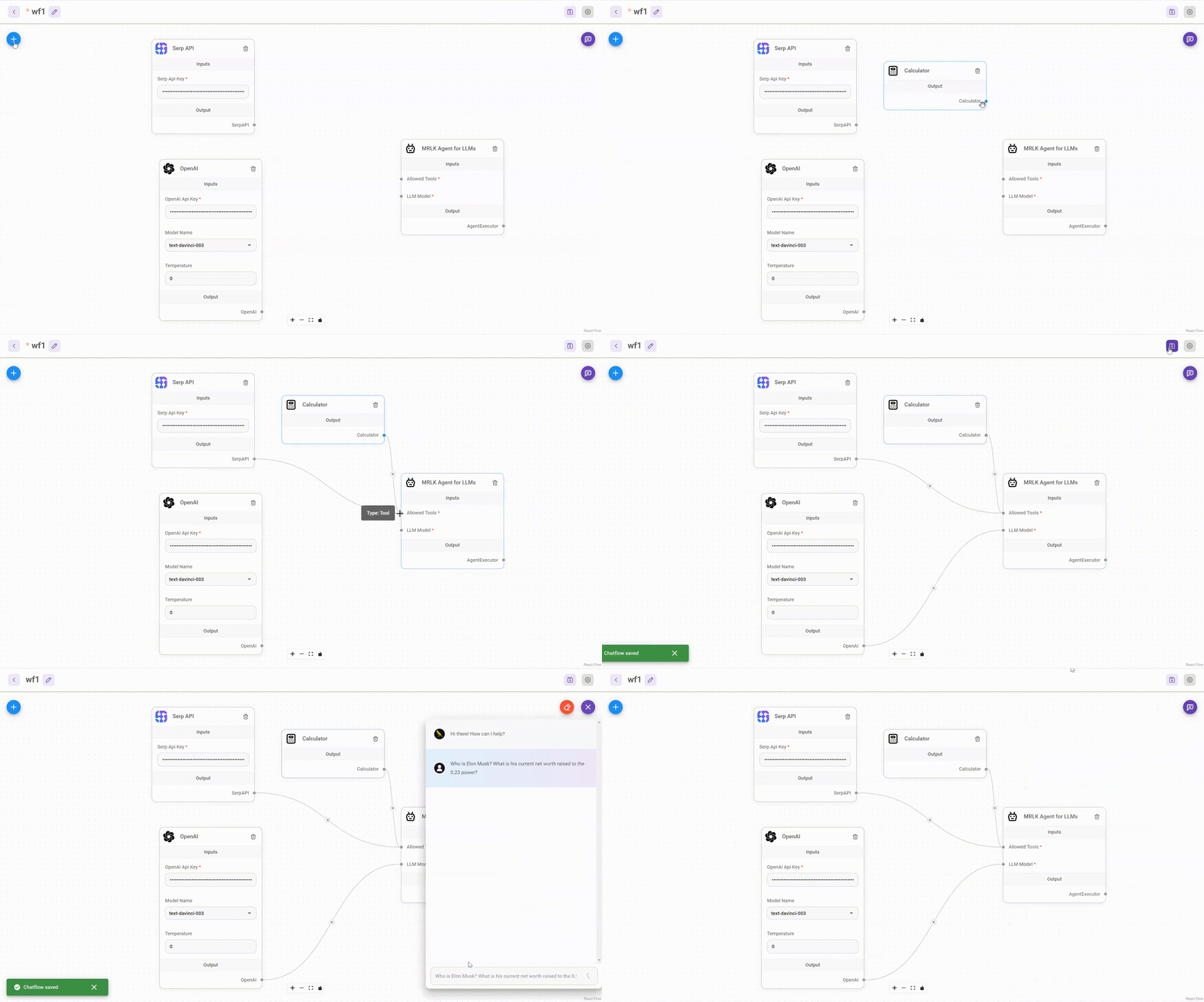
|
||||
|
||||
Install:
|
||||
|
||||
|
|
@ -16,4 +14,4 @@ npm i flowise-components
|
|||
|
||||
## License
|
||||
|
||||
Source code in this repository is made available under the [Apache License Version 2.0](https://github.com/FlowiseAI/Flowise/blob/master/LICENSE.md).
|
||||
Source code in this repository is made available under the [MIT License](https://github.com/FlowiseAI/Flowise/blob/master/LICENSE.md).
|
||||
|
|
|
|||
|
|
@ -1,47 +0,0 @@
|
|||
import { INodeParams, INodeCredential } from '../src/Interface'
|
||||
|
||||
class AWSApi implements INodeCredential {
|
||||
label: string
|
||||
name: string
|
||||
version: number
|
||||
description: string
|
||||
optional: boolean
|
||||
inputs: INodeParams[]
|
||||
|
||||
constructor() {
|
||||
this.label = 'AWS security credentials'
|
||||
this.name = 'awsApi'
|
||||
this.version = 1.0
|
||||
this.description =
|
||||
'Your <a target="_blank" href="https://docs.aws.amazon.com/IAM/latest/UserGuide/security-creds.html">AWS security credentials</a>. When unspecified, credentials will be sourced from the runtime environment according to the default AWS SDK behavior.'
|
||||
this.optional = true
|
||||
this.inputs = [
|
||||
{
|
||||
label: 'AWS Access Key',
|
||||
name: 'awsKey',
|
||||
type: 'string',
|
||||
placeholder: '<AWS_ACCESS_KEY_ID>',
|
||||
description: 'The access key for your AWS account.',
|
||||
optional: true
|
||||
},
|
||||
{
|
||||
label: 'AWS Secret Access Key',
|
||||
name: 'awsSecret',
|
||||
type: 'password',
|
||||
placeholder: '<AWS_SECRET_ACCESS_KEY>',
|
||||
description: 'The secret key for your AWS account.',
|
||||
optional: true
|
||||
},
|
||||
{
|
||||
label: 'AWS Session Key',
|
||||
name: 'awsSession',
|
||||
type: 'password',
|
||||
placeholder: '<AWS_SESSION_TOKEN>',
|
||||
description: 'The session key for your AWS account. This is only needed when you are using temporary credentials.',
|
||||
optional: true
|
||||
}
|
||||
]
|
||||
}
|
||||
}
|
||||
|
||||
module.exports = { credClass: AWSApi }
|
||||
|
|
@ -1,23 +0,0 @@
|
|||
import { INodeParams, INodeCredential } from '../src/Interface'
|
||||
|
||||
class AgentflowApi implements INodeCredential {
|
||||
label: string
|
||||
name: string
|
||||
version: number
|
||||
inputs: INodeParams[]
|
||||
|
||||
constructor() {
|
||||
this.label = 'Agentflow API'
|
||||
this.name = 'agentflowApi'
|
||||
this.version = 1.0
|
||||
this.inputs = [
|
||||
{
|
||||
label: 'Agentflow Api Key',
|
||||
name: 'agentflowApiKey',
|
||||
type: 'password'
|
||||
}
|
||||
]
|
||||
}
|
||||
}
|
||||
|
||||
module.exports = { credClass: AgentflowApi }
|
||||
|
|
@ -1,27 +0,0 @@
|
|||
import { INodeParams, INodeCredential } from '../src/Interface'
|
||||
|
||||
class AirtableApi implements INodeCredential {
|
||||
label: string
|
||||
name: string
|
||||
version: number
|
||||
description: string
|
||||
inputs: INodeParams[]
|
||||
|
||||
constructor() {
|
||||
this.label = 'Airtable API'
|
||||
this.name = 'airtableApi'
|
||||
this.version = 1.0
|
||||
this.description =
|
||||
'Refer to <a target="_blank" href="https://support.airtable.com/docs/creating-and-using-api-keys-and-access-tokens">official guide</a> on how to get accessToken on Airtable'
|
||||
this.inputs = [
|
||||
{
|
||||
label: 'Access Token',
|
||||
name: 'accessToken',
|
||||
type: 'password',
|
||||
placeholder: '<AIRTABLE_ACCESS_TOKEN>'
|
||||
}
|
||||
]
|
||||
}
|
||||
}
|
||||
|
||||
module.exports = { credClass: AirtableApi }
|
||||
|
|
@ -1,23 +0,0 @@
|
|||
import { INodeParams, INodeCredential } from '../src/Interface'
|
||||
|
||||
class AlibabaApi implements INodeCredential {
|
||||
label: string
|
||||
name: string
|
||||
version: number
|
||||
inputs: INodeParams[]
|
||||
|
||||
constructor() {
|
||||
this.label = 'Alibaba API'
|
||||
this.name = 'AlibabaApi'
|
||||
this.version = 1.0
|
||||
this.inputs = [
|
||||
{
|
||||
label: 'Alibaba Api Key',
|
||||
name: 'alibabaApiKey',
|
||||
type: 'password'
|
||||
}
|
||||
]
|
||||
}
|
||||
}
|
||||
|
||||
module.exports = { credClass: AlibabaApi }
|
||||
|
|
@ -1,23 +0,0 @@
|
|||
import { INodeParams, INodeCredential } from '../src/Interface'
|
||||
|
||||
class AnthropicApi implements INodeCredential {
|
||||
label: string
|
||||
name: string
|
||||
version: number
|
||||
inputs: INodeParams[]
|
||||
|
||||
constructor() {
|
||||
this.label = 'Anthropic API'
|
||||
this.name = 'anthropicApi'
|
||||
this.version = 1.0
|
||||
this.inputs = [
|
||||
{
|
||||
label: 'Anthropic Api Key',
|
||||
name: 'anthropicApiKey',
|
||||
type: 'password'
|
||||
}
|
||||
]
|
||||
}
|
||||
}
|
||||
|
||||
module.exports = { credClass: AnthropicApi }
|
||||
|
|
@ -1,26 +0,0 @@
|
|||
import { INodeParams, INodeCredential } from '../src/Interface'
|
||||
|
||||
class ApifyApiCredential implements INodeCredential {
|
||||
label: string
|
||||
name: string
|
||||
version: number
|
||||
description: string
|
||||
inputs: INodeParams[]
|
||||
|
||||
constructor() {
|
||||
this.label = 'Apify API'
|
||||
this.name = 'apifyApi'
|
||||
this.version = 1.0
|
||||
this.description =
|
||||
'You can find the Apify API token on your <a target="_blank" href="https://console.apify.com/account#/integrations">Apify account</a> page.'
|
||||
this.inputs = [
|
||||
{
|
||||
label: 'Apify API',
|
||||
name: 'apifyApiToken',
|
||||
type: 'password'
|
||||
}
|
||||
]
|
||||
}
|
||||
}
|
||||
|
||||
module.exports = { credClass: ApifyApiCredential }
|
||||
|
|
@ -1,39 +0,0 @@
|
|||
import { INodeParams, INodeCredential } from '../src/Interface'
|
||||
|
||||
class ArizeApi implements INodeCredential {
|
||||
label: string
|
||||
name: string
|
||||
version: number
|
||||
description: string
|
||||
inputs: INodeParams[]
|
||||
|
||||
constructor() {
|
||||
this.label = 'Arize API'
|
||||
this.name = 'arizeApi'
|
||||
this.version = 1.0
|
||||
this.description =
|
||||
'Refer to <a target="_blank" href="https://docs.arize.com/arize">official guide</a> on how to get API keys on Arize.'
|
||||
this.inputs = [
|
||||
{
|
||||
label: 'API Key',
|
||||
name: 'arizeApiKey',
|
||||
type: 'password',
|
||||
placeholder: '<ARIZE_API_KEY>'
|
||||
},
|
||||
{
|
||||
label: 'Space ID',
|
||||
name: 'arizeSpaceId',
|
||||
type: 'string',
|
||||
placeholder: '<ARIZE_SPACE_ID>'
|
||||
},
|
||||
{
|
||||
label: 'Endpoint',
|
||||
name: 'arizeEndpoint',
|
||||
type: 'string',
|
||||
default: 'https://otlp.arize.com'
|
||||
}
|
||||
]
|
||||
}
|
||||
}
|
||||
|
||||
module.exports = { credClass: ArizeApi }
|
||||
|
|
@ -1,23 +0,0 @@
|
|||
import { INodeParams, INodeCredential } from '../src/Interface'
|
||||
|
||||
class AssemblyAIApi implements INodeCredential {
|
||||
label: string
|
||||
name: string
|
||||
version: number
|
||||
inputs: INodeParams[]
|
||||
|
||||
constructor() {
|
||||
this.label = 'AssemblyAI API'
|
||||
this.name = 'assemblyAIApi'
|
||||
this.version = 1.0
|
||||
this.inputs = [
|
||||
{
|
||||
label: 'AssemblyAI Api Key',
|
||||
name: 'assemblyAIApiKey',
|
||||
type: 'password'
|
||||
}
|
||||
]
|
||||
}
|
||||
}
|
||||
|
||||
module.exports = { credClass: AssemblyAIApi }
|
||||
|
|
@ -1,29 +0,0 @@
|
|||
import { INodeParams, INodeCredential } from '../src/Interface'
|
||||
|
||||
class AstraDBApi implements INodeCredential {
|
||||
label: string
|
||||
name: string
|
||||
version: number
|
||||
description: string
|
||||
inputs: INodeParams[]
|
||||
|
||||
constructor() {
|
||||
this.label = 'Astra DB API'
|
||||
this.name = 'AstraDBApi'
|
||||
this.version = 2.0
|
||||
this.inputs = [
|
||||
{
|
||||
label: 'Astra DB Application Token',
|
||||
name: 'applicationToken',
|
||||
type: 'password'
|
||||
},
|
||||
{
|
||||
label: 'Astra DB Api Endpoint',
|
||||
name: 'dbEndPoint',
|
||||
type: 'string'
|
||||
}
|
||||
]
|
||||
}
|
||||
}
|
||||
|
||||
module.exports = { credClass: AstraDBApi }
|
||||
|
|
@ -1,39 +0,0 @@
|
|||
import { INodeParams, INodeCredential } from '../src/Interface'
|
||||
|
||||
class AzureCognitiveServices implements INodeCredential {
|
||||
label: string
|
||||
name: string
|
||||
version: number
|
||||
inputs: INodeParams[]
|
||||
|
||||
constructor() {
|
||||
this.label = 'Azure Cognitive Services'
|
||||
this.name = 'azureCognitiveServices'
|
||||
this.version = 1.0
|
||||
this.inputs = [
|
||||
{
|
||||
label: 'Azure Subscription Key',
|
||||
name: 'azureSubscriptionKey',
|
||||
type: 'password',
|
||||
description: 'Your Azure Cognitive Services subscription key'
|
||||
},
|
||||
{
|
||||
label: 'Service Region',
|
||||
name: 'serviceRegion',
|
||||
type: 'string',
|
||||
description: 'The Azure service region (e.g., "westus", "eastus")',
|
||||
placeholder: 'westus'
|
||||
},
|
||||
{
|
||||
label: 'API Version',
|
||||
name: 'apiVersion',
|
||||
type: 'string',
|
||||
description: 'The API version to use (e.g., "2024-05-15-preview")',
|
||||
placeholder: '2024-05-15-preview',
|
||||
default: '2024-05-15-preview'
|
||||
}
|
||||
]
|
||||
}
|
||||
}
|
||||
|
||||
module.exports = { credClass: AzureCognitiveServices }
|
||||
|
|
@ -1,47 +0,0 @@
|
|||
import { INodeParams, INodeCredential } from '../src/Interface'
|
||||
|
||||
class AzureOpenAIApi implements INodeCredential {
|
||||
label: string
|
||||
name: string
|
||||
version: number
|
||||
description: string
|
||||
inputs: INodeParams[]
|
||||
|
||||
constructor() {
|
||||
this.label = 'Azure OpenAI API'
|
||||
this.name = 'azureOpenAIApi'
|
||||
this.version = 1.0
|
||||
this.description =
|
||||
'Refer to <a target="_blank" href="https://azure.microsoft.com/en-us/products/cognitive-services/openai-service">official guide</a> of how to use Azure OpenAI service'
|
||||
this.inputs = [
|
||||
{
|
||||
label: 'Azure OpenAI Api Key',
|
||||
name: 'azureOpenAIApiKey',
|
||||
type: 'password',
|
||||
description: `Refer to <a target="_blank" href="https://learn.microsoft.com/en-us/azure/cognitive-services/openai/quickstart?tabs=command-line&pivots=rest-api#set-up">official guide</a> on how to create API key on Azure OpenAI`
|
||||
},
|
||||
{
|
||||
label: 'Azure OpenAI Api Instance Name',
|
||||
name: 'azureOpenAIApiInstanceName',
|
||||
type: 'string',
|
||||
placeholder: 'YOUR-INSTANCE-NAME'
|
||||
},
|
||||
{
|
||||
label: 'Azure OpenAI Api Deployment Name',
|
||||
name: 'azureOpenAIApiDeploymentName',
|
||||
type: 'string',
|
||||
placeholder: 'YOUR-DEPLOYMENT-NAME'
|
||||
},
|
||||
{
|
||||
label: 'Azure OpenAI Api Version',
|
||||
name: 'azureOpenAIApiVersion',
|
||||
type: 'string',
|
||||
placeholder: '2023-06-01-preview',
|
||||
description:
|
||||
'Description of Supported API Versions. Please refer <a target="_blank" href="https://learn.microsoft.com/en-us/azure/cognitive-services/openai/reference#chat-completions">examples</a>'
|
||||
}
|
||||
]
|
||||
}
|
||||
}
|
||||
|
||||
module.exports = { credClass: AzureOpenAIApi }
|
||||
|
|
@ -1,28 +0,0 @@
|
|||
import { INodeParams, INodeCredential } from '../src/Interface'
|
||||
|
||||
class BaiduQianfanApi implements INodeCredential {
|
||||
label: string
|
||||
name: string
|
||||
version: number
|
||||
inputs: INodeParams[]
|
||||
|
||||
constructor() {
|
||||
this.label = 'Baidu Qianfan API'
|
||||
this.name = 'baiduQianfanApi'
|
||||
this.version = 2.0
|
||||
this.inputs = [
|
||||
{
|
||||
label: 'Qianfan Access Key',
|
||||
name: 'qianfanAccessKey',
|
||||
type: 'string'
|
||||
},
|
||||
{
|
||||
label: 'Qianfan Secret Key',
|
||||
name: 'qianfanSecretKey',
|
||||
type: 'password'
|
||||
}
|
||||
]
|
||||
}
|
||||
}
|
||||
|
||||
module.exports = { credClass: BaiduQianfanApi }
|
||||
|
|
@ -1,24 +0,0 @@
|
|||
import { INodeParams, INodeCredential } from '../src/Interface'
|
||||
|
||||
class BraveSearchApi implements INodeCredential {
|
||||
label: string
|
||||
name: string
|
||||
version: number
|
||||
description: string
|
||||
inputs: INodeParams[]
|
||||
|
||||
constructor() {
|
||||
this.label = 'Brave Search API'
|
||||
this.name = 'braveSearchApi'
|
||||
this.version = 1.0
|
||||
this.inputs = [
|
||||
{
|
||||
label: 'BraveSearch Api Key',
|
||||
name: 'braveApiKey',
|
||||
type: 'password'
|
||||
}
|
||||
]
|
||||
}
|
||||
}
|
||||
|
||||
module.exports = { credClass: BraveSearchApi }
|
||||
|
|
@ -1,25 +0,0 @@
|
|||
import { INodeParams, INodeCredential } from '../src/Interface'
|
||||
|
||||
class CerebrasAPIAuth implements INodeCredential {
|
||||
label: string
|
||||
name: string
|
||||
version: number
|
||||
description: string
|
||||
inputs: INodeParams[]
|
||||
|
||||
constructor() {
|
||||
this.label = 'Cerebras API Key'
|
||||
this.name = 'cerebrasAIApi'
|
||||
this.version = 1.0
|
||||
this.inputs = [
|
||||
{
|
||||
label: 'Cerebras API Key',
|
||||
name: 'cerebrasApiKey',
|
||||
type: 'password',
|
||||
description: 'API Key (cloud.cerebras.ai)'
|
||||
}
|
||||
]
|
||||
}
|
||||
}
|
||||
|
||||
module.exports = { credClass: CerebrasAPIAuth }
|
||||
|
|
@ -1,23 +0,0 @@
|
|||
import { INodeParams, INodeCredential } from '../src/Interface'
|
||||
|
||||
class ChatflowApi implements INodeCredential {
|
||||
label: string
|
||||
name: string
|
||||
version: number
|
||||
inputs: INodeParams[]
|
||||
|
||||
constructor() {
|
||||
this.label = 'Chatflow API'
|
||||
this.name = 'chatflowApi'
|
||||
this.version = 1.0
|
||||
this.inputs = [
|
||||
{
|
||||
label: 'Chatflow Api Key',
|
||||
name: 'chatflowApiKey',
|
||||
type: 'password'
|
||||
}
|
||||
]
|
||||
}
|
||||
}
|
||||
|
||||
module.exports = { credClass: ChatflowApi }
|
||||
|
|
@ -1,34 +0,0 @@
|
|||
import { INodeParams, INodeCredential } from '../src/Interface'
|
||||
|
||||
class ChromaApi implements INodeCredential {
|
||||
label: string
|
||||
name: string
|
||||
description: string
|
||||
version: number
|
||||
inputs: INodeParams[]
|
||||
|
||||
constructor() {
|
||||
this.label = 'Chroma API'
|
||||
this.name = 'chromaApi'
|
||||
this.version = 1.0
|
||||
this.inputs = [
|
||||
{
|
||||
label: 'Chroma Api Key',
|
||||
name: 'chromaApiKey',
|
||||
type: 'password'
|
||||
},
|
||||
{
|
||||
label: 'Chroma Tenant',
|
||||
name: 'chromaTenant',
|
||||
type: 'string'
|
||||
},
|
||||
{
|
||||
label: 'Chroma Database',
|
||||
name: 'chromaDatabase',
|
||||
type: 'string'
|
||||
}
|
||||
]
|
||||
}
|
||||
}
|
||||
|
||||
module.exports = { credClass: ChromaApi }
|
||||
|
|
@ -1,23 +0,0 @@
|
|||
import { INodeParams, INodeCredential } from '../src/Interface'
|
||||
|
||||
class CohereApi implements INodeCredential {
|
||||
label: string
|
||||
name: string
|
||||
version: number
|
||||
inputs: INodeParams[]
|
||||
|
||||
constructor() {
|
||||
this.label = 'Cohere API'
|
||||
this.name = 'cohereApi'
|
||||
this.version = 1.0
|
||||
this.inputs = [
|
||||
{
|
||||
label: 'Cohere Api Key',
|
||||
name: 'cohereApiKey',
|
||||
type: 'password'
|
||||
}
|
||||
]
|
||||
}
|
||||
}
|
||||
|
||||
module.exports = { credClass: CohereApi }
|
||||
|
|
@ -1,23 +0,0 @@
|
|||
import { INodeCredential, INodeParams } from '../src/Interface'
|
||||
|
||||
class CometApi implements INodeCredential {
|
||||
label: string
|
||||
name: string
|
||||
version: number
|
||||
inputs: INodeParams[]
|
||||
|
||||
constructor() {
|
||||
this.label = 'Comet API'
|
||||
this.name = 'cometApi'
|
||||
this.version = 1.0
|
||||
this.inputs = [
|
||||
{
|
||||
label: 'Comet API Key',
|
||||
name: 'cometApiKey',
|
||||
type: 'password'
|
||||
}
|
||||
]
|
||||
}
|
||||
}
|
||||
|
||||
module.exports = { credClass: CometApi }
|
||||
|
|
@ -1,23 +0,0 @@
|
|||
import { INodeParams, INodeCredential } from '../src/Interface'
|
||||
|
||||
class ComposioApi implements INodeCredential {
|
||||
label: string
|
||||
name: string
|
||||
version: number
|
||||
inputs: INodeParams[]
|
||||
|
||||
constructor() {
|
||||
this.label = 'Composio API'
|
||||
this.name = 'composioApi'
|
||||
this.version = 1.0
|
||||
this.inputs = [
|
||||
{
|
||||
label: 'Composio API Key',
|
||||
name: 'composioApi',
|
||||
type: 'password'
|
||||
}
|
||||
]
|
||||
}
|
||||
}
|
||||
|
||||
module.exports = { credClass: ComposioApi }
|
||||
|
|
@ -1,33 +0,0 @@
|
|||
import { INodeParams, INodeCredential } from '../src/Interface'
|
||||
|
||||
class ConfluenceCloudApi implements INodeCredential {
|
||||
label: string
|
||||
name: string
|
||||
version: number
|
||||
description: string
|
||||
inputs: INodeParams[]
|
||||
|
||||
constructor() {
|
||||
this.label = 'Confluence Cloud API'
|
||||
this.name = 'confluenceCloudApi'
|
||||
this.version = 1.0
|
||||
this.description =
|
||||
'Refer to <a target="_blank" href="https://support.atlassian.com/confluence-cloud/docs/manage-oauth-access-tokens/">official guide</a> on how to get Access Token or <a target="_blank" href="https://id.atlassian.com/manage-profile/security/api-tokens">API Token</a> on Confluence'
|
||||
this.inputs = [
|
||||
{
|
||||
label: 'Access Token',
|
||||
name: 'accessToken',
|
||||
type: 'password',
|
||||
placeholder: '<CONFLUENCE_ACCESS_TOKEN>'
|
||||
},
|
||||
{
|
||||
label: 'Username',
|
||||
name: 'username',
|
||||
type: 'string',
|
||||
placeholder: '<CONFLUENCE_USERNAME>'
|
||||
}
|
||||
]
|
||||
}
|
||||
}
|
||||
|
||||
module.exports = { credClass: ConfluenceCloudApi }
|
||||
|
|
@ -1,27 +0,0 @@
|
|||
import { INodeParams, INodeCredential } from '../src/Interface'
|
||||
|
||||
class ConfluenceServerDCApi implements INodeCredential {
|
||||
label: string
|
||||
name: string
|
||||
version: number
|
||||
description: string
|
||||
inputs: INodeParams[]
|
||||
|
||||
constructor() {
|
||||
this.label = 'Confluence Server/Data Center API'
|
||||
this.name = 'confluenceServerDCApi'
|
||||
this.version = 1.0
|
||||
this.description =
|
||||
'Refer to <a target="_blank" href="https://confluence.atlassian.com/enterprise/using-personal-access-tokens-1026032365.html/">official guide</a> on how to get Personal Access Token</a> on Confluence'
|
||||
this.inputs = [
|
||||
{
|
||||
label: 'Personal Access Token',
|
||||
name: 'personalAccessToken',
|
||||
type: 'password',
|
||||
placeholder: '<CONFLUENCE_PERSONAL_ACCESS_TOKEN>'
|
||||
}
|
||||
]
|
||||
}
|
||||
}
|
||||
|
||||
module.exports = { credClass: ConfluenceServerDCApi }
|
||||
|
|
@ -1,34 +0,0 @@
|
|||
import { INodeParams, INodeCredential } from '../src/Interface'
|
||||
|
||||
class CouchbaseApi implements INodeCredential {
|
||||
label: string
|
||||
name: string
|
||||
version: number
|
||||
description: string
|
||||
inputs: INodeParams[]
|
||||
|
||||
constructor() {
|
||||
this.label = 'Couchbase API'
|
||||
this.name = 'couchbaseApi'
|
||||
this.version = 1.0
|
||||
this.inputs = [
|
||||
{
|
||||
label: 'Couchbase Connection String',
|
||||
name: 'connectionString',
|
||||
type: 'string'
|
||||
},
|
||||
{
|
||||
label: 'Couchbase Username',
|
||||
name: 'username',
|
||||
type: 'string'
|
||||
},
|
||||
{
|
||||
label: 'Couchbase Password',
|
||||
name: 'password',
|
||||
type: 'password'
|
||||
}
|
||||
]
|
||||
}
|
||||
}
|
||||
|
||||
module.exports = { credClass: CouchbaseApi }
|
||||
|
|
@ -1,23 +0,0 @@
|
|||
import { INodeCredential, INodeParams } from '../src/Interface'
|
||||
|
||||
class DeepseekApi implements INodeCredential {
|
||||
label: string
|
||||
name: string
|
||||
version: number
|
||||
inputs: INodeParams[]
|
||||
|
||||
constructor() {
|
||||
this.label = 'DeepseekAI API'
|
||||
this.name = 'deepseekApi'
|
||||
this.version = 1.0
|
||||
this.inputs = [
|
||||
{
|
||||
label: 'DeepseekAI API Key',
|
||||
name: 'deepseekApiKey',
|
||||
type: 'password'
|
||||
}
|
||||
]
|
||||
}
|
||||
}
|
||||
|
||||
module.exports = { credClass: DeepseekApi }
|
||||
|
|
@ -1,29 +0,0 @@
|
|||
import { INodeParams, INodeCredential } from '../src/Interface'
|
||||
|
||||
class DynamodbMemoryApi implements INodeCredential {
|
||||
label: string
|
||||
name: string
|
||||
version: number
|
||||
description: string
|
||||
inputs: INodeParams[]
|
||||
|
||||
constructor() {
|
||||
this.label = 'DynamodbMemory API'
|
||||
this.name = 'dynamodbMemoryApi'
|
||||
this.version = 1.0
|
||||
this.inputs = [
|
||||
{
|
||||
label: 'Access Key',
|
||||
name: 'accessKey',
|
||||
type: 'password'
|
||||
},
|
||||
{
|
||||
label: 'Secret Access Key',
|
||||
name: 'secretAccessKey',
|
||||
type: 'password'
|
||||
}
|
||||
]
|
||||
}
|
||||
}
|
||||
|
||||
module.exports = { credClass: DynamodbMemoryApi }
|
||||
|
|
@ -1,23 +0,0 @@
|
|||
import { INodeParams, INodeCredential } from '../src/Interface'
|
||||
|
||||
class E2BApi implements INodeCredential {
|
||||
label: string
|
||||
name: string
|
||||
version: number
|
||||
inputs: INodeParams[]
|
||||
|
||||
constructor() {
|
||||
this.label = 'E2B API'
|
||||
this.name = 'E2BApi'
|
||||
this.version = 1.0
|
||||
this.inputs = [
|
||||
{
|
||||
label: 'E2B Api Key',
|
||||
name: 'e2bApiKey',
|
||||
type: 'password'
|
||||
}
|
||||
]
|
||||
}
|
||||
}
|
||||
|
||||
module.exports = { credClass: E2BApi }
|
||||
|
|
@ -1,31 +0,0 @@
|
|||
import { INodeParams, INodeCredential } from '../src/Interface'
|
||||
|
||||
class ElectricsearchAPI implements INodeCredential {
|
||||
label: string
|
||||
name: string
|
||||
version: number
|
||||
description: string
|
||||
inputs: INodeParams[]
|
||||
|
||||
constructor() {
|
||||
this.label = 'Elasticsearch API'
|
||||
this.name = 'elasticsearchApi'
|
||||
this.version = 1.0
|
||||
this.description =
|
||||
'Refer to <a target="_blank" href="https://www.elastic.co/guide/en/kibana/current/api-keys.html">official guide</a> on how to get an API Key from ElasticSearch'
|
||||
this.inputs = [
|
||||
{
|
||||
label: 'Elasticsearch Endpoint',
|
||||
name: 'endpoint',
|
||||
type: 'string'
|
||||
},
|
||||
{
|
||||
label: 'Elasticsearch API Key',
|
||||
name: 'apiKey',
|
||||
type: 'password'
|
||||
}
|
||||
]
|
||||
}
|
||||
}
|
||||
|
||||
module.exports = { credClass: ElectricsearchAPI }
|
||||
|
|
@ -1,36 +0,0 @@
|
|||
import { INodeParams, INodeCredential } from '../src/Interface'
|
||||
|
||||
class ElasticSearchUserPassword implements INodeCredential {
|
||||
label: string
|
||||
name: string
|
||||
version: number
|
||||
description: string
|
||||
inputs: INodeParams[]
|
||||
|
||||
constructor() {
|
||||
this.label = 'ElasticSearch User Password'
|
||||
this.name = 'elasticSearchUserPassword'
|
||||
this.version = 1.0
|
||||
this.description = `Use Cloud ID field to enter your Elastic Cloud ID or the URL of the Elastic server instance.
|
||||
Refer to <a target="_blank" href="https://www.elastic.co/guide/en/elasticsearch/reference/current/setting-up-authentication.html">official guide</a> on how to get User Password from ElasticSearch.`
|
||||
this.inputs = [
|
||||
{
|
||||
label: 'Cloud ID',
|
||||
name: 'cloudId',
|
||||
type: 'string'
|
||||
},
|
||||
{
|
||||
label: 'ElasticSearch User',
|
||||
name: 'username',
|
||||
type: 'string'
|
||||
},
|
||||
{
|
||||
label: 'ElasticSearch Password',
|
||||
name: 'password',
|
||||
type: 'password'
|
||||
}
|
||||
]
|
||||
}
|
||||
}
|
||||
|
||||
module.exports = { credClass: ElasticSearchUserPassword }
|
||||
|
|
@ -1,26 +0,0 @@
|
|||
import { INodeParams, INodeCredential } from '../src/Interface'
|
||||
|
||||
class ElevenLabsApi implements INodeCredential {
|
||||
label: string
|
||||
name: string
|
||||
version: number
|
||||
description: string
|
||||
inputs: INodeParams[]
|
||||
|
||||
constructor() {
|
||||
this.label = 'Eleven Labs API'
|
||||
this.name = 'elevenLabsApi'
|
||||
this.version = 1.0
|
||||
this.description =
|
||||
'Sign up for a Eleven Labs account and <a target="_blank" href="https://elevenlabs.io/app/settings/api-keys">create an API Key</a>.'
|
||||
this.inputs = [
|
||||
{
|
||||
label: 'Eleven Labs API Key',
|
||||
name: 'elevenLabsApiKey',
|
||||
type: 'password'
|
||||
}
|
||||
]
|
||||
}
|
||||
}
|
||||
|
||||
module.exports = { credClass: ElevenLabsApi }
|
||||
|
|
@ -1,26 +0,0 @@
|
|||
import { INodeParams, INodeCredential } from '../src/Interface'
|
||||
|
||||
class ExaSearchApi implements INodeCredential {
|
||||
label: string
|
||||
name: string
|
||||
version: number
|
||||
description: string
|
||||
inputs: INodeParams[]
|
||||
|
||||
constructor() {
|
||||
this.label = 'Exa Search API'
|
||||
this.name = 'exaSearchApi'
|
||||
this.version = 1.0
|
||||
this.description =
|
||||
'Refer to <a target="_blank" href="https://docs.exa.ai/reference/getting-started#getting-access">official guide</a> on how to get an API Key from Exa'
|
||||
this.inputs = [
|
||||
{
|
||||
label: 'ExaSearch Api Key',
|
||||
name: 'exaSearchApiKey',
|
||||
type: 'password'
|
||||
}
|
||||
]
|
||||
}
|
||||
}
|
||||
|
||||
module.exports = { credClass: ExaSearchApi }
|
||||
|
|
@ -1,27 +0,0 @@
|
|||
import { INodeParams, INodeCredential } from '../src/Interface'
|
||||
|
||||
class FigmaApi implements INodeCredential {
|
||||
label: string
|
||||
name: string
|
||||
version: number
|
||||
description: string
|
||||
inputs: INodeParams[]
|
||||
|
||||
constructor() {
|
||||
this.label = 'Figma API'
|
||||
this.name = 'figmaApi'
|
||||
this.version = 1.0
|
||||
this.description =
|
||||
'Refer to <a target="_blank" href="https://www.figma.com/developers/api#access-tokens">official guide</a> on how to get accessToken on Figma'
|
||||
this.inputs = [
|
||||
{
|
||||
label: 'Access Token',
|
||||
name: 'accessToken',
|
||||
type: 'password',
|
||||
placeholder: '<FIGMA_ACCESS_TOKEN>'
|
||||
}
|
||||
]
|
||||
}
|
||||
}
|
||||
|
||||
module.exports = { credClass: FigmaApi }
|
||||
|
|
@ -1,32 +0,0 @@
|
|||
import { INodeParams, INodeCredential } from '../src/Interface'
|
||||
|
||||
class FireCrawlApiCredential implements INodeCredential {
|
||||
label: string
|
||||
name: string
|
||||
version: number
|
||||
description: string
|
||||
inputs: INodeParams[]
|
||||
|
||||
constructor() {
|
||||
this.label = 'FireCrawl API'
|
||||
this.name = 'fireCrawlApi'
|
||||
this.version = 2.0
|
||||
this.description =
|
||||
'You can find the FireCrawl API token on your <a target="_blank" href="https://www.firecrawl.dev/">FireCrawl account</a> page.'
|
||||
this.inputs = [
|
||||
{
|
||||
label: 'FireCrawl API',
|
||||
name: 'firecrawlApiToken',
|
||||
type: 'password'
|
||||
},
|
||||
{
|
||||
label: 'FireCrawl API URL',
|
||||
name: 'firecrawlApiUrl',
|
||||
type: 'string',
|
||||
default: 'https://api.firecrawl.dev'
|
||||
}
|
||||
]
|
||||
}
|
||||
}
|
||||
|
||||
module.exports = { credClass: FireCrawlApiCredential }
|
||||
|
|
@ -1,23 +0,0 @@
|
|||
import { INodeParams, INodeCredential } from '../src/Interface'
|
||||
|
||||
class FireworksApi implements INodeCredential {
|
||||
label: string
|
||||
name: string
|
||||
version: number
|
||||
inputs: INodeParams[]
|
||||
|
||||
constructor() {
|
||||
this.label = 'Fireworks API'
|
||||
this.name = 'fireworksApi'
|
||||
this.version = 1.0
|
||||
this.inputs = [
|
||||
{
|
||||
label: 'Fireworks Api Key',
|
||||
name: 'fireworksApiKey',
|
||||
type: 'password'
|
||||
}
|
||||
]
|
||||
}
|
||||
}
|
||||
|
||||
module.exports = { credClass: FireworksApi }
|
||||
|
|
@ -1,27 +0,0 @@
|
|||
import { INodeParams, INodeCredential } from '../src/Interface'
|
||||
|
||||
class GithubApi implements INodeCredential {
|
||||
label: string
|
||||
name: string
|
||||
version: number
|
||||
description: string
|
||||
inputs: INodeParams[]
|
||||
|
||||
constructor() {
|
||||
this.label = 'Github API'
|
||||
this.name = 'githubApi'
|
||||
this.version = 1.0
|
||||
this.description =
|
||||
'Refer to <a target="_blank" href="https://docs.github.com/en/authentication/keeping-your-account-and-data-secure/managing-your-personal-access-tokens">official guide</a> on how to get accessToken on Github'
|
||||
this.inputs = [
|
||||
{
|
||||
label: 'Access Token',
|
||||
name: 'accessToken',
|
||||
type: 'password',
|
||||
placeholder: '<GITHUB_ACCESS_TOKEN>'
|
||||
}
|
||||
]
|
||||
}
|
||||
}
|
||||
|
||||
module.exports = { credClass: GithubApi }
|
||||
|
|
@ -1,63 +0,0 @@
|
|||
import { INodeParams, INodeCredential } from '../src/Interface'
|
||||
const scopes = [
|
||||
'https://www.googleapis.com/auth/gmail.readonly',
|
||||
'https://www.googleapis.com/auth/gmail.compose',
|
||||
'https://www.googleapis.com/auth/gmail.modify',
|
||||
'https://www.googleapis.com/auth/gmail.labels'
|
||||
]
|
||||
|
||||
class GmailOAuth2 implements INodeCredential {
|
||||
label: string
|
||||
name: string
|
||||
version: number
|
||||
inputs: INodeParams[]
|
||||
description: string
|
||||
|
||||
constructor() {
|
||||
this.label = 'Gmail OAuth2'
|
||||
this.name = 'gmailOAuth2'
|
||||
this.version = 1.0
|
||||
this.description =
|
||||
'You can find the setup instructions <a target="_blank" href="https://docs.flowiseai.com/integrations/langchain/tools/gmail">here</a>'
|
||||
this.inputs = [
|
||||
{
|
||||
label: 'Authorization URL',
|
||||
name: 'authorizationUrl',
|
||||
type: 'string',
|
||||
default: 'https://accounts.google.com/o/oauth2/v2/auth'
|
||||
},
|
||||
{
|
||||
label: 'Access Token URL',
|
||||
name: 'accessTokenUrl',
|
||||
type: 'string',
|
||||
default: 'https://oauth2.googleapis.com/token'
|
||||
},
|
||||
{
|
||||
label: 'Client ID',
|
||||
name: 'clientId',
|
||||
type: 'string'
|
||||
},
|
||||
{
|
||||
label: 'Client Secret',
|
||||
name: 'clientSecret',
|
||||
type: 'password'
|
||||
},
|
||||
{
|
||||
label: 'Additional Parameters',
|
||||
name: 'additionalParameters',
|
||||
type: 'string',
|
||||
default: 'access_type=offline&prompt=consent',
|
||||
hidden: true
|
||||
},
|
||||
{
|
||||
label: 'Scope',
|
||||
name: 'scope',
|
||||
type: 'string',
|
||||
hidden: true,
|
||||
default: scopes.join(' ')
|
||||
}
|
||||
]
|
||||
}
|
||||
}
|
||||
|
||||
module.exports = { credClass: GmailOAuth2 }
|
||||
|
|
@ -1,55 +0,0 @@
|
|||
import { INodeParams, INodeCredential } from '../src/Interface'
|
||||
|
||||
class GoogleVertexAuth implements INodeCredential {
|
||||
label: string
|
||||
name: string
|
||||
version: number
|
||||
inputs: INodeParams[]
|
||||
|
||||
constructor() {
|
||||
this.label = 'Google Vertex Auth'
|
||||
this.name = 'googleVertexAuth'
|
||||
this.version = 1.0
|
||||
this.inputs = [
|
||||
{
|
||||
label: 'Google Application Credential File Path',
|
||||
name: 'googleApplicationCredentialFilePath',
|
||||
description:
|
||||
'Path to your google application credential json file. You can also use the credential JSON object (either one)',
|
||||
placeholder: 'your-path/application_default_credentials.json',
|
||||
type: 'string',
|
||||
optional: true
|
||||
},
|
||||
{
|
||||
label: 'Google Credential JSON Object',
|
||||
name: 'googleApplicationCredential',
|
||||
description: 'JSON object of your google application credential. You can also use the file path (either one)',
|
||||
placeholder: `{
|
||||
"type": ...,
|
||||
"project_id": ...,
|
||||
"private_key_id": ...,
|
||||
"private_key": ...,
|
||||
"client_email": ...,
|
||||
"client_id": ...,
|
||||
"auth_uri": ...,
|
||||
"token_uri": ...,
|
||||
"auth_provider_x509_cert_url": ...,
|
||||
"client_x509_cert_url": ...
|
||||
}`,
|
||||
type: 'string',
|
||||
rows: 4,
|
||||
optional: true
|
||||
},
|
||||
{
|
||||
label: 'Project ID',
|
||||
name: 'projectID',
|
||||
description: 'Project ID of GCP. If not provided, it will be read from the credential file',
|
||||
type: 'string',
|
||||
optional: true,
|
||||
additionalParams: true
|
||||
}
|
||||
]
|
||||
}
|
||||
}
|
||||
|
||||
module.exports = { credClass: GoogleVertexAuth }
|
||||
|
|
@ -1,58 +0,0 @@
|
|||
import { INodeParams, INodeCredential } from '../src/Interface'
|
||||
const scopes = ['https://www.googleapis.com/auth/calendar', 'https://www.googleapis.com/auth/calendar.events']
|
||||
|
||||
class GoogleCalendarOAuth2 implements INodeCredential {
|
||||
label: string
|
||||
name: string
|
||||
version: number
|
||||
inputs: INodeParams[]
|
||||
description: string
|
||||
|
||||
constructor() {
|
||||
this.label = 'Google Calendar OAuth2'
|
||||
this.name = 'googleCalendarOAuth2'
|
||||
this.version = 1.0
|
||||
this.description =
|
||||
'You can find the setup instructions <a target="_blank" href="https://docs.flowiseai.com/integrations/langchain/tools/google-calendar">here</a>'
|
||||
this.inputs = [
|
||||
{
|
||||
label: 'Authorization URL',
|
||||
name: 'authorizationUrl',
|
||||
type: 'string',
|
||||
default: 'https://accounts.google.com/o/oauth2/v2/auth'
|
||||
},
|
||||
{
|
||||
label: 'Access Token URL',
|
||||
name: 'accessTokenUrl',
|
||||
type: 'string',
|
||||
default: 'https://oauth2.googleapis.com/token'
|
||||
},
|
||||
{
|
||||
label: 'Client ID',
|
||||
name: 'clientId',
|
||||
type: 'string'
|
||||
},
|
||||
{
|
||||
label: 'Client Secret',
|
||||
name: 'clientSecret',
|
||||
type: 'password'
|
||||
},
|
||||
{
|
||||
label: 'Additional Parameters',
|
||||
name: 'additionalParameters',
|
||||
type: 'string',
|
||||
default: 'access_type=offline&prompt=consent',
|
||||
hidden: true
|
||||
},
|
||||
{
|
||||
label: 'Scope',
|
||||
name: 'scope',
|
||||
type: 'string',
|
||||
hidden: true,
|
||||
default: scopes.join(' ')
|
||||
}
|
||||
]
|
||||
}
|
||||
}
|
||||
|
||||
module.exports = { credClass: GoogleCalendarOAuth2 }
|
||||
|
|
@ -1,62 +0,0 @@
|
|||
import { INodeParams, INodeCredential } from '../src/Interface'
|
||||
const scopes = [
|
||||
'https://www.googleapis.com/auth/documents',
|
||||
'https://www.googleapis.com/auth/drive',
|
||||
'https://www.googleapis.com/auth/drive.file'
|
||||
]
|
||||
|
||||
class GoogleDocsOAuth2 implements INodeCredential {
|
||||
label: string
|
||||
name: string
|
||||
version: number
|
||||
inputs: INodeParams[]
|
||||
description: string
|
||||
|
||||
constructor() {
|
||||
this.label = 'Google Docs OAuth2'
|
||||
this.name = 'googleDocsOAuth2'
|
||||
this.version = 1.0
|
||||
this.description =
|
||||
'You can find the setup instructions <a target="_blank" href="https://docs.flowiseai.com/integrations/langchain/tools/google-sheets">here</a>'
|
||||
this.inputs = [
|
||||
{
|
||||
label: 'Authorization URL',
|
||||
name: 'authorizationUrl',
|
||||
type: 'string',
|
||||
default: 'https://accounts.google.com/o/oauth2/v2/auth'
|
||||
},
|
||||
{
|
||||
label: 'Access Token URL',
|
||||
name: 'accessTokenUrl',
|
||||
type: 'string',
|
||||
default: 'https://oauth2.googleapis.com/token'
|
||||
},
|
||||
{
|
||||
label: 'Client ID',
|
||||
name: 'clientId',
|
||||
type: 'string'
|
||||
},
|
||||
{
|
||||
label: 'Client Secret',
|
||||
name: 'clientSecret',
|
||||
type: 'password'
|
||||
},
|
||||
{
|
||||
label: 'Additional Parameters',
|
||||
name: 'additionalParameters',
|
||||
type: 'string',
|
||||
default: 'access_type=offline&prompt=consent',
|
||||
hidden: true
|
||||
},
|
||||
{
|
||||
label: 'Scope',
|
||||
name: 'scope',
|
||||
type: 'string',
|
||||
hidden: true,
|
||||
default: scopes.join(' ')
|
||||
}
|
||||
]
|
||||
}
|
||||
}
|
||||
|
||||
module.exports = { credClass: GoogleDocsOAuth2 }
|
||||
|
|
@ -1,62 +0,0 @@
|
|||
import { INodeParams, INodeCredential } from '../src/Interface'
|
||||
const scopes = [
|
||||
'https://www.googleapis.com/auth/drive',
|
||||
'https://www.googleapis.com/auth/drive.appdata',
|
||||
'https://www.googleapis.com/auth/drive.photos.readonly'
|
||||
]
|
||||
|
||||
class GoogleDriveOAuth2 implements INodeCredential {
|
||||
label: string
|
||||
name: string
|
||||
version: number
|
||||
inputs: INodeParams[]
|
||||
description: string
|
||||
|
||||
constructor() {
|
||||
this.label = 'Google Drive OAuth2'
|
||||
this.name = 'googleDriveOAuth2'
|
||||
this.version = 1.0
|
||||
this.description =
|
||||
'You can find the setup instructions <a target="_blank" href="https://docs.flowiseai.com/integrations/langchain/tools/google-drive">here</a>'
|
||||
this.inputs = [
|
||||
{
|
||||
label: 'Authorization URL',
|
||||
name: 'authorizationUrl',
|
||||
type: 'string',
|
||||
default: 'https://accounts.google.com/o/oauth2/v2/auth'
|
||||
},
|
||||
{
|
||||
label: 'Access Token URL',
|
||||
name: 'accessTokenUrl',
|
||||
type: 'string',
|
||||
default: 'https://oauth2.googleapis.com/token'
|
||||
},
|
||||
{
|
||||
label: 'Client ID',
|
||||
name: 'clientId',
|
||||
type: 'string'
|
||||
},
|
||||
{
|
||||
label: 'Client Secret',
|
||||
name: 'clientSecret',
|
||||
type: 'password'
|
||||
},
|
||||
{
|
||||
label: 'Additional Parameters',
|
||||
name: 'additionalParameters',
|
||||
type: 'string',
|
||||
default: 'access_type=offline&prompt=consent',
|
||||
hidden: true
|
||||
},
|
||||
{
|
||||
label: 'Scope',
|
||||
name: 'scope',
|
||||
type: 'string',
|
||||
hidden: true,
|
||||
default: scopes.join(' ')
|
||||
}
|
||||
]
|
||||
}
|
||||
}
|
||||
|
||||
module.exports = { credClass: GoogleDriveOAuth2 }
|
||||
|
|
@ -1,26 +0,0 @@
|
|||
import { INodeParams, INodeCredential } from '../src/Interface'
|
||||
|
||||
class GoogleGenerativeAICredential implements INodeCredential {
|
||||
label: string
|
||||
name: string
|
||||
version: number
|
||||
description: string
|
||||
inputs: INodeParams[]
|
||||
|
||||
constructor() {
|
||||
this.label = 'Google Generative AI'
|
||||
this.name = 'googleGenerativeAI'
|
||||
this.version = 1.0
|
||||
this.description =
|
||||
'You can get your API key from official <a target="_blank" href="https://ai.google.dev/tutorials/setup">page</a> here.'
|
||||
this.inputs = [
|
||||
{
|
||||
label: 'Google AI API Key',
|
||||
name: 'googleGenerativeAPIKey',
|
||||
type: 'password'
|
||||
}
|
||||
]
|
||||
}
|
||||
}
|
||||
|
||||
module.exports = { credClass: GoogleGenerativeAICredential }
|
||||
Some files were not shown because too many files have changed in this diff Show More
Loading…
Reference in New Issue