191 lines
6.8 KiB
Markdown
191 lines
6.8 KiB
Markdown
<!-- markdownlint-disable MD030 -->
|
|
|
|
<p align="center">
|
|
<img src="https://github.com/FlowiseAI/Flowise/blob/main/images/flowise_white.svg#gh-light-mode-only">
|
|
<img src="https://github.com/FlowiseAI/Flowise/blob/main/images/flowise_dark.svg#gh-dark-mode-only">
|
|
</p>
|
|
|
|
[](https://github.com/FlowiseAI/Flowise/releases)
|
|
[](https://discord.gg/jbaHfsRVBW)
|
|
[](https://twitter.com/FlowiseAI)
|
|
[](https://star-history.com/#FlowiseAI/Flowise)
|
|
[](https://github.com/FlowiseAI/Flowise/fork)
|
|
|
|
[English](../README.md) | [繁體中文](./README-TW.md) | [简体中文](./README-ZH.md) | 日本語 | [한국어](./README-KR.md)
|
|
|
|
<h3>AIエージェントをビジュアルに構築</h3>
|
|
<a href="https://github.com/FlowiseAI/Flowise">
|
|
<img width="100%" src="https://github.com/FlowiseAI/Flowise/blob/main/images/flowise_agentflow.gif?raw=true"></a>
|
|
|
|
## ⚡ クイックスタート
|
|
|
|
[NodeJS](https://nodejs.org/en/download) >= 18.15.0 をダウンロードしてインストール
|
|
|
|
1. Flowise のインストール
|
|
```bash
|
|
npm install -g flowise
|
|
```
|
|
2. Flowise の実行
|
|
|
|
```bash
|
|
npx flowise start
|
|
```
|
|
|
|
3. [http://localhost:3000](http://localhost:3000) を開く
|
|
|
|
## 🐳 Docker
|
|
|
|
### Docker Compose
|
|
|
|
1. プロジェクトのルートにある `docker` フォルダに移動する
|
|
2. `.env.example` ファイルをコピーして同じ場所に貼り付け、名前を `.env` に変更する
|
|
3. `docker compose up -d`
|
|
4. [http://localhost:3000](http://localhost:3000) を開く
|
|
5. コンテナを停止するには、`docker compose stop` を使用します
|
|
|
|
### Docker Image
|
|
|
|
1. ローカルにイメージを構築する:
|
|
```bash
|
|
docker build --no-cache -t flowise .
|
|
```
|
|
2. image を実行:
|
|
|
|
```bash
|
|
docker run -d --name flowise -p 3000:3000 flowise
|
|
```
|
|
|
|
3. image を停止:
|
|
```bash
|
|
docker stop flowise
|
|
```
|
|
|
|
## 👨💻 開発者向け
|
|
|
|
Flowise には、3 つの異なるモジュールが 1 つの mono リポジトリにあります。
|
|
|
|
- `server`: API ロジックを提供する Node バックエンド
|
|
- `ui`: React フロントエンド
|
|
- `components`: サードパーティノードとの統合
|
|
|
|
### 必須条件
|
|
|
|
- [PNPM](https://pnpm.io/installation) をインストール
|
|
```bash
|
|
npm i -g pnpm
|
|
```
|
|
|
|
### セットアップ
|
|
|
|
1. リポジトリをクローン
|
|
|
|
```bash
|
|
git clone https://github.com/FlowiseAI/Flowise.git
|
|
```
|
|
|
|
2. リポジトリフォルダに移動
|
|
|
|
```bash
|
|
cd Flowise
|
|
```
|
|
|
|
3. すべてのモジュールの依存関係をインストール:
|
|
|
|
```bash
|
|
pnpm install
|
|
```
|
|
|
|
4. すべてのコードをビルド:
|
|
|
|
```bash
|
|
pnpm build
|
|
```
|
|
|
|
5. アプリを起動:
|
|
|
|
```bash
|
|
pnpm start
|
|
```
|
|
|
|
[http://localhost:3000](http://localhost:3000) でアプリにアクセスできるようになりました
|
|
|
|
6. 開発用ビルド:
|
|
|
|
- `.env` ファイルを作成し、`packages/ui` に `VITE_PORT` を指定する(`.env.example` を参照)
|
|
- `.env` ファイルを作成し、`packages/server` に `PORT` を指定する(`.env.example` を参照)
|
|
- 実行
|
|
|
|
```bash
|
|
pnpm dev
|
|
```
|
|
|
|
コードの変更は [http://localhost:8080](http://localhost:8080) に自動的にアプリをリロードします
|
|
|
|
## 🌱 環境変数
|
|
|
|
Flowise は、インスタンスを設定するためのさまざまな環境変数をサポートしています。`packages/server` フォルダ内の `.env` ファイルで以下の変数を指定することができる。[続き](https://github.com/FlowiseAI/Flowise/blob/main/CONTRIBUTING.md#-env-variables)を読む
|
|
|
|
## 📖 ドキュメント
|
|
|
|
[Flowise ドキュメント](https://docs.flowiseai.com/)
|
|
|
|
## 🌐 セルフホスト
|
|
|
|
お客様の既存インフラに Flowise をセルフホストでデプロイ、様々な[デプロイ](https://docs.flowiseai.com/configuration/deployment)をサポートします
|
|
|
|
- [AWS](https://docs.flowiseai.com/deployment/aws)
|
|
- [Azure](https://docs.flowiseai.com/deployment/azure)
|
|
- [Digital Ocean](https://docs.flowiseai.com/deployment/digital-ocean)
|
|
- [GCP](https://docs.flowiseai.com/deployment/gcp)
|
|
- <details>
|
|
<summary>その他</summary>
|
|
|
|
- [Railway](https://docs.flowiseai.com/deployment/railway)
|
|
|
|
[](https://railway.app/template/pn4G8S?referralCode=WVNPD9)
|
|
|
|
- [Render](https://docs.flowiseai.com/deployment/render)
|
|
|
|
[](https://docs.flowiseai.com/deployment/render)
|
|
|
|
- [Hugging Face Spaces](https://docs.flowiseai.com/deployment/hugging-face)
|
|
|
|
<a href="https://huggingface.co/spaces/FlowiseAI/Flowise"><img src="https://huggingface.co/datasets/huggingface/badges/raw/main/open-in-hf-spaces-sm.svg" alt="Hugging Face Spaces"></a>
|
|
|
|
- [Elestio](https://elest.io/open-source/flowiseai)
|
|
|
|
[](https://elest.io/open-source/flowiseai)
|
|
|
|
- [Sealos](https://cloud.sealos.io/?openapp=system-template%3FtemplateName%3Dflowise)
|
|
|
|
[](https://cloud.sealos.io/?openapp=system-template%3FtemplateName%3Dflowise)
|
|
|
|
- [RepoCloud](https://repocloud.io/details/?app_id=29)
|
|
|
|
[](https://repocloud.io/details/?app_id=29)
|
|
|
|
</details>
|
|
|
|
## ☁️ クラウドホスト
|
|
|
|
[Flowise Cloud の使い方を始める](https://flowiseai.com/)
|
|
|
|
## 🙋 サポート
|
|
|
|
ご質問、問題提起、新機能のご要望は、[discussion](https://github.com/FlowiseAI/Flowise/discussions)までお気軽にどうぞ
|
|
|
|
## 🙌 コントリビュート
|
|
|
|
これらの素晴らしい貢献者に感謝します
|
|
|
|
<a href="https://github.com/FlowiseAI/Flowise/graphs/contributors">
|
|
<img src="https://contrib.rocks/image?repo=FlowiseAI/Flowise" />
|
|
</a>
|
|
|
|
[コントリビューティングガイド](CONTRIBUTING.md)を参照してください。質問や問題があれば、[Discord](https://discord.gg/jbaHfsRVBW) までご連絡ください。
|
|
[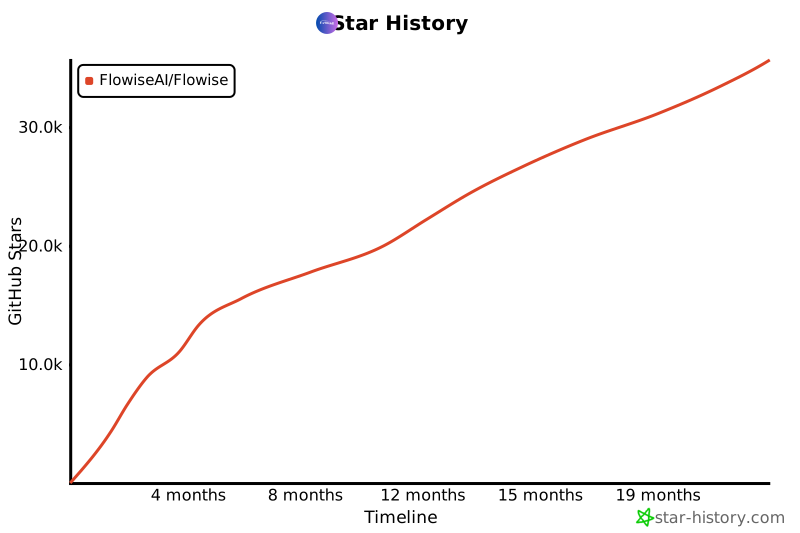](https://star-history.com/#FlowiseAI/Flowise&Date)
|
|
|
|
## 📄 ライセンス
|
|
|
|
このリポジトリのソースコードは、[Apache License Version 2.0](LICENSE.md)の下で利用可能です。
|